57
Using Recorders
Thissectiondescribeshowtoperformrecordingona
computerbyusingWindowsRecorder.
1
Connectamicrophonetothemicrophonejack.
2
Click Start > Control Panel > Sounds, Speech,
and Audio Devices > Sounds and Audio Devices.
3
Click AdvancedfromVolumeandthen,click
Options > Properties.
4
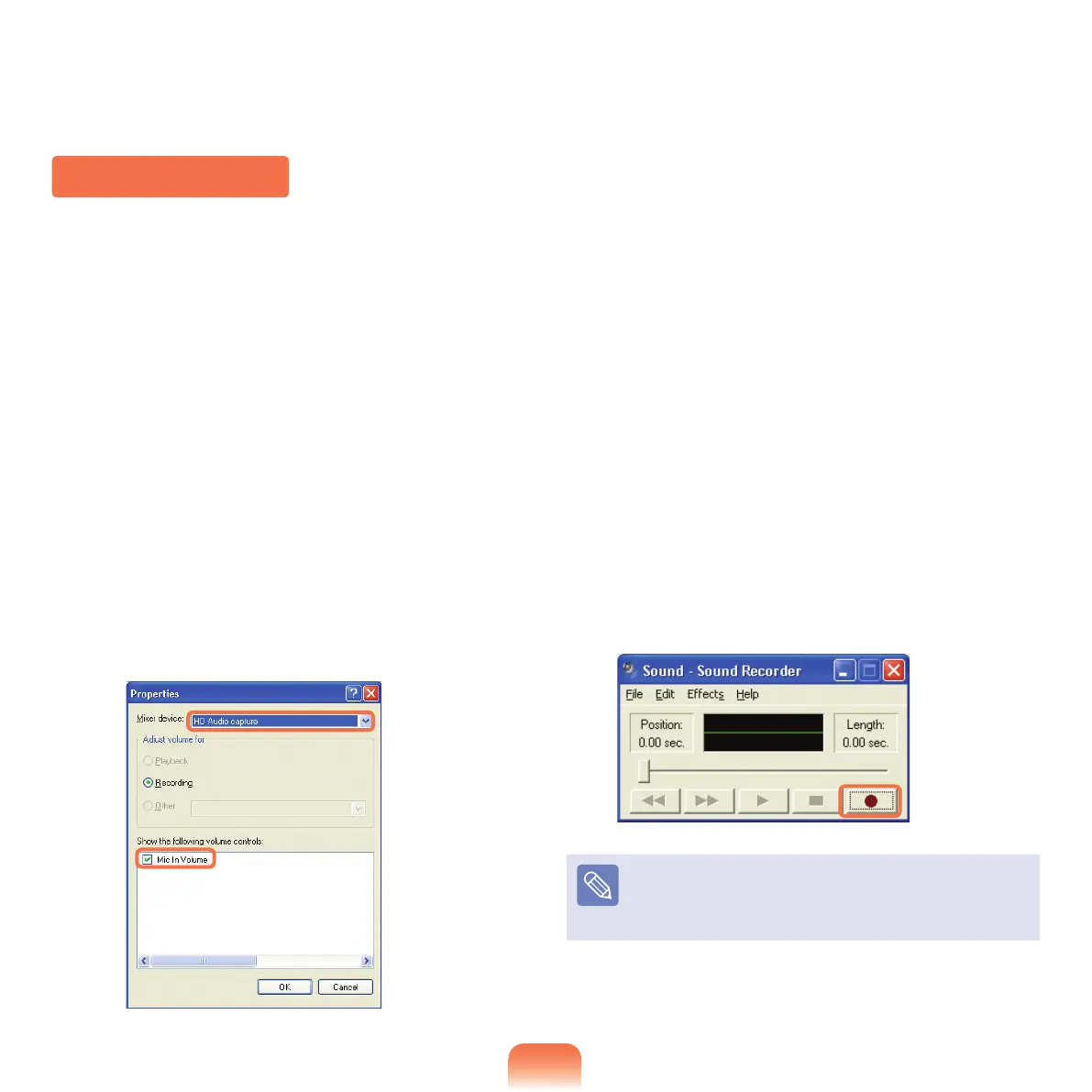
Select HD Audio capturefromthemixerdeviceto
select Recording from Adjust Volume for.
5
Select Mic in Volume from Show the following
volume controls and click OK.
6
The Recording Control window appears and the
SelectioncheckboxofMicrophoneisselected.
Increase the microphone volume and close the
window to increase the recording sensitivity.
7
Click Start > All Programs > Accessories >
Entertainment > Sound Recorder.
8
Click the Recordbuttontoperformrecording.
ThedefaultrecordingdurationofWindowsis60
seconds. Download a dedicated recording program from
the Internet to record audio data for a long time.



 To Next Page