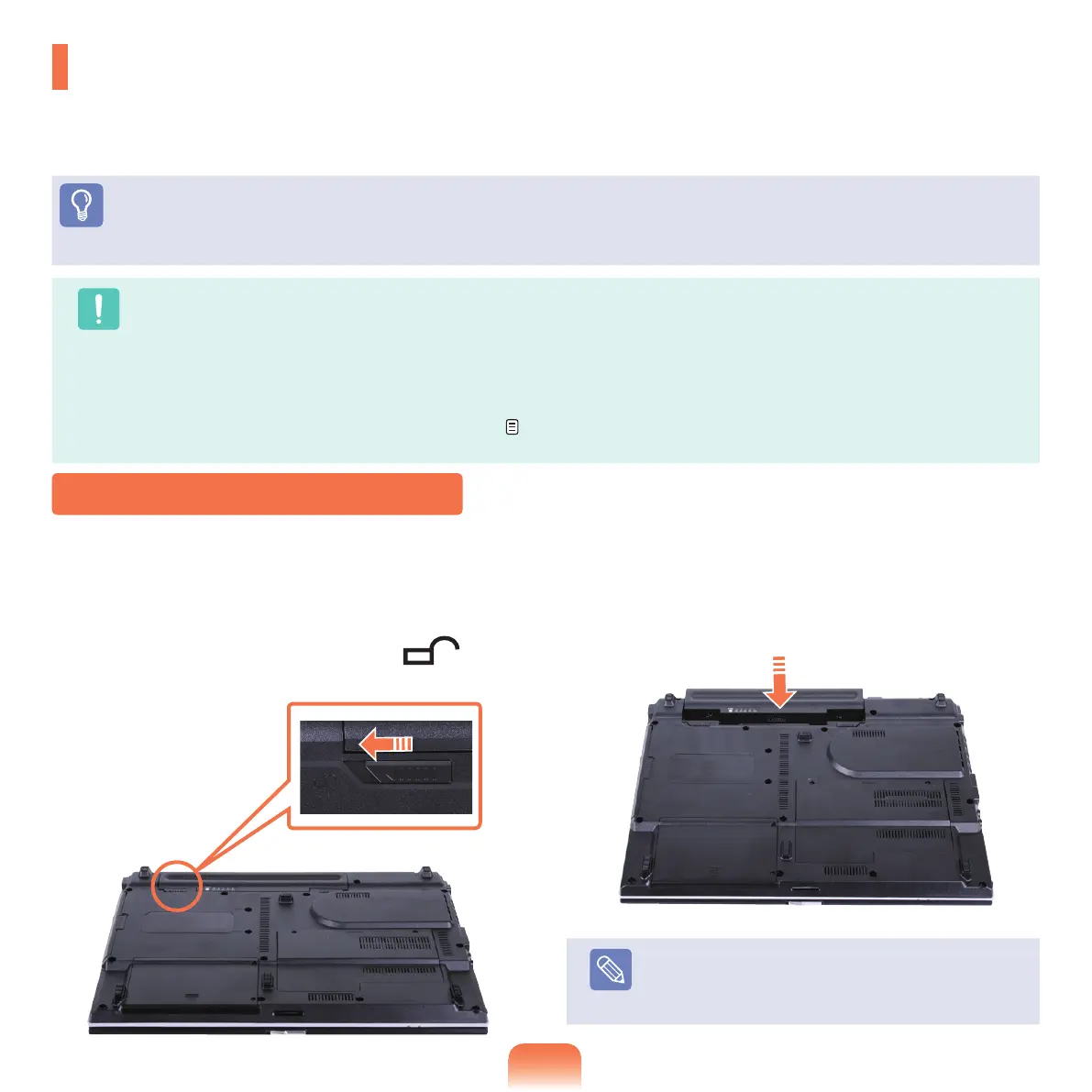
1
Shutdownthesystem,closetheLCDpaneland
placethecomputerupsidedownonaatsurface.
2
Pullthetwobatterylatchesoutwards( ),then
removethebattery.
3
Toinstallthebatteryagain,slidethebatteryintothe
system.
Thebatterylatchesmoveinwardsandxthebattery
automatically.
Note
Checkifthebatterylatchhasbeenmovedinwards.
Installing/Removing the Battery
Battery
PleaserefertothefollowinginstructionswhenrunningthecomputeronbatterypowerwithoutconnectingtheAC
power.
ALithium-Ionsmartbatteryissuppliedwiththiscomputer.
Before You Start!
Carefullyreadandfollowtheprecautionsprintedonthebatterybeforeusingthebattery.
Caution
Precautions
UseonlychargersspeciedintheUserManual.
Neverheatthebatterypack,putitnearorinareoruseatatemperaturehigherthan60°C,asthismaycausere.
Nevercauseashortcircuitbetweenthebatterypackterminalsordisassemblethebatterypack.
CarefullyreadandfollowtheprecautionsprintedonthebatteryandthesafetyinstructionsintheUserManualbeforeusingthe
battery.
Please refer to the system operation environment (
p.167)ofthismanualandoperateandstorethebatteryatroom
temperature.



 To Next Page