145
Reinstalling Windows XP
YoucanreinstallWindowsusingtheSystemRecoveryCDwhenWindowsdoesnotworkproperly.
Before You Start!
■
ASystemRecoveryCDmaynotbesupplieddependingonyourcomputermodel.
■
ToreinstallWindowswhenWindowsdoesnotboot,refertopage 147.
Note
ReinstallingWindowsmaydeletedata(lesandprograms)savedontheharddiskdrive.Makesuretobackupallimportant
data.SamsungElectronicsshallnotbeheldliableforanylossofdata.
ExplainStandardinstallationoptionasastandard.
1
InsertthesystemrecoveryCDintotheCD-ROM
drive.
2
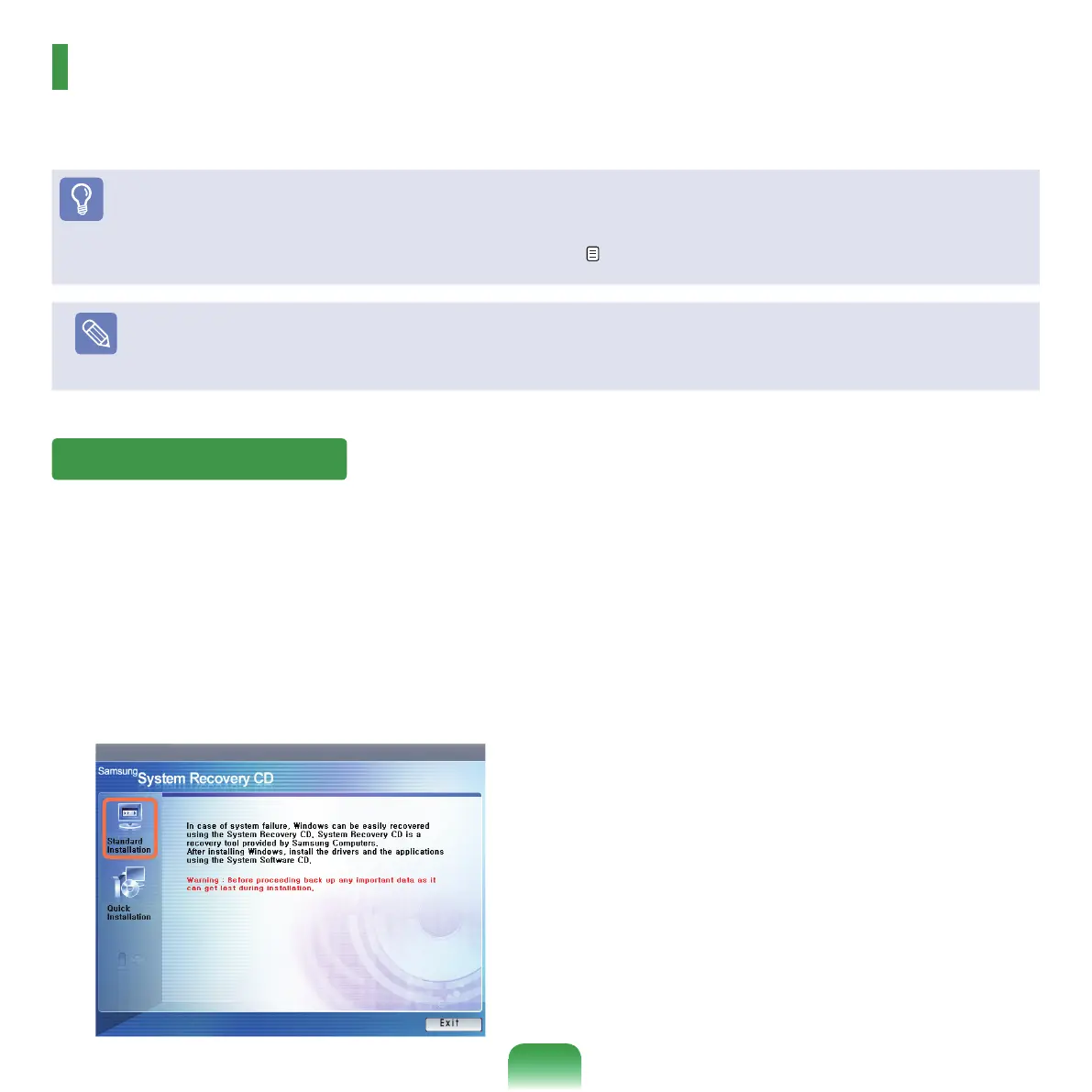
Intheinitialscreen,clickStandard Installation.
■ Standard installation: You can change the settings
for
partitioning,theinstallationfolder,etc.duringthe
Windowsinstallation.However,reinstallingWindows
maydeletethedataontheharddiskdrivesuchasles,
programs,etc.Inordertominimizedamagefromdata
loss,pleaseremembertoalwaysbackupdata.
■ Quick Installation:Thisre-installsWindowswiththe
userdataandthesystemcongurationintact.The
userdatainthealreadyexistingWindowsfoldersmay
bepreservedastheexistingWindowsfoldersare
overwritten.
Reinstalling Windows



 To Next Page