MDC(Multi Display Control) Program
MDC(Multi Display Control) Program
The remote control Enable/Disable function operates
The remote control Enable/Disable function operates
whether or not the power is On/Off, and this applies to all
whether or not the power is On/Off, and this applies to all
displays connected to the MDC. However, all displays return
displays connected to the MDC. However, all displays return
to the default setting with the remote control receiving
to the default setting with the remote control receiving
function enabled regardless of the status at the time the
function enabled regardless of the status at the time the
MDC is shut down.
MDC is shut down.
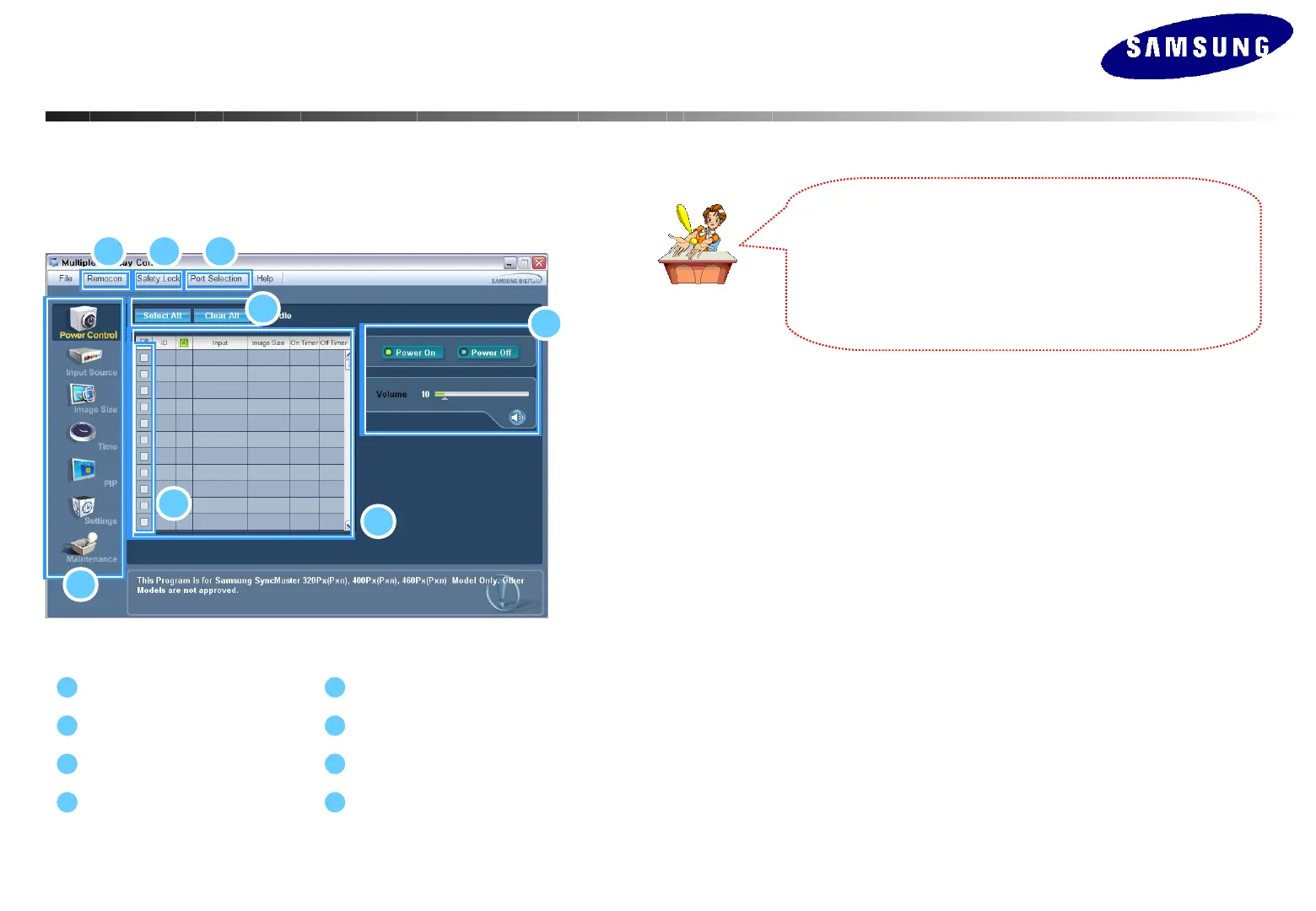
Start– Main Window
-
Click Start> Program>Multiple Display Control to start the program.
-
Select a set to see the volume of the selected set within the slider.
1
5
7
2
3 4
6
8
Main Icons
Safety Lock
Safety Lock
Remocon
Port Selection
Info Grid
Port Selection Control Tools
1. Click the main icons to switch into each screen.
2. Allows you to enable or disable the remote control signal receiving function of the
display unit.
3. Use to lock monitor functions.
4. Use to change the port. The default port is COM1.
5. Use Select All and Clear All buttons to select or clear all displays.
6. Use Grid to view brief information on selected display.
2 3 4
7
6
1
8
5






 To Next Page