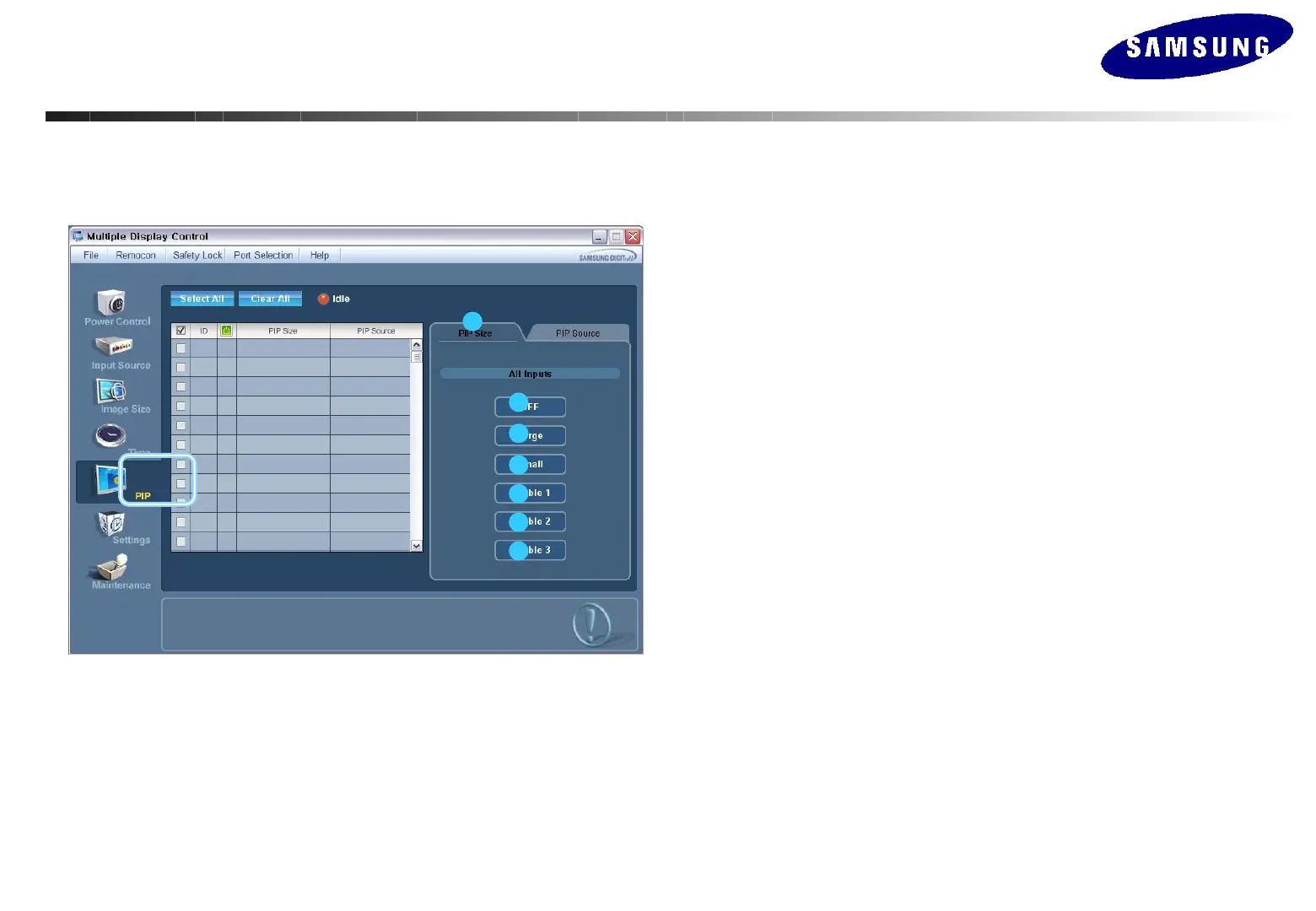
PIP Control – PIP Size
1. Click PIP of the main icons to display the PIP control window.
1
2
3
4
5
6
7
-
Info Grid shows some basic information necessary to PIP Size Control.
1) PIP Size
Shows the current PIP Size of the display in use.
2) OFF
Turns off the PIP of the selected display.
3) Large
Turns on the PIP of the selected display and changes the size to Large.
4) Small
Turns on the PIP of the selected display and changes the size to Small.
5) Double1
Turns on the PIP of the selected display and changes the size to Double 1.
6) Double2
Turns on the PIP of the selected display and changes the size to Double 2.
7) Double3
Turns on the PIP of the selected display and changes the size to Double 3.
• PIP Control is available only for the displays whose power status is ON.
• The set with the input source Component is not displayed on Info Grid.
MDC(Multi Display Control) Program
MDC(Multi Display Control) Program






 To Next Page