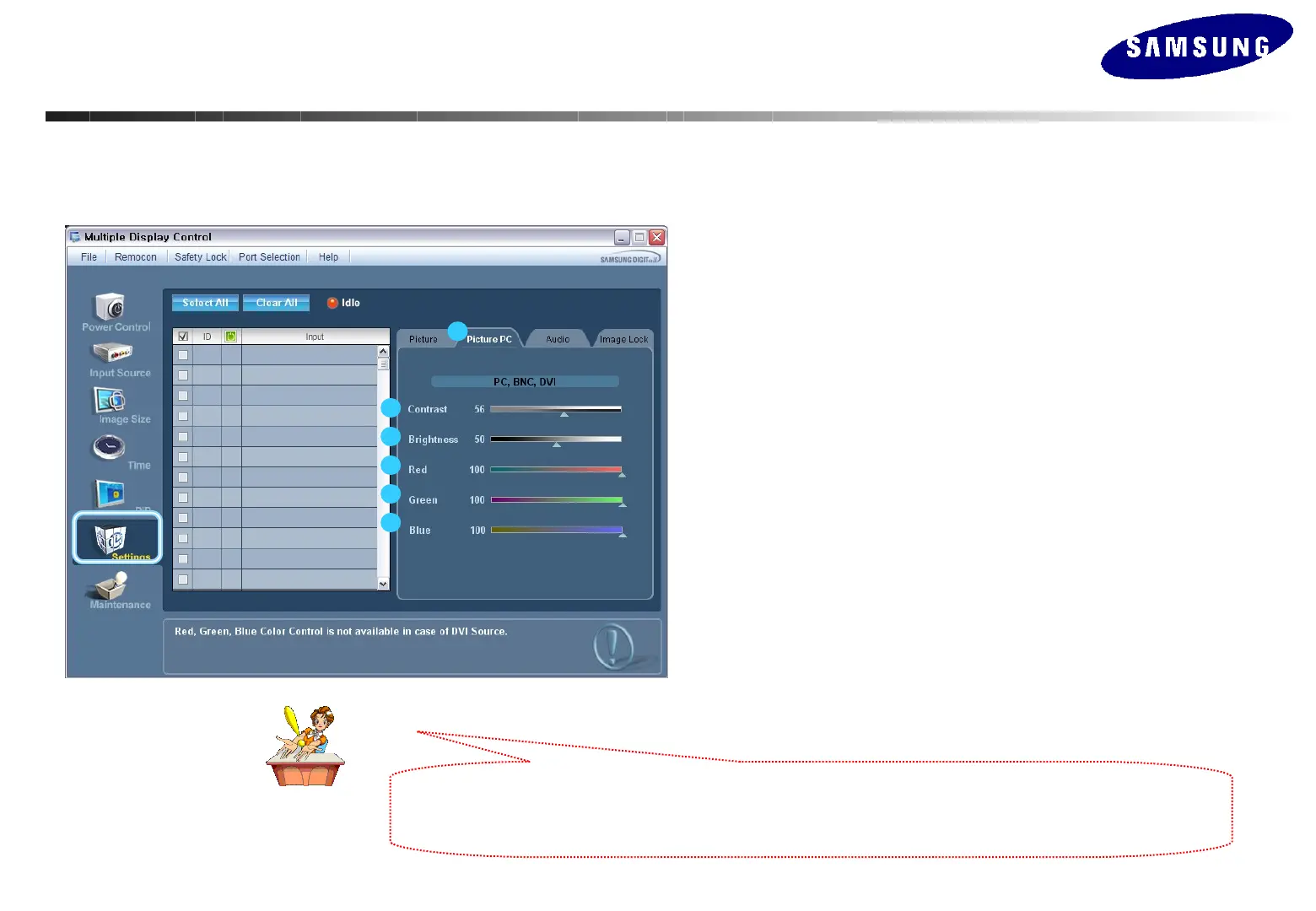
Setting Control – Picture PC
1. Click Setting of the main icons and select the Picture PC tab to display the Setting
Control window.
- Info Grid shows some basic information necessary to Setting Control. When each
function is selected, the set value of the selected function is displayed in the slide. As
you select Select All, the value is returned to the default setting (50).
Changing a value in this screen will automatically change the mode to “CUSTOM.”
1) Picture PC
Available only for PC, BNC, and DVI.
2) Contrast
Adjusts Contrast of the selected display.
3) Brightness
Adjusts Brightness of the selected display.
4) Red
Adjusts Red Color of the selected display.
5) Green
Adjusts Green Color of the selected display.
6) Blue
Adjusts Blue Color of he selected display.
1
2
3
4
5
6
This feature is available only for the displays whose power status is ON and if no selection is made, the factory
This feature is available only for the displays whose power status is ON and if no selection is made, the factory
default is displayed.
default is displayed.
MDC(Multi Display Control) Program
MDC(Multi Display Control) Program






 To Next Page