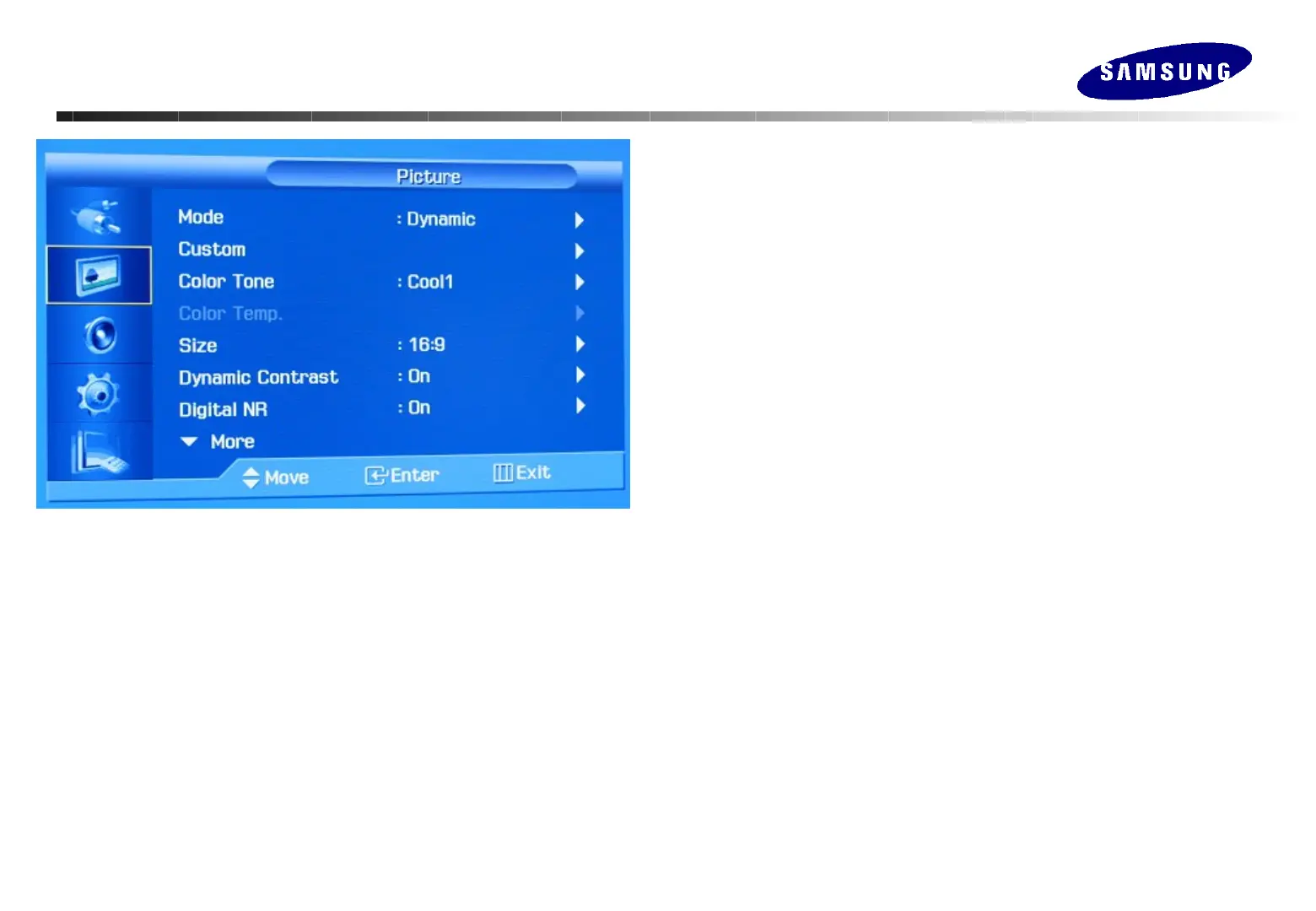
Mode
The Monitor has four automatic picture settings ("Dynamic", "Standard",
"Movie" and "Custom") that are preset at the factory.
Custom
Change the contrast and brightness according to personal preference.
: Contrast, Brightness, Sharpness, Color, Tint
Color Tone
The tone of the color can be changed. The individual color components are
also user adjustabls.
: Cool2, Cool1, Normal, Warm1, Warm2
Color Temp
Choose color tone off on the first stage and so can control color
temperature.
Color Temperature Range : 5000 ~ 15000K (Step : 1000K)
Size
You can switch the Size. : 16:9, Zoom1, Zoom2, 4:3
Dynamic Contrast
Dynamic Contrast automatically sets the most optimal contrast ratio.
: Off / On
Digital NR
Digital Noise Reduction. : Off / On
Adjusting Your Monitor
Adjusting Your Monitor
(Picture : AV/S-Video/Component)
(Picture : AV/S-Video/Component)






 To Next Page