MDC(Multi Display Control) Program
MDC(Multi Display Control) Program
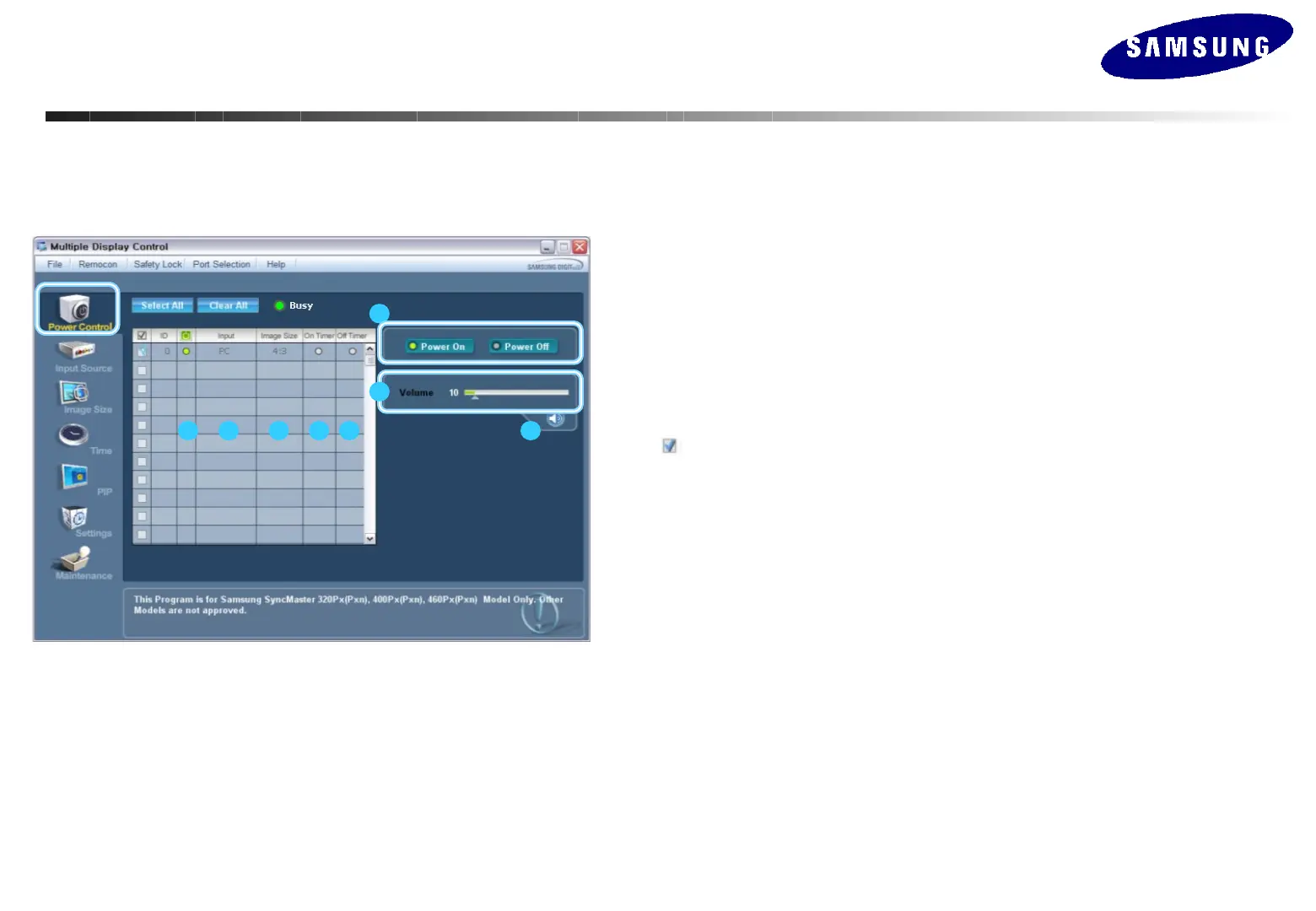
Power Control
1 2 3 4 5
6
8
7
1. Click Power Control of the main icons to display the Power Control window.
- Info Grid shows some basic information necessary for Power Control.
1) Power Status
2) Input Source
3) Image Size
4) On Timer Status
5) Off Timer Status
2. Use the Select All button or Check Box to choose a display to control.
-
Power Control allows you to control functions regarding the power of the selected
display on the menu.
6) Power On/Off
Turns the power of the selected display on or off.
7) Volume
Adjust the volume of the selected display.
The appropriate volume for the selected set is displayed as you select a set.
(When you cancel the selection or choose Select All, the volume returns to the default value
8) Mute On/Off
Turns on or off the Mute function of the selected monitor. The Power Control feature is
available for all connected monitors.
• The Volume Control and Mute features are available only for the displays whose
power status is ON.






 To Next Page