SATEL VERSA 13
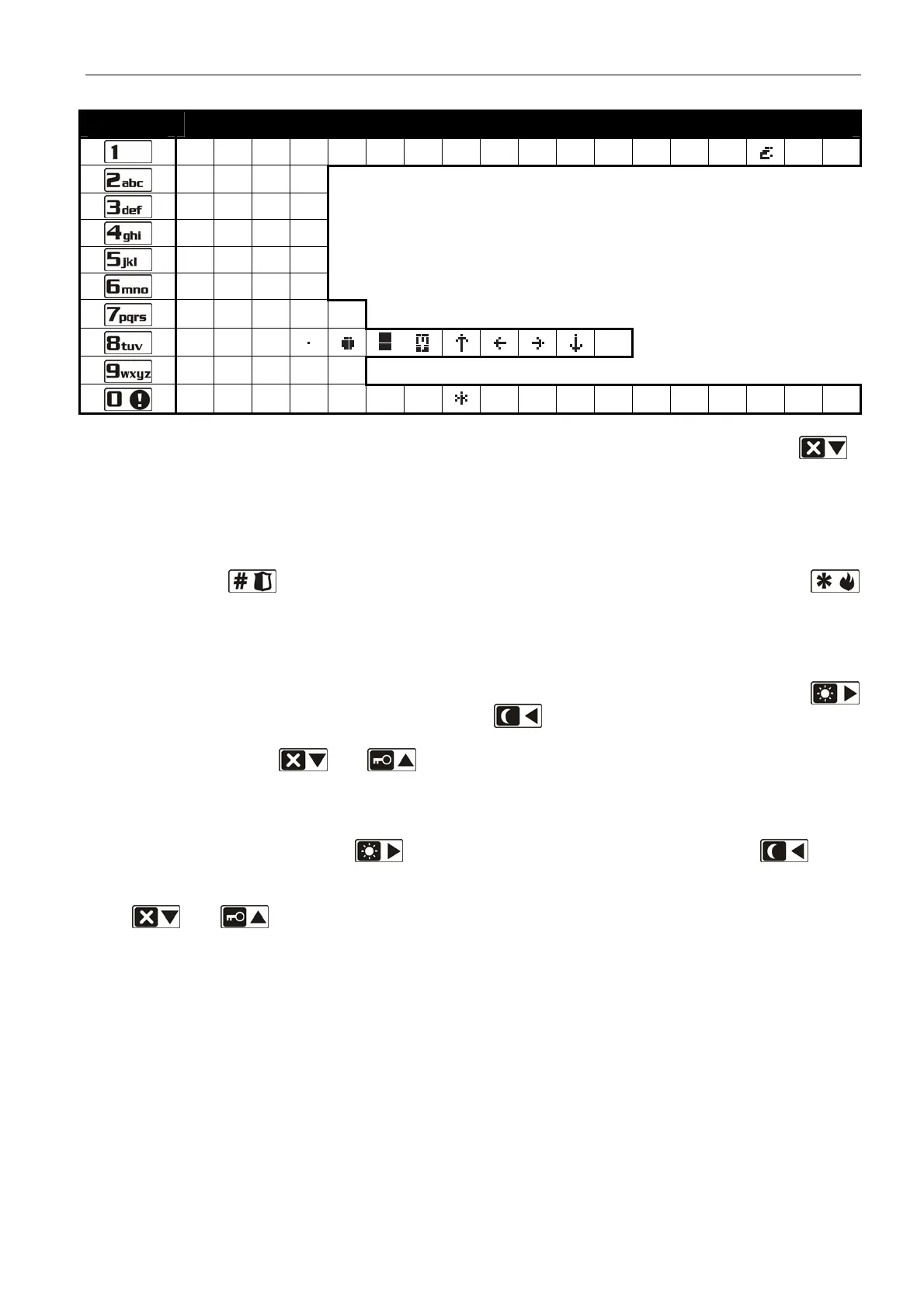
Key Characters available after next keystroke
! ? ' ` " { } $ % & @ \ ^ |
# 1
a b c 2
d e f 3
g h i 4
j k l 5
m n o 6
p q r s 7
t u v
8
w x y z 9
. , : ; + -
/ = _ < > ( ) [ ] 0
Table 3. Characters available in the VERSA-LCD-GR keypad when entering names. The
lower case letters are available under the same keys (to change the letter case, press
).
2.1.8 Entering data by means of the VERSA-LED-GR keypad
The data being entered are presented by means of LEDs. The method of programming
depends on the type of data to be entered by service function. To save the data in the control
panel, press the key. To exit the function without saving the changes, press the
key.
Selection from the single-choice list
The lit LEDs show the available items on the list. Blinking LED indicates the current
position of the cursor and, consequently, the item which is currently selected. The
key moves the cursor to the right, and the key – to the left. As all the LEDs are
numbered, you can use the numerical keys to select the item at once and move the
cursor there. The
and keys are not used.
Selection from the multiple-choice list
The lit LEDs show which items have been selected. Blinking LED indicates the current
position of the cursor. The
key moves the cursor to the right, and the key –
to the left. Press any numerical key to toggle the status of the LED over which the
cursor is placed (depending on its current status, the LED comes on or goes out). The
and keys are not used.
Entering decimal values
After entering the selected parameter programming function, the currently programmed
value will be presented in binary mode on LEDs 1-12 (see: Fig. 1). LEDs 1-4 present
(see: page 14 Table 4) the first digit , LEDs 5-8 – the second one, LEDs 9-12 – the third
one. To enter the new numerical value, press the corresponding numerical keys. You
can enter:
– 1 digit – it will be shown on LEDs 1-4 (the other LEDs are off);
– 2 digits – they will be shown on LEDs 1-8 (the other LEDs are off);
– 3 digits – they will be shown on LEDs 1-12.
The arrow keys are not used.
Correction of the entered value is only possible after re-entering the selected parameter
programming function.














 To Next Page