SATEL VERSA 9
6.1 Display [LCD keypads]
The liquid crystal (2x16 character) display in the LCD keypad facilitates communication
between the user and the alarm system. It provides clear information about the system state
and presents functions which are available to the user. If required, the display can be back-
lighted.
The display can work in normal mode or in zone presentation mode (the modes being
toggled by means of the key). When in the normal mode, the date and time (in installer
defined format) or the keypad name are presented in the upper line of the display. In the
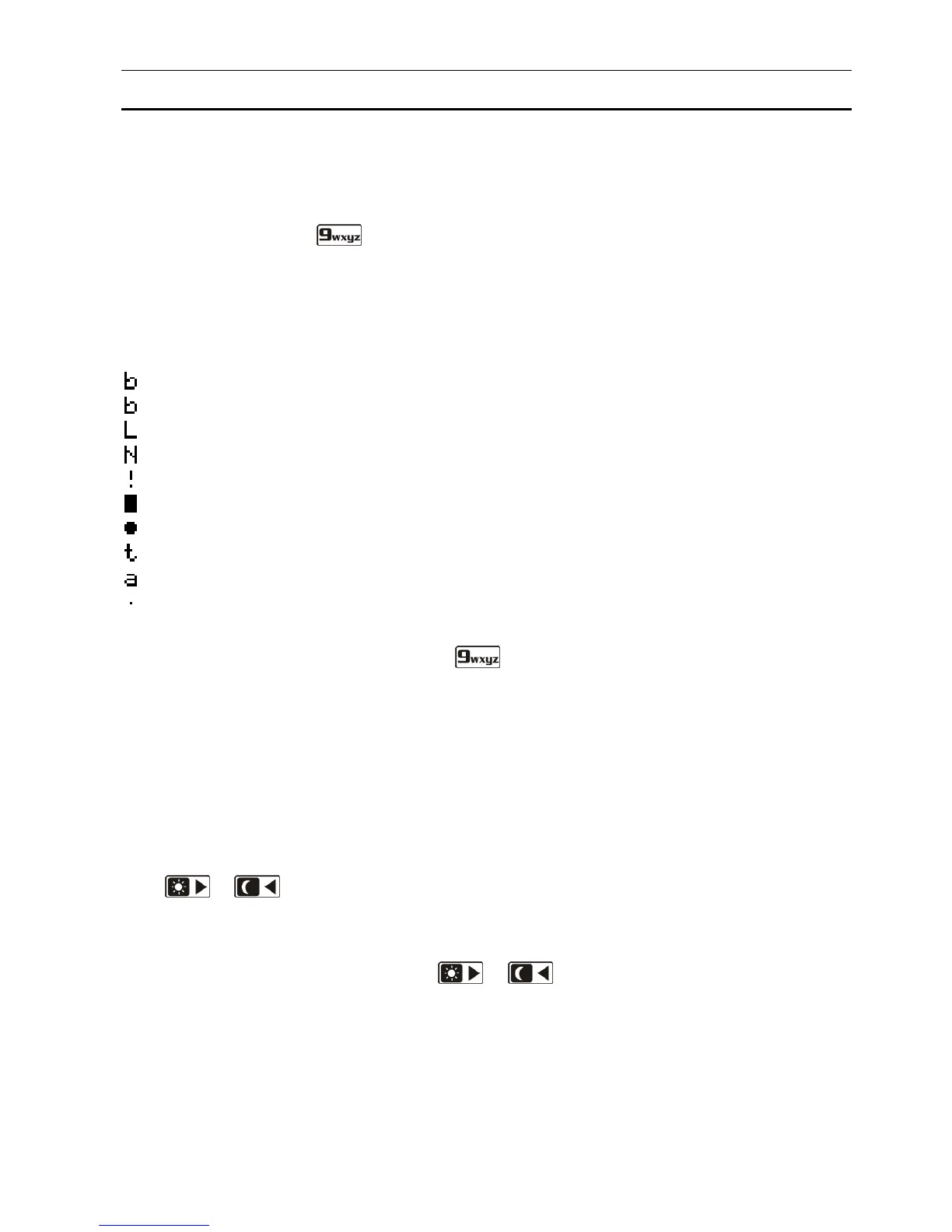
zone presentation mode, symbols are displayed, showing the status of zones available in the
system (where the control panel settings do not provide for detector presence at a zone, the
status of the zone is not displayed). The numbers around the display correspond to the zone
numbers. Described below are all symbols according to their priority (the higher position = the
higher priority of the status presented by the given symbol):
– zone inhibited (not displayed when armed),
[blinking] – zone isolated (not displayed when armed),
– long zone violation (not displayed when armed),
– no zone violations (not displayed when armed),
– zone that first triggered alarm,
– zone tampered (2EOL type zone),
– zone violated,
– tamper memory (2EOL type zone),
– alarm memory,
– normal zone status.
Note: If the global GRADE 2 option is enabled by the installer, switching the display over to
the zone status presentation mode ( key) is impossible.
Irrespective of the selected mode, the occurrence of specific events may result in the
following information being displayed (the higher position = the higher priority of the status
presented):
– countdown of auto-arming delay;
– countdown of entry delay;
– countdown of exit delay;
– alarm from zone – the message contains the name of zone which triggered the alarm
and remains displayed until the alarm is cleared (in case of alarm from several zones,
messages about successive alarms are displayed alternately every 2 seconds – use the
or key to scroll them through);
– alarm in partition – the message contains the name of partition where the alarm
occurred and remains displayed until the alarm is cleared (if there is alarm in both
partitions, messages about the alarm are displayed alternately every 2 seconds in the
first and second partition – use the or key to scroll them through);
– there was a tamper and the service must be called in – the message is displayed until
trouble memory is cleared by a person using the service code (see: section CHECKING
THE TROUBLES AND SYSTEM STATE
).
Note: If the GRADE 2 global option is enabled by the installer, the messages on alarms and
tampers are not displayed.















 To Next Page