SATEL VERSA 21
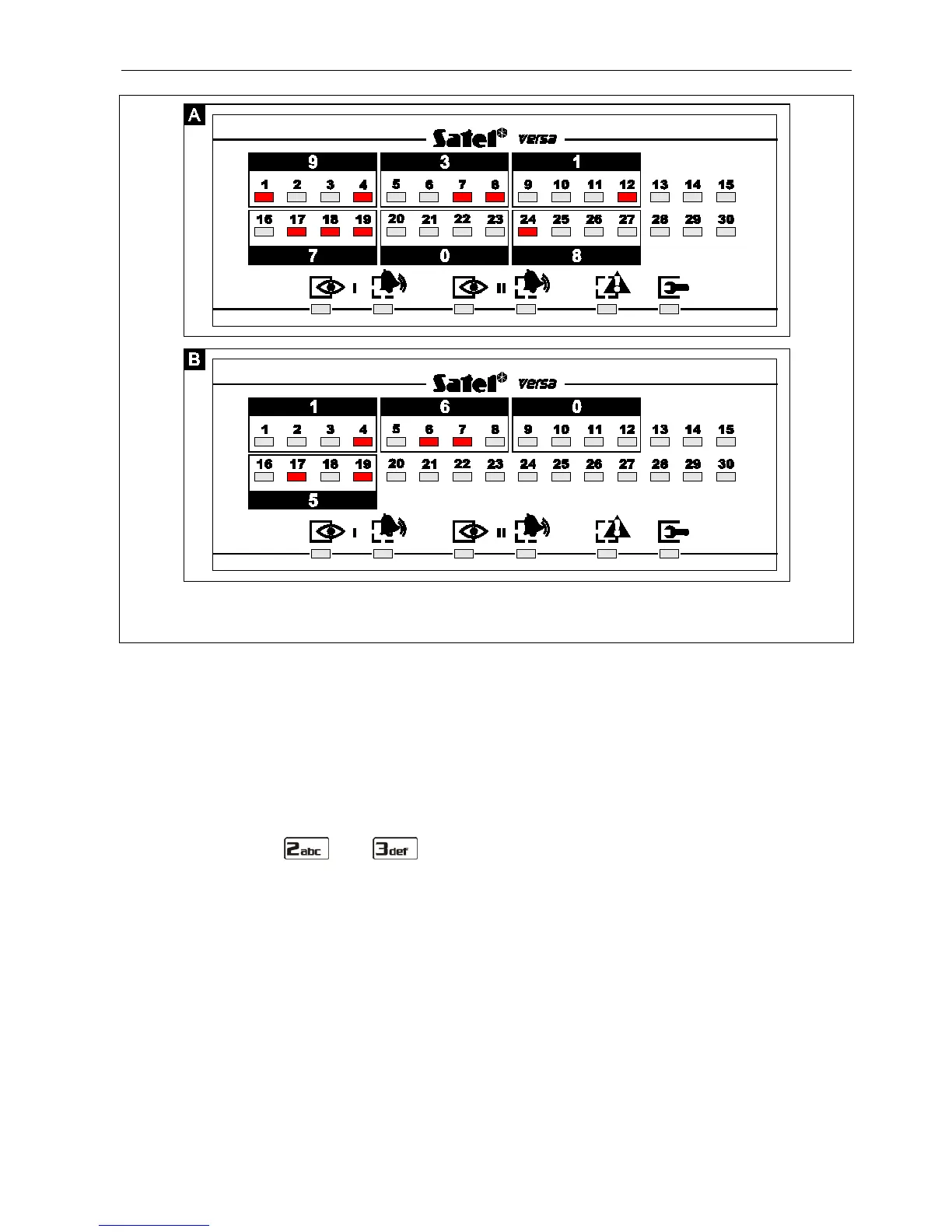
Fig. 4. Examples of presenting decimal values by means of LEDs in the LED keypad.
Example A: value 931708 has been programmed; example B – value 1605.
Use the keys designated with numbers to enter digits. In the LCD keypad, the digits are
presented on the display. In the LED keypad, the digits are presented in binary format by
means of LEDs, however only up to 6 digits can be presented (the next ones are skipped).
The LEDs 1-12 show the first 3 digits (the first digit – LEDs 1-4, the second – 5-8, the third –
9-12), while the LEDs 16-27 show the next 3 digits (the fourth digit – LEDs 16-19, the fifth –
20-23, the sixth – 24-27), as shown in Table 1.
6.12.6 Entering hexadecimal values
To enter digits from 0 to 9, use the keys bearing the numbers. Characters from A to F are
available under the and keys. Press these keys repeatedly, until the required
character appears. In the LCD keypad, all characters are presented on the display. In the
LED keypad, the characters are presented in binary format by means of LEDs, however only
up to 6 characters can be presented (the next ones being skipped). The LEDs 1-12 show the
first 3 characters (the first character – LEDs 1-4, the second – 5-8, the third – 9-12), while the
LEDs 16-27 show the next 3 characters (the fourth character – LEDs 16-19, the fifth – 20-23,
the sixth – 24-27), as shown in Table 1.
6.12.7 Entering names
Entering names is only possible in the LCD keypad. Keep pressing particular keys until the
required character appears. Characters available in the keypad are presented in Table 2.
Hold down the key to display the digit assigned to the key.
Shown on the right side in the upper line of the display is information about the letter case:
[ABC] or [abc] (it will be displayed after pressing any key and will be visible for a few seconds
after the last keystroke).















 To Next Page