10 User Manual SATEL
6.2 LEDs presenting zone status [LED keypads]
Note: If the GRADE 2 global option is enabled by the installer, the LED keypad LEDs will
only present the zone status after the code is entered and confirmed by using the
key.
30 numbered LEDs in the LED keypad provide information about the status of system zones.
When the user functions are used, the LEDs provide some additional information, depending
on the selected function.
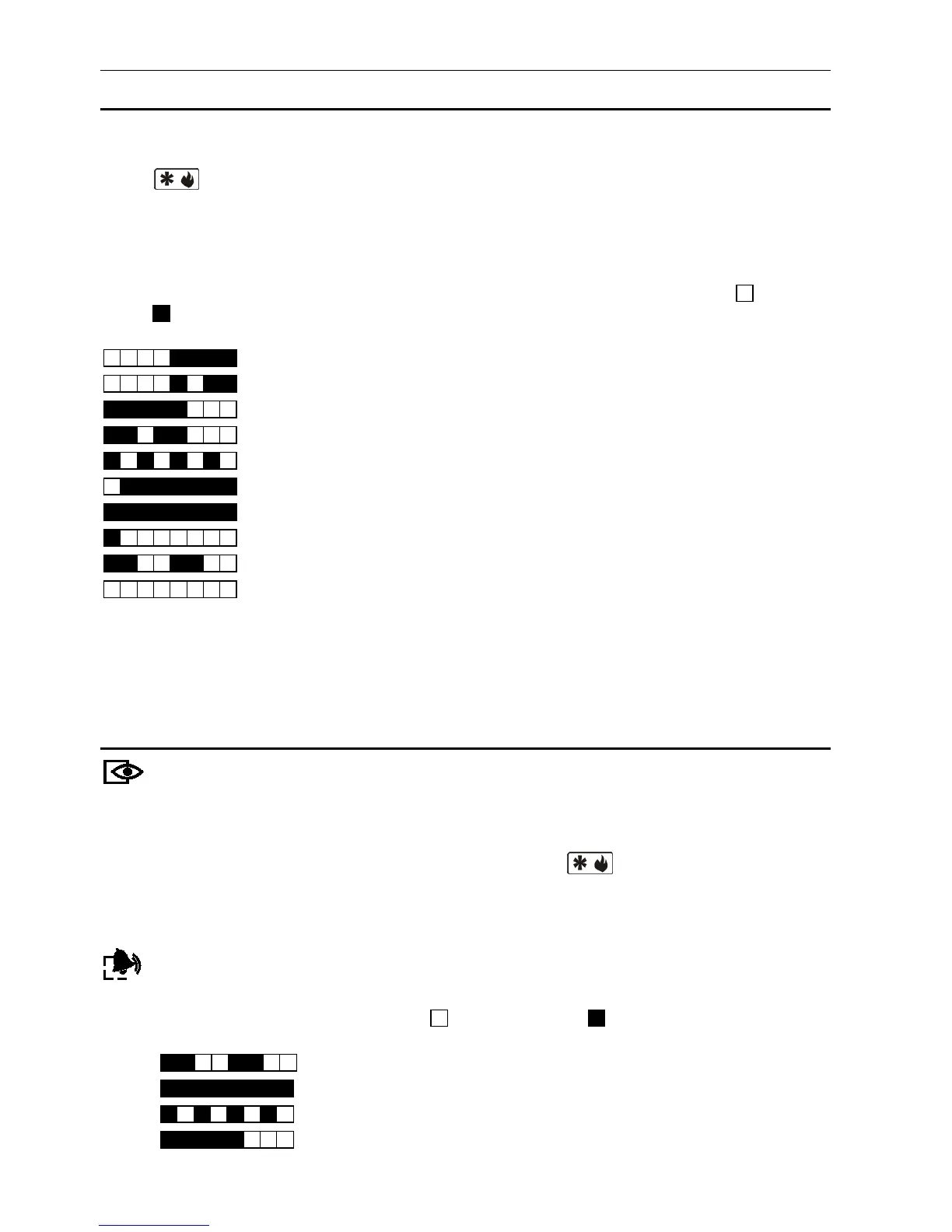
Presented graphically below is the way in which information about the zone status is provided
by means of LEDs. Each LED lighting scheme covers approx. 2-second period ( – LED is
OFF; – LED is ON). The higher position in the list means the higher priority of the
presented status:
– zone inhibited (not displayed when armed),
– zone isolated (not displayed when armed),
– long zone violation (not displayed when armed),
– no zone violations (not displayed when armed),
– zone that first triggered alarm,
– zone tampered (2EOL type zone),
– zone violated,
– tamper memory (2EOL type zone),
– alarm memory,
– normal zone status.
Additionally, the LEDs show countdown of entry delay and exit delay in partitions (the first
partition – LEDs 1-15; the second partition – LEDs 16-30). The LEDs which are ON (exit
delay) or blinking (entry delay) show how much time has left to the end of countdown.
A single LED means 2 seconds. If the countdown time exceeds 30 seconds, the LEDs will
only start going off, when the time left is shorter than 30 seconds.
6.3 LEDs presenting partition and system state
armed. The LED is blinking during the exit delay countdown.
Note: Information about armed mode can be set to disappear after the time defined
by the installer has elapsed. To display the information about armed mode
again, enter the code and confirm it using the key.
Both LEDs are used during the process of "step-by-step" programming to present the
number of current step (see: "STEP BY STEP" PROGRAMMING METHOD).
alarm or alarm memory, respectively. Presented graphically below is the way in which
the LEDs provide information on alarm/ alarm memory. Each LED lighting scheme
covers approx. 2-second period ( – LED is OFF; – LED is ON). The higher
position in the list means the higher priority of the presented status:
– fire alarm,
–
burglary alarm,
– warning alarm,
– tamper alarm,















 To Next Page