EasyManua.ls Logo

SciCan Statim 5000 - Service Manual

SciCan Statim 5000
271 pages
Print Icon
To Next Page IconTo Next Page
Loading...
STAT
IM
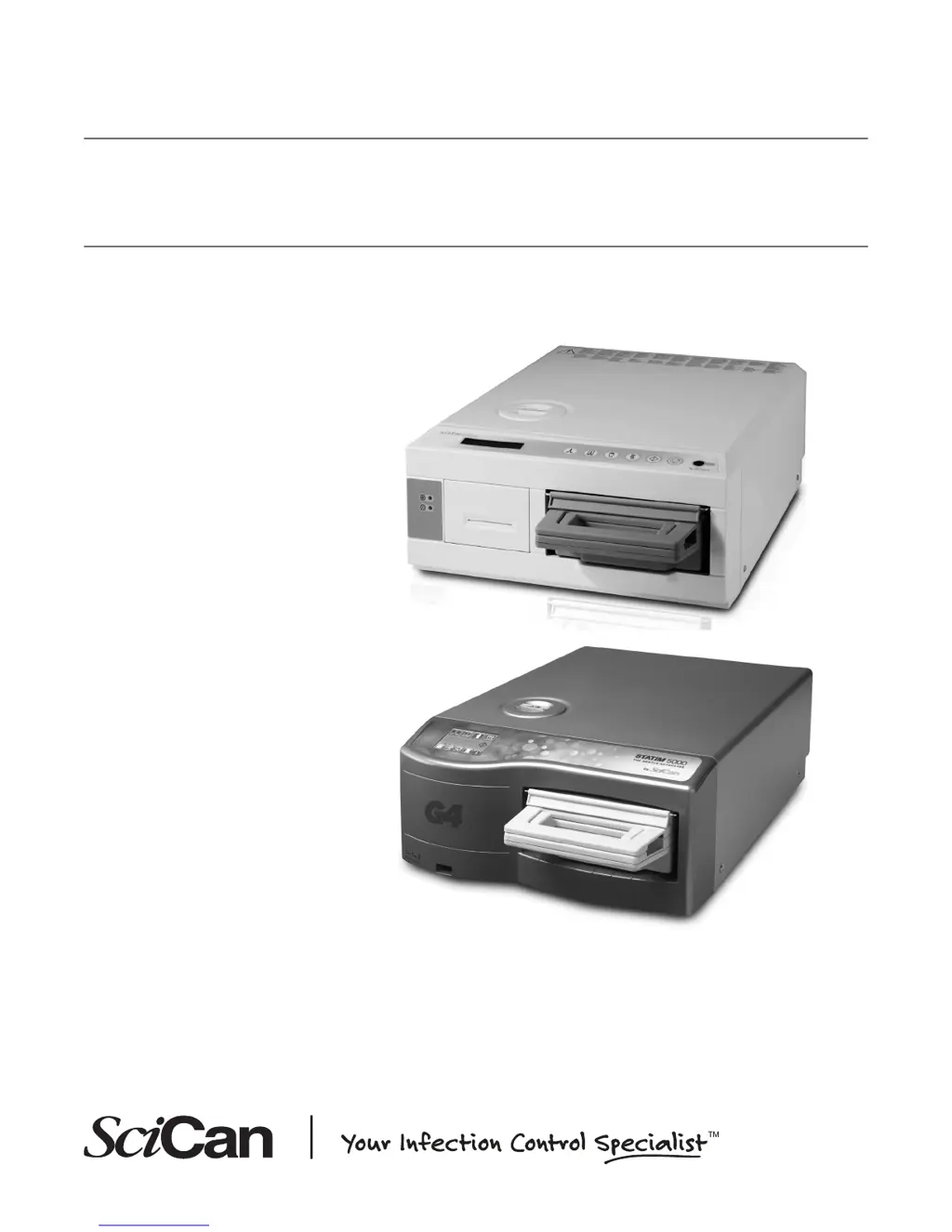
5000/5000S/5000 G4
CASSETTE AUTOCLAVE
Service Manual
STAT
IM
5000 Service Manual 96-106775 Rev 5.0. Copyright 2012 SciCan Ltd. All rights reserved.

Table of Contents

Other manuals for SciCan Statim 5000

Questions and Answers

  • W
    William CrawfordSep 3, 2025
    How to troubleshoot power issues with my SciCan Statim 5000 Laboratory Equipment?
    • A
      Alexandra CarterSep 3, 2025
      If your SciCan Laboratory Equipment doesn't power on, check that it's plugged into a properly grounded outlet and the power cord is firmly connected at the rear. Try a different circuit. Power the unit off for 10 seconds, then back on. Also, check the condition of the line circuit breaker or fuse.
  • S
    Sheryl TaylorSep 1, 2025
    What to do if my SciCan Laboratory Equipment displays 'REFILL RESERVOIR'?
    • A
      Ashley PeckSep 1, 2025
      If your SciCan Laboratory Equipment displays 'REFILL RESERVOIR' and won't start, it means the water level in the reservoir is low. Simply refill the reservoir.
  • D
    David ChoiAug 31, 2025
    Why does my SciCan Statim 5000 Laboratory Equipment say 'WATER QUALITY IS NOT ACCEPTABLE'?
    • R
      robert41Aug 31, 2025
      If the SciCan Laboratory Equipment displays 'WATER QUALITY IS NOT ACCEPTABLE' and won't start, it's likely due to using improperly distilled water. Empty the reservoir and refill it with steam-process distilled water that has less than 5 ppm total dissolved solids (conductivity less than 10 µS / cm). Use a water conductivity meter to check the water quality before refilling.
  • L
    Louis MartinezAug 30, 2025
    How to fix SciCan Statim 5000 that does not power ON?
    • F
      fzimmermanAug 30, 2025
      If your SciCan Laboratory Equipment isn't powering on, make sure it's plugged into a properly grounded outlet and that the power cord is firmly seated at the rear of the machine. Try using a different electrical circuit. Power the unit OFF for 10 seconds, then power it back ON. Also, check the condition of the line circuit breaker or fuse.
  • B
    Brett WilcoxAug 29, 2025
    What to do if SciCan Statim 5000 Laboratory Equipment shows 'CYCLE INTERRUPTED' error?
    • R
      Ronald NelsonAug 29, 2025
      If your SciCan Laboratory Equipment displays 'CYCLE INTERRUPTED — NOT STERILE', 'CYCLE ABORTED — NOT STERILE' or 'CYCLE FAULT' messages, first record the CYCLE FAULT number. Wait a few minutes before attempting another cycle. Inspect the cassette to ensure the holes in the back of the seal are perfectly aligned and the flexible lip of the seal is completely free. Check the exhaust tube for kinks or obstructions. If the tube cannot be straightened, remove it from the push-in fitting attached to the Statim by depressing the collar on the fitting and pulling firmly on the tube with your other hand. Also, ensure the Statim hasn't been exposed to electrical interference, referring to the Installation section dealing with Environmental Considerations.
  • M
    Mary JohnsonAug 28, 2025
    What to do if there is water under my SciCan Laboratory Equipment?
    • J
      Jesse HoAug 28, 2025
      If you find water under the SciCan Laboratory Equipment during operation, it could be a leaking cassette. Check the cassette seal for misalignment or damage and replace it if necessary. Be careful, as the metal parts will be hot, and the cassette will contain hot steam. Attempt another cycle.
  • M
    Mike JonesAug 27, 2025
    What does 'Drying interrupted – LOAD NOT STERILE' mean on my SciCan Statim 5000 Laboratory Equipment?
    • V
      vwatersAug 27, 2025
      If you see the 'Drying interrupted – LOAD NOT STERILE' message on your SciCan Laboratory Equipment, it likely means the STOP button was pressed during the drying phase. Repackage the instruments if necessary, and rerun another sterilization cycle.
  • G
    Gary BowenAug 25, 2025
    How to improve drying in SciCan Laboratory Equipment?
    • E
      ebyrdAug 26, 2025
      If instruments are not drying in your SciCan Laboratory Equipment, ensure the cycle completes fully. Proper loading of instruments in the cassette is important. Verify the unit is level. Inspect air filters and replace them if dirty. Clean the cassette's interior and apply Stat-Dri / Stat-Dri Plus drying agent. Also, check the exhaust tube for any kinks.
  • R
    Ryan LeeAug 23, 2025
    What to do if SciCan Laboratory Equipment shows 'Cycle aborted, NOT STERILE and CYCLE FAULT' messages?
    • C
      cody09Aug 23, 2025
      If you see 'Cycle aborted, NOT STERILE and CYCLE FAULT' messages on your SciCan Laboratory Equipment, first, record the CYCLE FAULT number. Then, wait a few minutes before attempting another cycle. If it happens again, remove the cassette and check that the holes in the back of the seal are perfectly aligned and the flexible lip of the seal is completely free. Ensure there are no kinks or obstructions in the exhaust tube. Also, check that the Statim hasn't been exposed to electrical interference. If the problem continues, record the cycle fault message number and contact your dealer.
  • N
    Nicholas HansonDec 3, 2025
    How to fix drying issues with my SciCan Laboratory Equipment?

    Summary

    About this Service Guide

    Safety Compliance

    Details safety criteria for servicing STATIM units according to international standards and regulations.

    1. Identifying STATIM 5000 Units

    Identifying Software Versions

    Explains how to identify a unit's software version by checking the LCD readout on power-up.

    Identifying Controller Board Types

    Details how to identify three different types of controller boards based on PCB revision.

    Identifying Steam Generator Types

    Describes three types of steam generators encountered in STATIM 5000/5000S/5000 G4 units.

    2. Tools, Maintenance Schedules, Procedures and Testing

    Tools

    Lists STATIM specific items, generic reference devices, and electrical safety test devices required for servicing.

    Routine Maintenance Schedule and Procedures

    Provides daily, weekly, and 6-month maintenance guidelines to keep the STATIM in good order.

    Draining the Reservoir

    Instructions for draining the reservoir to prevent water damage and reduce contaminant accumulation.

    Cleaning the Cassette

    Recommendations for cleaning the STATIM cassette interior for proper functioning and instrument drying.

    Filters on the STATIM 5000;5000 S;5000 G4

    Details procedures for changing the bacteria-retentive and compressor filters on STATIM 5000/5000S/5000 G4 units.

    Replacing the Cassette Seal

    Procedure for changing the STATIM cassette seal every 500 cycles or six months for optimal performance.

    Electrical safety testing

    Details dielectric strength and protective bonding impedance tests required after servicing or cover removal.

    Water Conductivity Testing

    Explains how to test water conductivity using distilled water with low dissolved solids.

    3. Troubleshooting Cycle Faults

    Diagnostics and Troubleshooting

    Guidance on understanding problems and what to do when a STATIM unit fails to function correctly.

    Basic mechanical diagnostics

    Functional checks recommended when the immediate cause of a problem is unknown or a cycle fault is unavailable.

    Using software as a diagnostic tool

    Describes how to gather information for diagnosis using unit software, varying by unit type and controller.

    Cycle Fault Numbers and descriptions on units with revision 3.x and 4.x type controller boards

    Lists cycle fault numbers, descriptions, and probable causes for specific controller board revisions.

    Cycle Fault Numbers and descriptions on units with revision 2.x;5.x;6.x and 7.x type controller boards

    Lists cycle fault numbers, descriptions, and probable causes for units with revision 2.x/5.x/6.x and 7.x controller boards.

    4. STATIM 5000 Calibration

    Calibration Procedure 2: for Rev 2.x or 5.x Boards, Software R1.xx or R2.xx

    Procedure for calibrating STATIM 2000/5000 non S units with revision 2.x or 5.x controller boards.

    Calibration Procedure 3: for Rev. 6.x Board, Software Rev. 4.xx and 5.xx

    Procedure for calibrating STATIM 2000/5000 non S units with revision 6.x controller boards.

    Calibration Procedure 4: for Rev. 7.x Board, Software Rev. 6.xx

    Procedure for calibrating STATIM 2000/5000 non S units with revision 7.x controller boards.

    Calibration Procedure 8: for non-S G4 units with Rev. 7.x Board, Software Rev. 7.xx, SL 00 R1.xx

    Procedure for calibrating STATIM 2000/5000 G4 non S units with revision 7.x controller boards.

    5. STATIM 5000 S Calibration

    Calibration Procedure 5: for Rev 2.x or 5.x Boards, Software R1.xx and R2.xx

    Procedure for calibrating S-class STATIM 5000 units with revision 2.x or 5.x controller boards.

    Calibration Procedure 6: for Rev 6.x Boards, Software R4.xx and R5.xx

    Procedure for calibrating S-class STATIM 5000 units with revision 6.x controller boards.

    Calibration Procedure 7: for Rev 7.x Boards, Software R6.xx

    Procedure for calibrating S-class STATIM 5000 units with revision 7.x controller boards.

    Calibration Procedure 9: for S-class G4 Units with Rev. 7.x Board, Software Rev. 7.xx, SL 00 R1.xx

    Procedure for calibrating S-class STATIM 5000 G4 units with revision 7.x controller boards.

    6. Cover Assembly

    For STATIM 5000 Classic

    Instructions for removing and reinstalling the cover for the STATIM 5000 Classic model.

    For STATIM 5000 G4

    Instructions for removing and reinstalling the cover for the STATIM 5000 G4 model.

    Removing and Replacing the Armature Gasket

    Procedure for removing and replacing the armature gasket on the fascia.

    Removing and Replacing the Fascia

    Procedure for removing and replacing the fascia, including the printer module if present.

    Removing and Replacing the Membrane Keypad (LCD overlay)

    Steps to remove and replace the membrane keypad and LCD overlay from the fascia.

    Removing and Replacing the LCD

    Procedure for removing and replacing the LCD assembly from the fascia.

    Removing and Replacing the STATIM 5000 G4 Armature Gasket

    Steps to remove and replace the armature gasket on the STATIM 5000 G4 fascia.

    Removing and Replacing the STATIM 5000 G4 LCD Overlay

    Procedure for removing and replacing the LCD overlay on the STATIM 5000 G4 fascia.

    Removing and Replacing the STATIM 5000 G4 Colour LCD Touchscreen

    Instructions for removing and replacing the colour LCD touchscreen assembly.

    Removing and Replacing the STATIM 5000 G4 Fascia

    Steps to remove and replace the fascia on the STATIM 5000 G4.

    7. Electrical and Electronic Components

    Controller Board

    Information on identifying different types of controller boards, including typical features.

    Replacing;Refitting the Controller Board Assembly

    Steps to replace or refit the controller board assembly, including connector and wire management.

    STATIM 5000 G4 Electronics

    Procedures for removing and replacing the LCD controller board and associated components.

    Microprocessor

    Details on processor types and their configurations on different controller boards.

    Removing the Microprocessor (and Pre-Programmed EEPROM where fitted)

    Guidelines for removing the microprocessor and EEPROM devices, emphasizing ESD precautions.

    Replacing;refitting the Microprocessor (and Pre-Programmed EEPROM where fitted)

    Instructions for replacing or retrofitting the microprocessor and EEPROM, noting alignment.

    Microswitch

    Explains the function of the microswitch and symptoms of failure.

    Replacing the Microswitch

    Procedure for replacing and refitting the microswitch, including testing and adjustment.

    Mains Components

    Covers power cords, power switch, receptacle, and line filter components.

    Power (on;off) Switch

    Instructions for removing and replacing the unit's power switch.

    Receptacle; Line Filter

    Procedures for removing and replacing the mains input receptacle and line filter.

    LCD DC Power Source for STATIM 5000 G4

    Steps for removing and replacing the LCD DC power source assembly.

    8. Water Pumps, Reservoir, and Compressor

    Water Pumps

    Identifies three types of water pumps used in STATIM units and notes on interchangeability.

    Testing pump flow (for all types)

    Procedure to test water pump flow using a pump tester and specific parameters.

    Performing Filter Maintenance

    Details early and later filter configurations and maintenance for STATIM pumps.

    Performing internal pump filter maintenance

    Steps for performing filter maintenance on internal pump filters, including disassembly.

    Performing inline filter maintenance

    Instructions for replacing the in-line filter, which should be done every 2000 cycles or two years.

    Performing Pump Tube Replacement

    Guidance on replacing pump tubes to correct water delivery issues if filters are clean.

    Removing the Fluid-O-Tech Pump Assembly

    Step-by-step instructions for removing the Fluid-O-Tech pump assembly.

    Testing the Fluid-O-Tech Pump Diode

    Procedure for testing the pump diode using a multimeter.

    Reinstalling the Fluid-O-Tech Pump Assembly

    Instructions for reinstalling the Fluid-O-Tech pump assembly after removal.

    Removing the SciCan or Ulka Pump Assembly

    Procedure for removing the SciCan or Ulka pump assembly.

    Reinstalling the SciCan Pump Assembly

    Steps for reinstalling the SciCan pump assembly, including electrical safety tests.

    Priming STATIM 5000; 5000 S Pumps

    Steps to prime the STATIM pump after installation or maintenance.

    Reservoir and Water Sensors

    Describes reservoir configurations and water sensor types found in STATIM units.

    Troubleshooting reservoirs with water quality sensor only

    Diagnosing problems related to the water quality sensor, including conductivity issues.

    Modifying the conductivity set up in the service menu

    Steps to modify conductivity settings in the service menu, especially for upgraded reservoirs.

    Removing and replacing the float sensor

    Procedure for removing and replacing the float sensor in the reservoir.

    Compressor

    Identifies two types of compressors (MEDO and THOMAS) used in STATIM units.

    Removing and Reinstalling the Medo compressor

    Detailed instructions for removing and reinstalling the MEDO compressor.

    Removing and Reinstalling the Thomas Compressor

    Procedures for removing and reinstalling the THOMAS (or SciCan) compressor.

    Upgrading a unit with a Thomas Compressor to a Medo Compressor

    Instructions for modifying the chassis to accommodate a MEDO compressor.

    9. Solenoid Valve and Pressure Transducer

    Solenoid Valve

    Describes two types of solenoid valves and procedures for inspecting and repairing Type B valves.

    Removing the Solenoid Valve

    Steps to remove the solenoid valve assembly from the unit.

    Refitting the Solenoid Valve

    Instructions for refitting the solenoid valve assembly, including tube connections.

    Pressure Transducer

    Information on pressure transducers, their types, and identification methods.

    Identifying and checking the Pressure Transducer

    How to identify and check the function of the pressure transducer.

    Checking output voltage on pressure transducer

    Procedure to check the output voltage of the pressure transducer against standard readings.

    Checking the Transducer

    Steps to check the transducer's function by comparing readings and ensuring proper setup.

    Removing the Pressure Transducer

    Procedure for removing the pressure transducer from the unit.

    Reinstalling the Pressure Transducer

    Instructions for reinstalling the pressure transducer, including recalibration.

    Removing the Pressure Interface Board

    Steps for removing the pressure interface board, applicable to specific controller board revisions.

    Reinstalling the Pressure Interface Board

    Procedure for reinstalling the pressure interface board.

    Removing and Replacing the Battery

    Steps for removing and replacing the real-time clock battery on the pressure interface board or main PCB.

    10. Armature, Isoplate, and Probe Bracket and Chamber Thermocouple

    Armature and Isoplate

    Information on replacement armatures and isoplates, and how to remove them.

    Removing the Armature and Isoplate

    Step-by-step instructions for removing the armature and isoplate assembly.

    Reinstalling the armature and isoplate

    Procedure for reinstalling the armature and isoplate, including bracket alignment.

    Removing the isoplate from the armature-isoplate

    Instructions for removing the isoplate from the armature.

    Replacing and reassembling the isoplate into the armature

    Steps for installing a replacement isoplate into the armature.

    Probe Bracket and Chamber Thermocouple

    Information on the probe bracket and chamber thermocouple subassembly, noting it's a critical component.

    Removing the probe bracket and chamber thermocouple subassembly

    Procedure for removing the probe bracket and chamber thermocouple subassembly.

    Aligning the probe bracket and chamber thermocouple

    Critical steps for aligning the probe bracket and chamber thermocouple for correct unit function.

    11. Steam Generator, Check Valve, Thermal Fuse and Pressure Relief Valve

    Steam Generator

    Describes four types of steam generators encountered during STATIM servicing.

    Replacing 1 st generation and stainless steel steam generators

    Information on upgrading older steam generators to the Alex type with kit references.

    Removing the Stainless Steel Steam Generator

    Steps for removing the stainless steel steam generator.

    Reinstalling the Stainless Steel Steam Generator

    Instructions for reinstalling the stainless steel steam generator, noting bracket configurations.

    Check Valves

    Explains the function of the check valve and recommends annual replacement.

    Testing the Check Valve

    Describes two methods for checking the check valve's functionality.

    Removing and Replacing the Steam Generator Check Valve

    Procedure for removing and replacing the steam generator check valve.

    Steam Generator Thermal Fuses

    Describes four types of thermal fuse configurations for steam generators.

    Removing the Thermal Fuse on the Aluminium Steam Generator (for all models)

    Procedure for removing thermal fuses from aluminium steam generators.

    Replacing the Thermal Fuse on the Aluminium Steam Generator (for all models)

    Instructions for replacing thermal fuses on aluminium steam generators.

    Pressure Relief Valve (PRV)

    Details two types of pressure relief valves fitted to STATIM units and their specifications.

    Checking the Pressure Relief Valve

    Procedure for checking the PRV's functionality under running conditions.

    Removing and Replacing the Pressure Relief Valve

    Steps for removing and replacing the PRV, emphasizing safety precautions.

    12. Printer and Data Logger

    Printer and Data Logger

    Overview of unit variants and data recording devices, including printer and data logger compatibility.

    Printer

    Information on internal printers, including removal, replacement, and positioning the ferrite core.

    Removing and Replacing the Printer Module (where fitted)

    Steps for removing and replacing the printer module assembly.

    Positioning the Ferrite Core

    Guidance on correctly positioning the ferrite core on the printer module cable.

    Removing and Replacing the Printer Interface Board (module removed from fascia)

    Procedure for removing and replacing the printer interface board.

    Printer Interface Board - Important Notes

    Important notes regarding printer interface board versions and jumper settings.

    Adjusting Print Quality

    How to adjust the print contrast potentiometer for optimal print quality.

    Removing and Replacing the Battery

    Procedure for replacing the printer's real-time clock battery if it fails to save date/time.

    Removing the Printer Assembly

    Steps to remove the printer assembly from the printer module.

    Replacing the Printer

    Instructions for replacing the printer assembly into the module housing.

    Installing Thermal Paper into the Printer

    Guide for installing thermal paper into the printer, including proper feed direction.

    Removing Paper Jams

    Steps for resolving paper jams, including partial disassembly if needed.

    External Serial Printers (for use on Rev. 7.x controller boards ONLY)

    Information on compatible external serial printers and required cables.

    Recommended Printers for Statims with Revision 7 Controller Boards

    Lists tested and recommended printers for STATIM 5000 units with Rev. 7 boards.

    Installing the external printer on your Statim unit

    Steps for setting up the STATIM unit to recognize and use an external printer.

    Data Logger (for use on Rev. 7.x controller boards ONLY)

    Information on the data logger, its capabilities, and installation for Rev. 7.x controller boards.

    Installing the SciCan Data Logger

    Steps for installing the SciCan Data Logger, including setting up the STATIM unit.

    Data Logger Troubleshooting

    Troubleshooting common display messages and issues encountered with the Data Logger.

    Transferring data from the USB drive or SD card

    Procedure for transferring data from the MSD to a computer.

    Data Logger Specifications

    Lists specifications for the Data Logger, including connection types and compatible MSDs.

    13. Installation

    Environmental Considerations

    Factors affecting STATIM performance, including temperature, humidity, spacing, venting, work surface, and environment.

    Unit Placement

    Ensures the unit is placed on a stable surface with the level indicator balanced.

    Connecting the Waste Bottle

    Instructions for connecting the waste bottle for collecting wastewater.

    Filling the Statim Reservoir

    Guidelines for filling the reservoir with steam-processed distilled water.

    Priming the Statim Pump

    Steps to prime the STATIM pump after installation or maintenance.

    Powering up and setting up the unit

    Initial steps for powering up and setting up the unit after installation.

    Setting the Time and Date

    Procedures for setting the time and date on STATIM G4 and Classic models.

    Language Selection

    Steps to change the displayed language on the STATIM LCD screen.

    Assigning Unit Identifier Number

    Procedure for assigning a unique identifier number to STATIM units.

    Setting;Editing Serial Number

    Instructions for setting or editing the unit's serial number on Rev. 7 controller boards.

    Setting Air Drying Time

    Procedure for setting the air drying time on STATIM Classic and G4 models.

    Connecting STATIM 5000 G4 to a Network

    Steps to connect the STATIM G4 to a network via Ethernet or wireless bridge.

    Setting up the web portal

    Instructions for setting up the STATIM's web portal, including CONTACTS and LAN pages.

    Setting up email

    Steps to configure email addresses for notifications and downloads.

    Setting up email NOTIFICATIONS

    How to set up email notifications for operating information and cycle faults.

    Setting the TIME zone and Internet synchronization

    Procedure for setting the time zone and enabling automatic Internet time synchronization.

    Setting the PASSWORD

    Instructions for setting a new user name and password to secure configurations.

    Setting up a BACKUP

    Steps to back up configurable changes and contact information to an office computer.

    Using TESTS

    How to run network connectivity tests to confirm proper setup.

    Preparing Unit for Use

    Final steps before first use, including running cycles and cleaning.

    Shipping the Unit

    Instructions for draining the reservoir and preparing the unit for shipment.

    Unit installation checklist

    A checklist to ensure all installation steps are completed correctly.

    14. STATIM Operational Diagram

    SciCan Statim 5000 Specifications

    General IconGeneral
    TypeAutoclave
    ModelStatim 5000
    ManufacturerSciCan
    Water Reservoir Capacity1.5 liters
    Power Supply50/60Hz
    Cycle OptionsUnwrapped, Wrapped

    Related product manuals