4 Maintenance
4--34
F--9999--8 Build 8 Issue 1
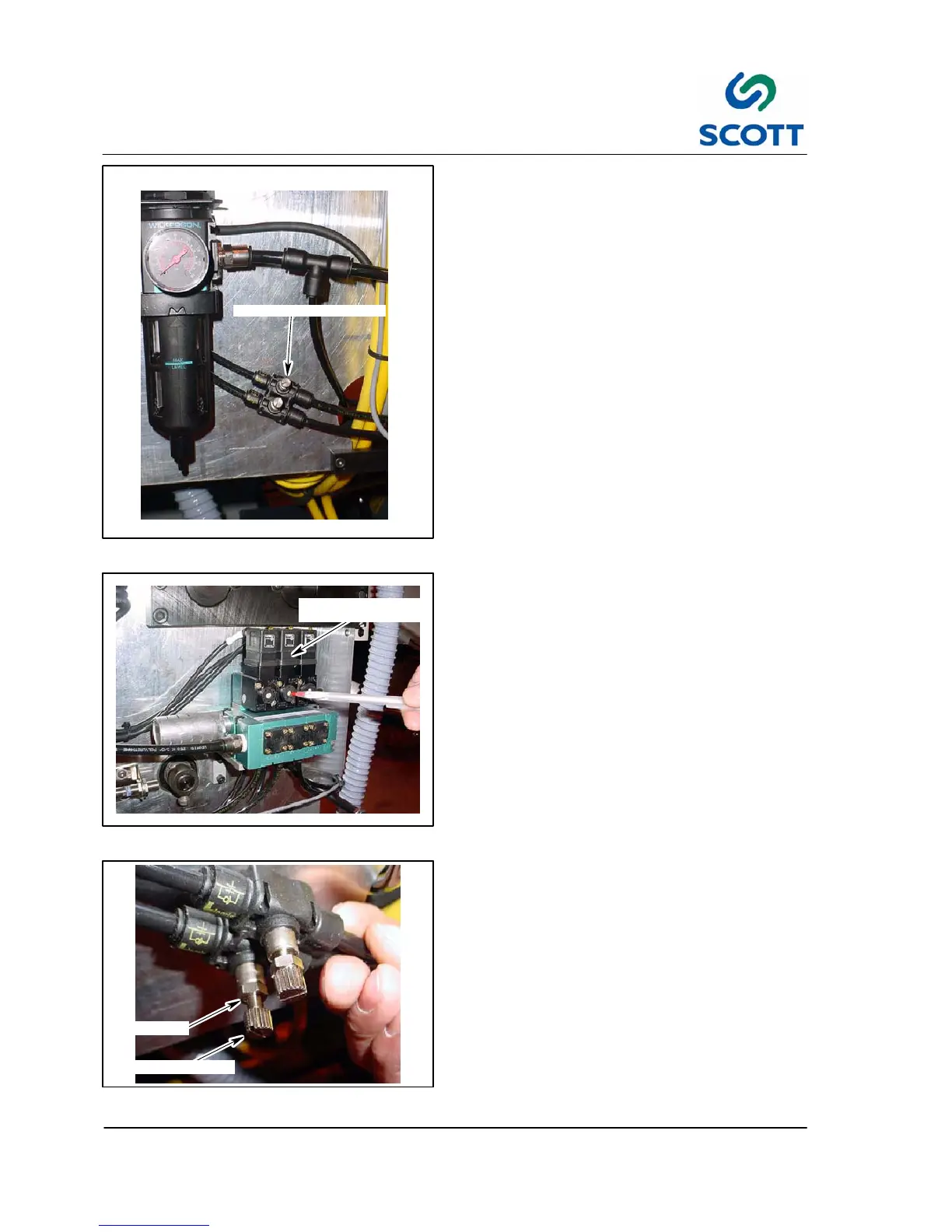
FLOW CONTROL VALVES
Fig. 4 -33. Paper Stop Adjustment Valves
4.2.10 Paper Stop Adjustment
The paper stop cylinder is equipped with two flow
control adjustment valves. One is for up motion
and the other is for down motion.
If the cylinder opens or closes too hard, it can
cause premature wear to the cylinders and paper
stop parts.
If the cylinder is too slow, it will not stop the sheet
stock in time.
The cylinder should have a smooth up and down
motion.
To Ad just:
Step: 1. Remove the rear cover.
PAPER STOP
ACTIVATION VALVE
Fig. 4-34. Paper Stop Activation Button
Step: 2. Depress the paper stop activation button
in for Up Motion and release button for
Down motion.
JAM NUT
THUMB SCREW
”
Fig. 4-35. Flow Controls
Step: 3. To adjust the “up” or “down” motion,
loosen the jam nut on the flow control.
Step: 4. Turn thumb screw clockwise (in) to slow
stop motion or counter--clockwise (out) to
speed up stop motion.
Step: 5. After paper stop cylinder is properly
adjusted, tighten jam nut on thumb
screw.



 To Next Page