49
•
TCP 47000, for Airtune in AirPlay
•
TCP 7000, for AirPlay by passing URL
•
TCP 7100, for AirPlay mirroring
•
TCP 18000-18009, for macOS and iOS AV data
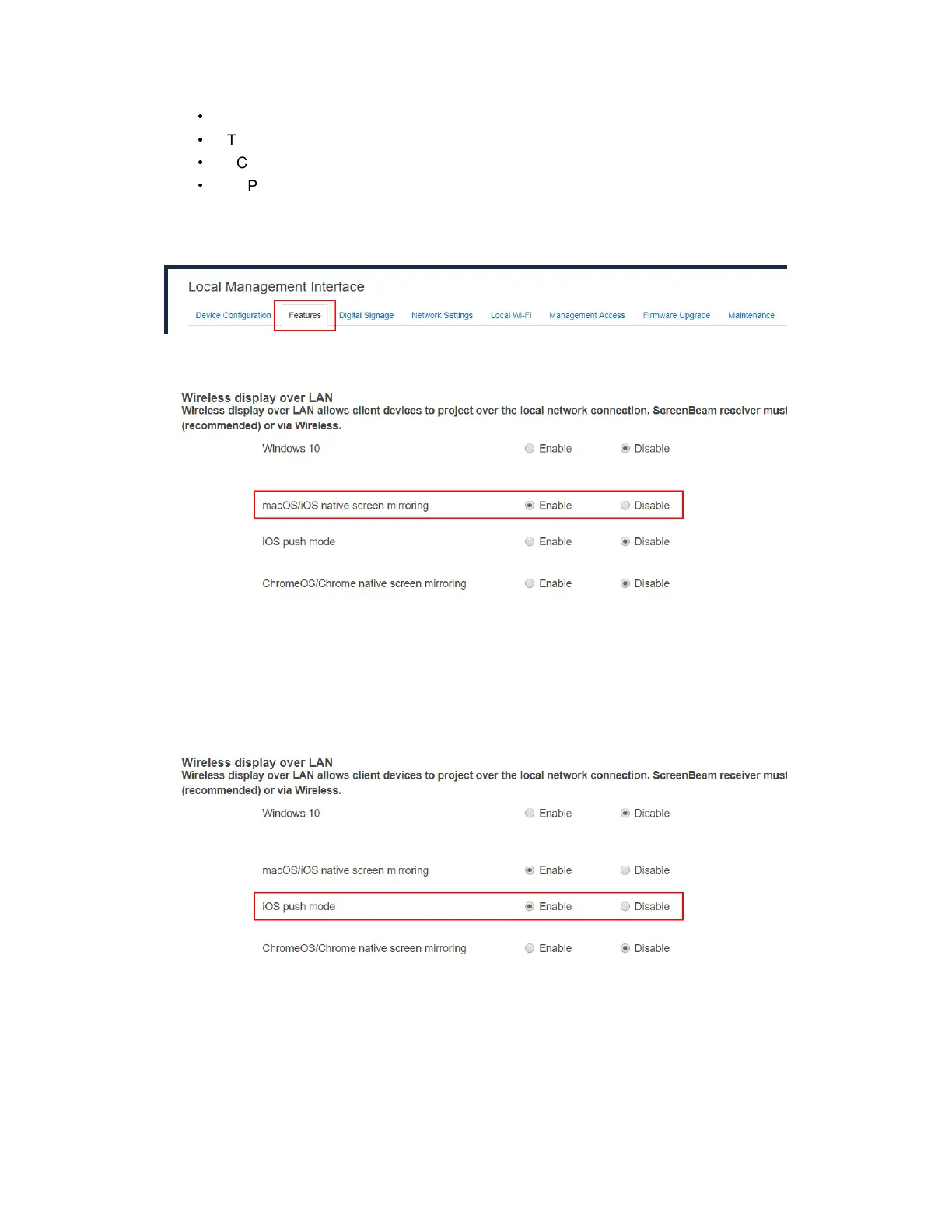
To set up native screen mirroring for macOS/iOS devices, follow this procedure:
1. Go to the Features tab page by clicking the Features tab.
2. Go to the Wireless display over LAN section, and set macOS/iOS native screen
mirroring to Enable or Disable.
Enable: macOS/iOS devices are allowed to project over the local network with native
screen mirroring. By default, this feature is enabled.
Disable: macOS/iOS devices are not allowed to project over the local network with
native screen mirroring.
3. If your streaming app can support iOS push mode, enable the iOS push mode.
Otherwise, disable it.
4. Click the Apply button, and then click OK on the pop-up message box to confirm.



 To Next Page