69
V.3.7 Digital Signage Settings
ScreenBeam receiver’s Digital Signage mode can turn your display into a digital signage
player.
To set up the receiver’s digital signage mode, follow this procedure:
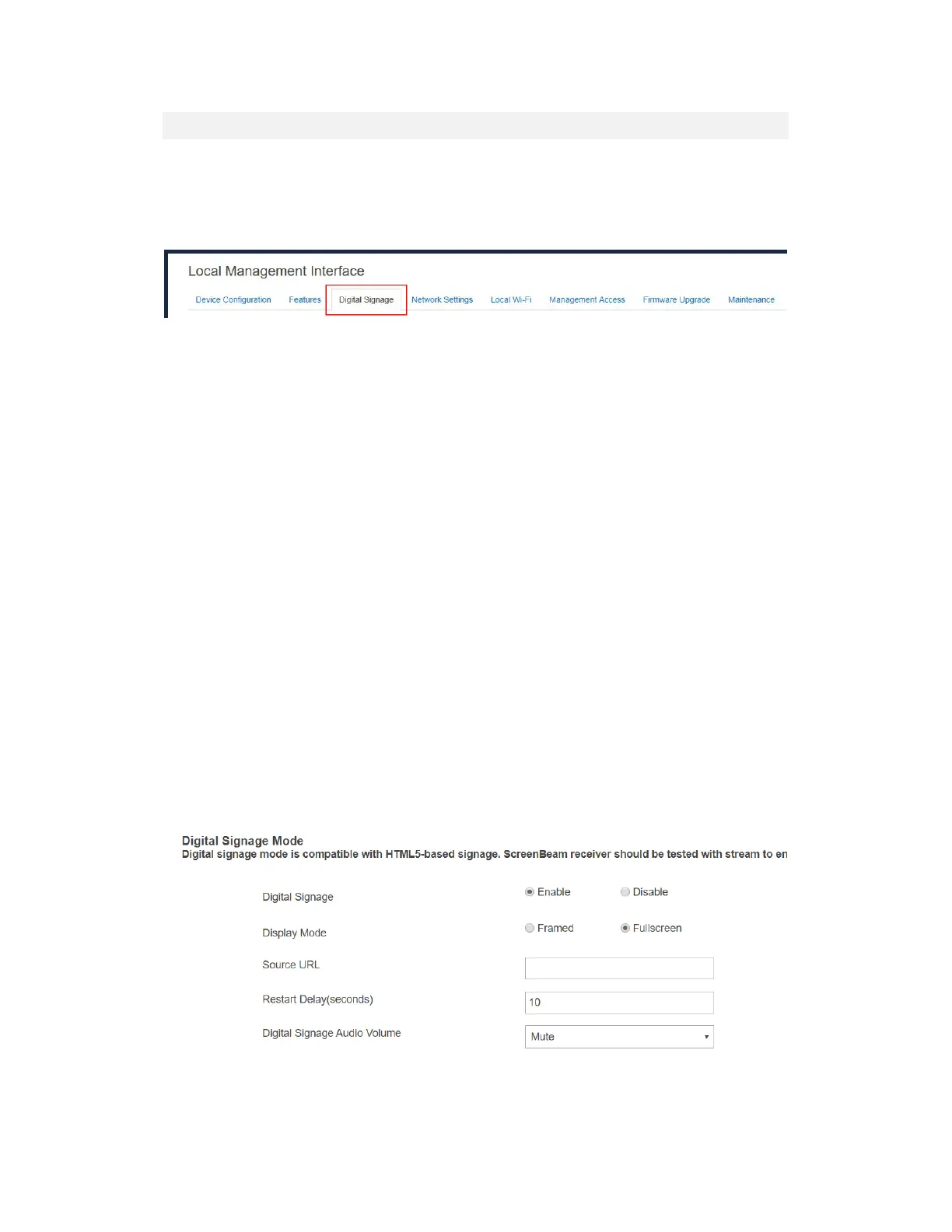
1. Go to the Digital Signage tab page by clicking the Digital Signage tab.
2. Properly configure the Digital Signage options.
Digital Signage: Selecting Enable will turn the digital signage feature on, while
selecting Disable will turn this feature off.
Display Mode: Selecting Framed will display the signage in a framed window,
together with other information such as Internet access connection, wireless display
instruction, and receiver name, while selecting Fullscreen will display the signage
in full screen, together with only the receiver name.
Source URL: The URL of the source content.
The digital signage supports content delivered using HTML5/CSS/JavaScript with
the following features:
• Chromium engine only (latest available in Android)
• H.264 video up to 4096x2160/3840x2160 @ 30fps
• Audio: MP3, AAC-LC, HE-AAC v1/v2
• Static images: JPG, PNG, GIF
• WebGL
All content shall be tested for viewability in Android Webview by users to validate its
suitability.
Restart Delay (seconds): It is the delay time to restart the signage playback after a
wireless display connection ends or after the receiver is restarted. The delay time
range is 10-1000 seconds.
Digital Signage Audio Volume: It is used to control audio volume for digital
signage playback. Currently, available options are Mute, Low, Medium, and High.



 To Next Page