81
Part VI Updating Firmware for the
Receiver
ScreenBeam 1100 Plus allows updating its firmware wirelessly through the LMI or locally
through a USB flash drive.
VI.1 Firmware Update via LMI
There are two ways to update the receiver’s firmware via LMI: from a local PC or from the
ScreenBeam firmware update server.
VI.1.1 Updating Firmware from a Local PC
Users can wirelessly update the receiver’s firmware by transferring the firmware update file
from a local PC.
To upgrade the receiver from a local PC, follow this procedure:
1. Download the latest firmware from ScreenBeam’s website:
https://support.screenbeam.com.
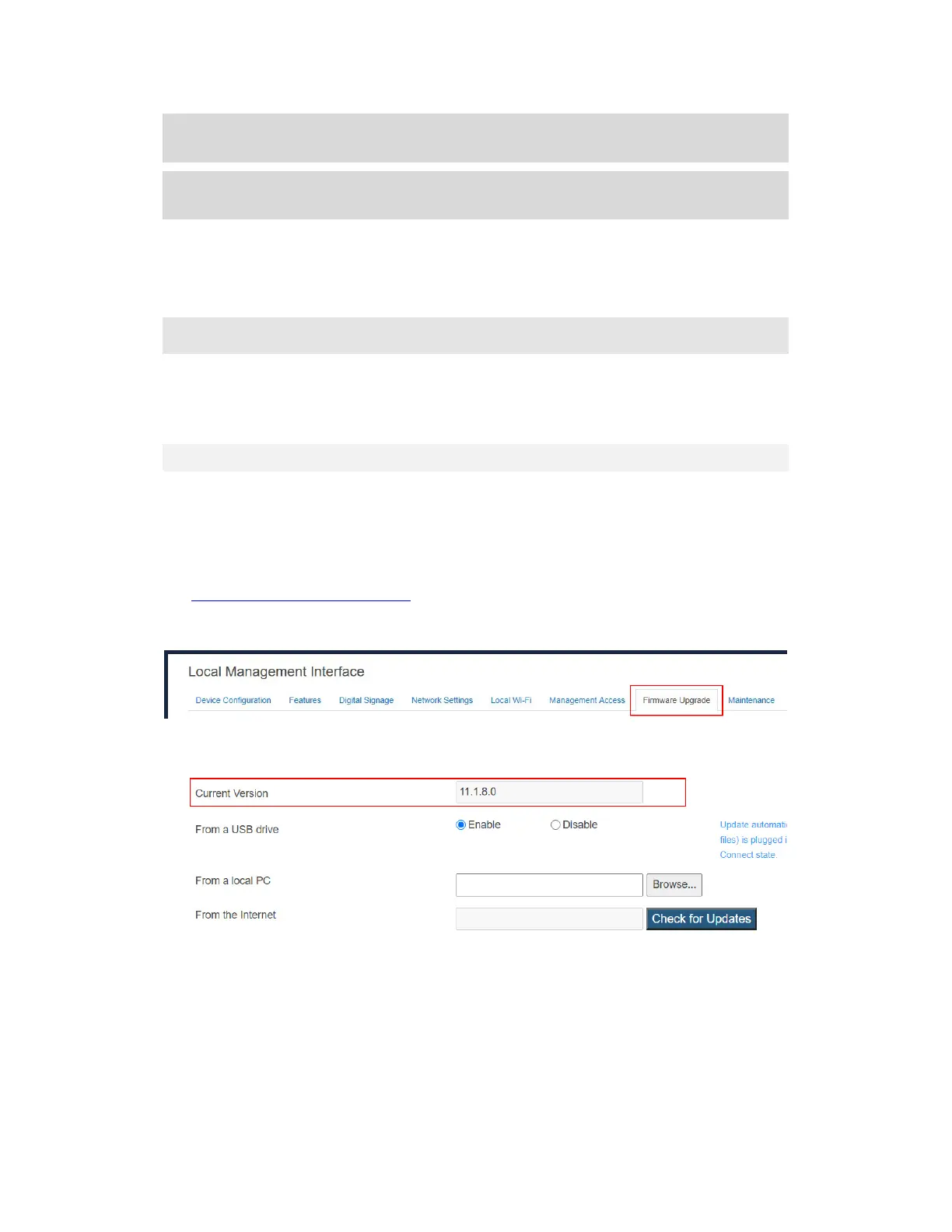
2. Log into Local Management Interface on ScreenBeam 1100 Plus, and go to the
Firmware Upgrade tab page by clicking the Firmware Upgrade tab.
On the Firmware Upgrade tab page, users can check the current firmware version in
the Firmware Version section.
3. Select the Browse button next to the From a local PC box.



 To Next Page