Navigation (NAV)* 113
Operating RADIO, MEDIA (audiovisual
systems)
NAME, TEL NAV, INFO CAR, SETUP
– Enter all required information for the route guidance. To do so,
you can use any of the various options described on
⇒ page 104.
–Select Start route guidance ⇒ page 112, fig. 132; the route will
be calculated and the map will be automatically displayed.
– Using the rotary pushbutton, select one of the available routes
shown on the map (applies only to route without stopover)
⇒ page 113, or
– Press the rotary pushbutton to select the suggested route on the
map ⇒ page 114.
After the route has been calculated the navigation system will automatically
switch to the map display mode. Route guidance is shown in simplified form
on the instrument panel display ⇒ page 101. You will also receive spoken
navigation information ⇒ page 100.
When you have entered a single destination ⇒ page 104 and started route
guidance, you will be offered up to three different routes to reach your desti-
nation ⇒ page 113.
Once you have entered a route plan and started route guidance an overview
map will be displayed showing all stopovers and various information
regarding the route ⇒ page 114.
Entered destinations can be saved ⇒ page 117 and ⇒ page 118.
Route criteria ⇒ page 121 can be changed at any time during guidance and
the route will be recalculated.
If you start a route guidance, but do not complete it, this guidance will be
continued automatically when you start driving again. This also applies to
entered destinations that were not reached due to unexpected circumstances
(e.g. change of plans). To end route guidance, select Stop route guidance
⇒ page 115.
Note
Calculated destinations can also be changed on the map display by moving
the cursor ⇒ page 129.
Single destination navigation: Information before route
guidance
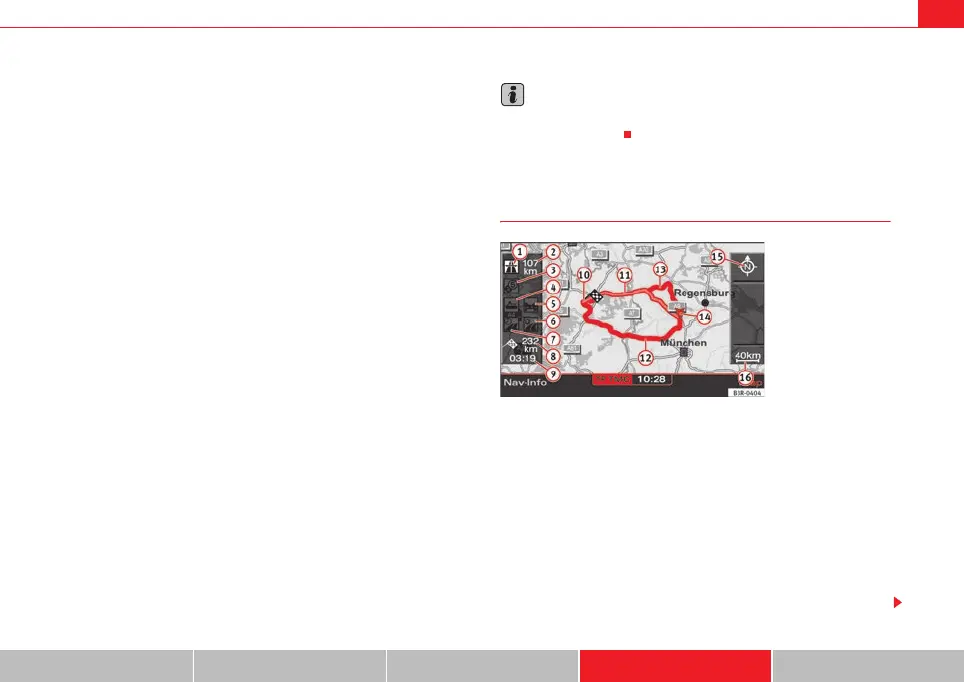
Once you have entered the destination ⇒ page 104 you will be
offered up to three alternative routes ⇒ fig. 133.
– Select one of the possible routes by turning the rotary push-
button.
– Press the rotary pushbutton to start the route guidance for the
selected route.
When you select a route by rotating the control knob, you are shown different
information about this route. The information pertaining to the selected route
is highlighted in white.
Fig. 133 Navigation:
Example of map display
after route has been calcu-
lated.
media_systemE_EN.book Seite 113 Montag, 21. September 2009 1:48 13



 To Next Page