Introduction
volume in the Sound setup menu
›››
page 93.
Diagram of the menus
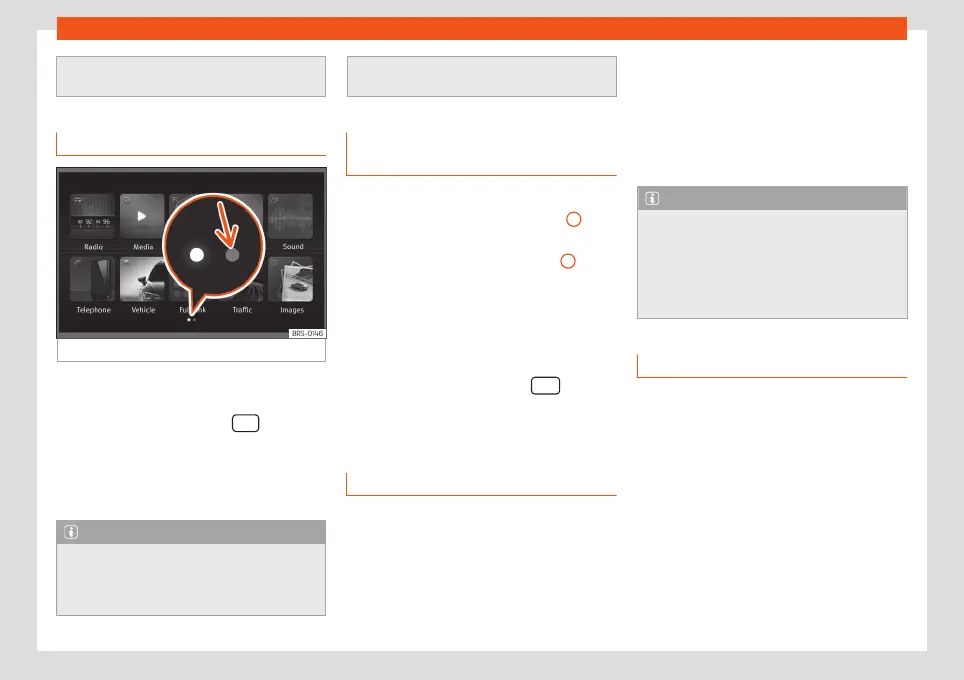
Fig. 5
Main menu
The Infotainment system touchscreen can be
used to select the different main menus.
Press the Infotainment button
to open
the menus summary
›››
page 5.
The display of the touchscreen's main menu
can be switched between “grid” and “carou-
sel” via the Settings menu
›››
page 92.
Note
●
There may be more icons on the second
page, depending on the infotainment ver-
sion. In this case, to see the other icons
press the function button
›››
Fig. 5 (arrow)
or swipe your finger horizontally across the
screen.
Infotainment system rotary knobs
and buttons
Rotary/push knobs
The left-hand rotary knob
›››
Fig. 2
10
is the
volume control or the on/off button.
The right-hand rotary knob
›››
Fig. 2
12
is the
setup button.
Infotainment buttons
The buttons on the unit are shown in this
manual with the word infotainment button
and their function within a rectangle, for ex-
ample, the infotainment button
.
The Infotainment buttons are used by press-
ing them or pressing and holding.
Switch on and Switch off
To manually switch the Infotainment system
on and off, briefly press the left rotary knob
.
When switching on, the system starts-up with
the last set volume, provided that this does
not exceed the preset maximum start-up vol-
ume
›››
page 93, Sound and volume set-
tings.
The unit will switch off automatically when
the key is removed from the ignition or when
the on/off button is pressed (depending on
the equipment fitted or the vehicle). If the In-
fotainment system is switched on again, it will
switch off automatically after approximately
30 minutes (switch-off delay).
Note
●
The Infotainment system is a part of the
vehicle. It cannot be used in any other vehi-
cle.
●
If the battery has been disconnected, the
ignition must be activated before switching
on the Infotainment system.
Change base volume
Increasing or decreasing the volume or
muting the sound
Increase the volume: Turn the volume con-
trol
clockwise or move the left thumbwheel
on the multifunction steering wheel upward
›››
Booklet Instruction Manual.
Lower the volume: turn the volume control
clockwise or move the left thumbwheel on
the multifunction steering wheel downward
.
›››
Booklet Operating Manual
Changes in volume are indicated by a vol-
ume bar on the screen. The volume can be
controlled using the steering wheel controls.
10



 To Next Page