Audio and Media Mode
DVD video mode
3 Only available for the model: Navi System Plus
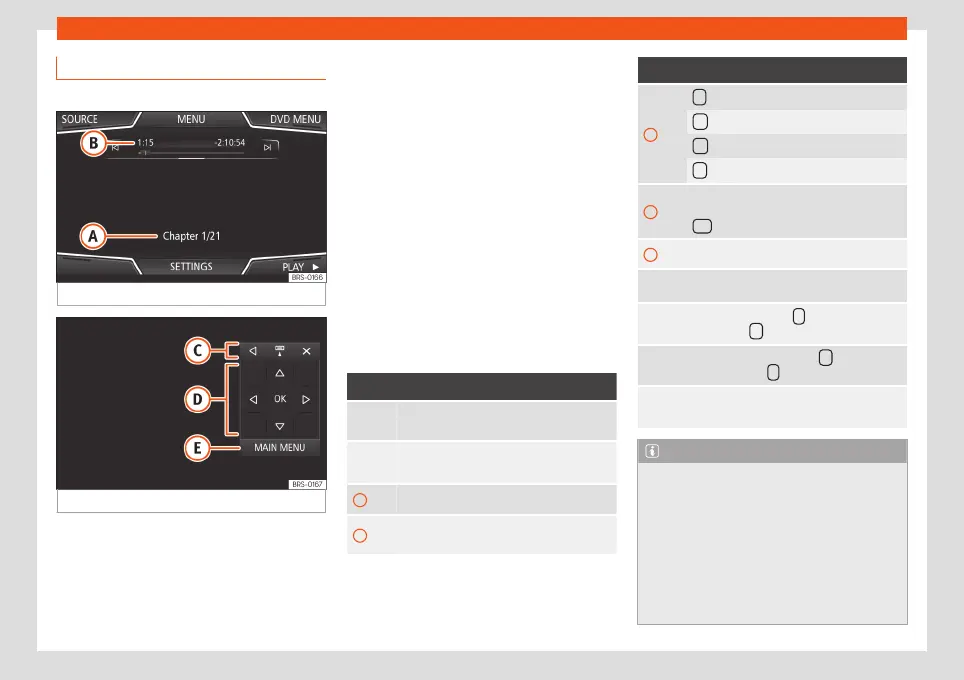
Fig. 40
DVD main menu.
Fig. 41
DVD mode control menu.
DVD video regional code
Quite often, the playback of DVD video is
limited to certain regions (for example, to the
US and Canada) by so-called region “co-
des”. These DVDs can only be played on
units that are coded for the same region.
The unit's DVD drive is configured to read the
regional code for the region in which the vehi-
cle was originally sold.
Start DVD mode
●
Insert a compatible DVD in the DVD drive.
The reading of DVD data may take a few sec-
onds.
The DVD's “intro” (short initial sequence) is
played. Next, the different DVD menus are
displayed.
Controlling the DVD menu
●
Briefly touch the screen to activate the
function buttons in the DVD mode main menu
›››
Fig. 40.
Function button: function
SOURC
E
Display and selection of the source.
DVD
MENU
To display the control menu and return to
the main DVD screen
›››
Fig. 41.
A Chapter display.
B
Displays play time duration and remaining
play time.
Function button: function
C
: Move the control menu window.
: Minimise the control menu window.
: Maximise the control menu window.
: Close the control menu.
D
Use the arrow buttons to browse the DVD
menu. Confirm the selection by pressing
OK .
E Press to open the DVD main menu.
/
To move to the next or previous chapter.
Playback stops. The function button
changes to
.
Playback is resumed. The function but-
ton changes to
.
SET-
TINGS
This menu contains the Video (DVD) set-
tings
›››
page 56.
Note
●
The visual appearance of the DVD film
menus and the menu options which it offers
are the responsibility of the DVD manufac-
turer.
●
The difference in behaviour of some films
when using the same mode is the responsi-
bility of the DVD manufacturer.
●
You may not be able to play video DVDs
which you have burned yourself.
»
55



 To Next Page