4.2
SEL-734B Capacitor Bank Control Field Reference Guide Date Code 20170207
Configuring the SEL-734B
Establish SEL Communication Between PC and the SEL-734B
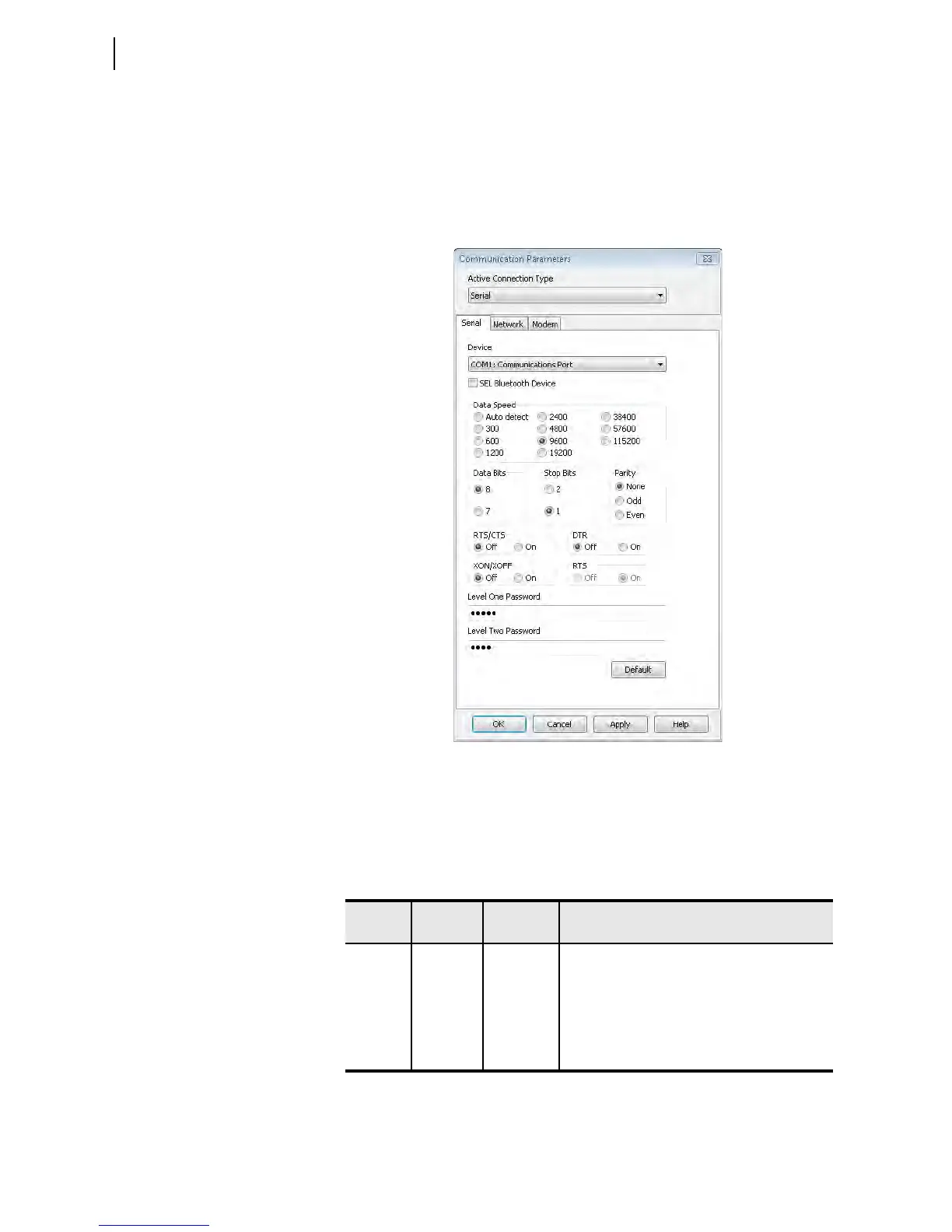
Step 5. Set communication parameters appropriately. Figure 4.1 shows
the default serial port parameters for Port F and Port 2 of the
SEL-734B.
Step 6. Click OK.
The communications status is shown in the bottom left-hand corner of
QuickSet.
Figure 4.1 Default Serial Communication Parameters
Security
The SEL-734B supports four access levels to prevent unauthorized access.
Table 4.1 describes the default passwords and the capabilities of each access
level. The user must enter Access Level 1 before entering Access Level E or
Access Level 2.
Table 4.1 Default Passwords and Access Levels
Access
Level
Terminal
Prompt
Default
Password
Capability
0AC = N/A Entry access level
ACC => OTTER View configuration settings and meter data
EAC E=> BLONDEL Reset demands and perform all Access Level 1
commands
2AC =>> TAIL Change configuration settings, reset all data, and
perform all commands



 To Next Page