4.4
SEL-734B Capacitor Bank Control Field Reference Guide Date Code 20170207
Configuring the SEL-734B
Change Passwords
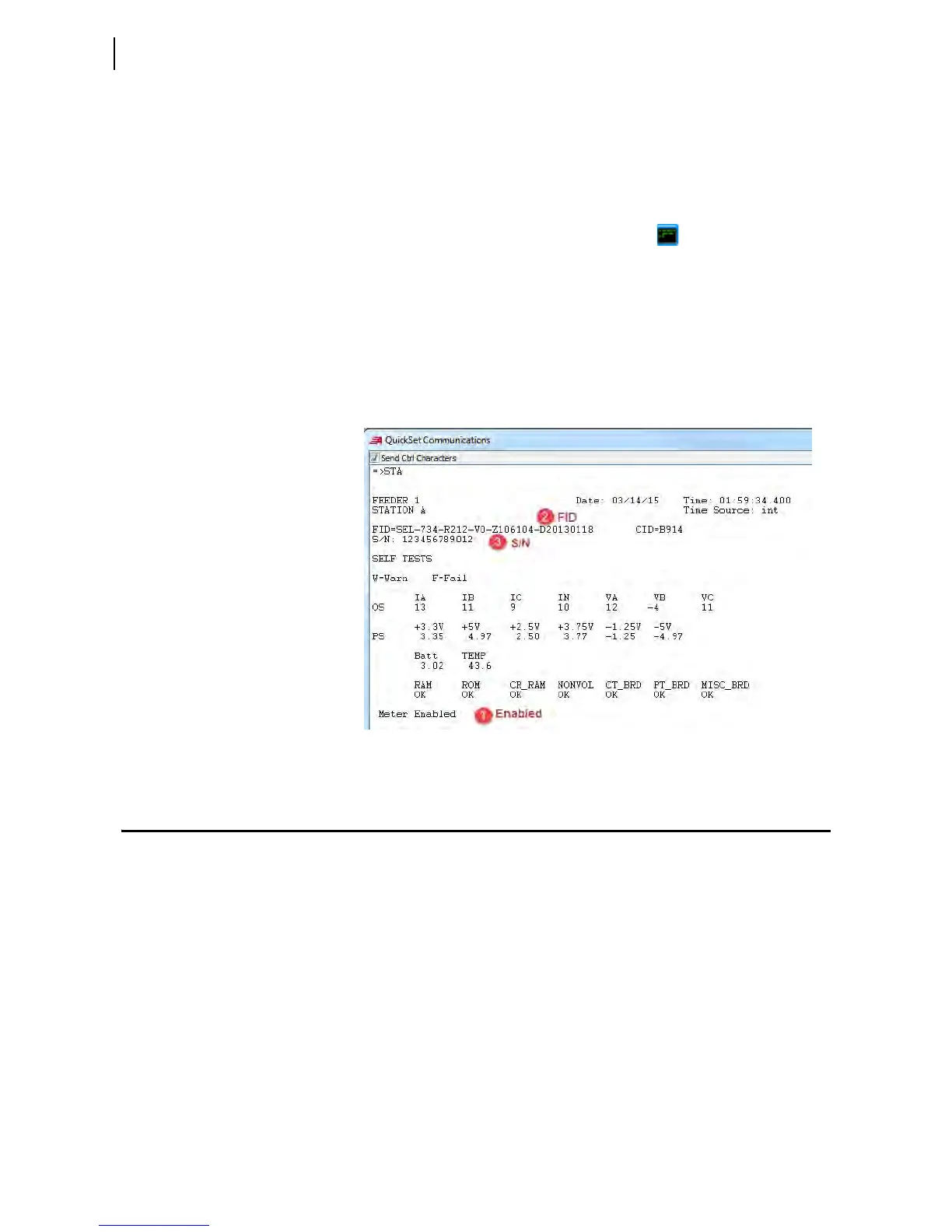
Check the Status of the Controller Using a Terminal Program
You can use an ASCII terminal program to check the status of the SEL-734B.
The following steps detail this procedure using the QuickSet terminal
program, but you can use other terminal programs.
Step 1. Establish communication to the SEL-734B.
Step 2. Click the QuickSet Terminal icon ( ) on the header ribbon
or open a terminal program and establish SEL ASCII
communication to the device.
Step 3. Enter Access Level 1.
a. Enter the ACC command.
b. When prompted, enter the Access Level 1 password.
c. Enter the STA command.
Step 4. Verify that the meter is enabled.
Figure 4.3 QuickSet Terminal Status Example
Change Passwords
To prevent unauthorized access, set strong passwords, as described in the
following steps.
Using QuickSet
Step 1. Open the QuickSet HMI.
Step 2. Navigate to the Control window.
Step 3. In the Passwords field, click the Level drop-down box and
select the password level that you want to change.
Step 4. Type the new password in the New Password and Confirm
Password text boxes.
Step 5. Click Set next to the Confirm Password text box.
QuickSet will show a message confirming that the password was reset.



 To Next Page