Installing the SR IEM G4
29
Daisy chaining audio signals
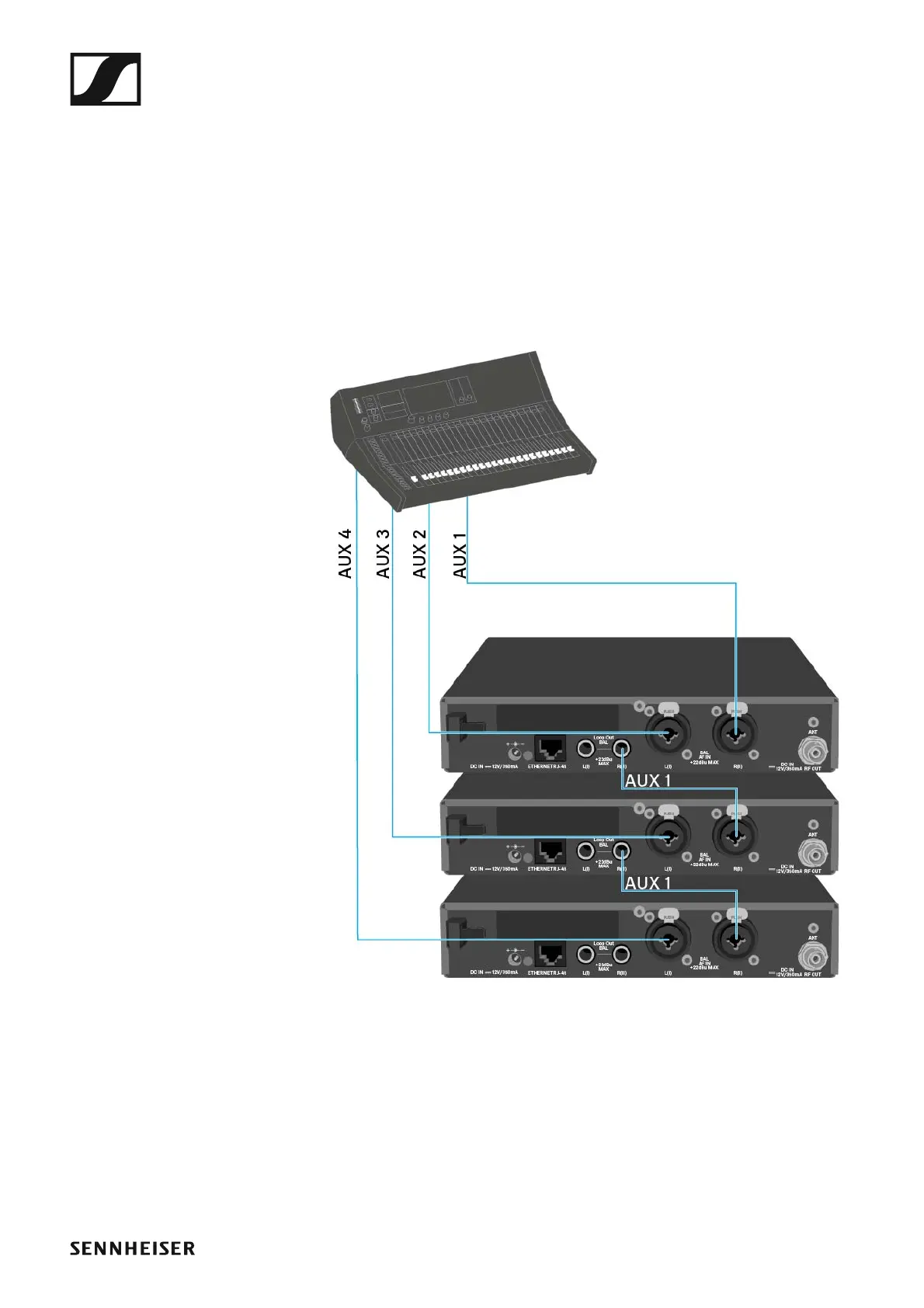
Using the LOOP OUT BAL L and/or LOOP OUT BAL R output sockets, it is
possible to transmit a signal that you want to make available to all receiv-
ers from the mixing console to a transmitter and then to daisy chain this
signal from the transmitter to the other transmitters.
In this way, for example, you can distribute an AUX path from the mixing
console in Focus mode to multiple transmitters and output a separate sig-
nal on the other channel of the same transmitter (e.g. for the individual mu-
sician).
▷ Transmit a signal from the mixing console to the input socket of trans-
mitter A (in this example: BAL AF IN R).
▷ Connect the LOOP OUT BAL R output socket of transmitter A with the
BAL AF IN R input socket of transmitter B.
▷ Now connect the LOOP OUT BAL R output socket of transmitter B with
the BAL AF IN R input socket of transmitter C.
▷ Continue on in this way for the remaining transmitters.












 To Next Page