Using the EK IEM G4
54
Home screen
After you switch on the receiver, the display panel initially displays the
Sennheiser logo. After a short time, the home screen is then displayed.
The home screen has three different standard displays.
▷ On the home screen, press the ESC button to switch between the stan-
dard displays.
In Stereo mode, you can also press the UP/DOWN button to switch be-
tween the standard displays.
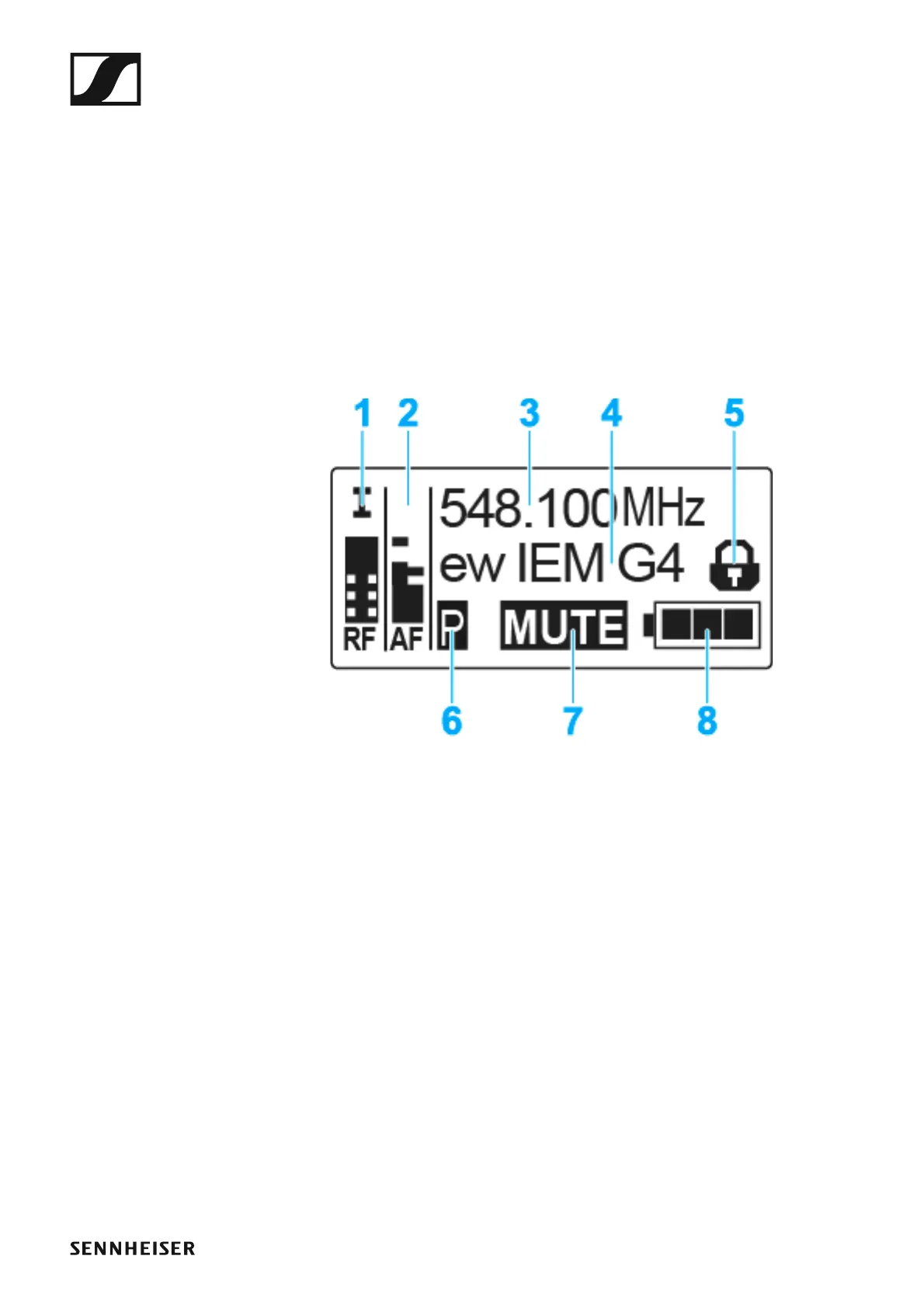
Frequency/Name standard display
►
1 RF RF level (radio frequency)
• RF signal level display
• including the display of the squelch threshold (see “Squelch menu
item”)
2 AF audio level (audio frequency)
• Displays the audio level of the received transmitter (separated by
channel in Stereo mode)
When the display shows full deflection, the audio input level is exces-
sively high.
• See “Balance menu item”
3 Frequency
• Current receiving frequency
• See “Frequency Preset menu item”
4 Name
• Freely selectable name of the receiver
• See “Name menu item”
5 Lock-off function
• Lock-off function is activated.
• See “Lock-off function”
6 Battery status












 To Next Page