Using the SR IEM G4
87
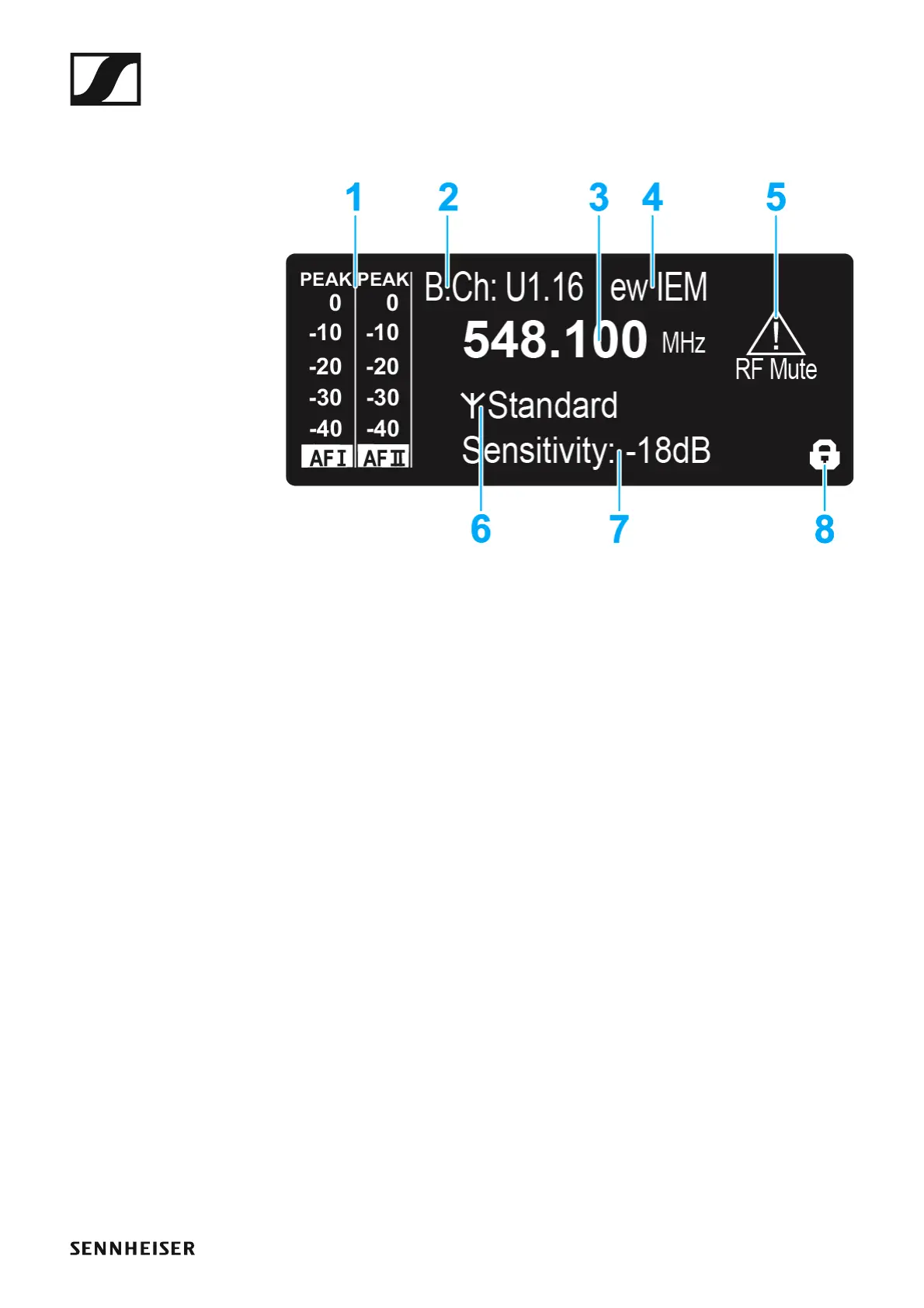
Displays on the SR IEM G4 display panel
You can view the following information on the transmitter display.
1 AF audio level (audio frequency)
• Audio channel level with peak hold function
When the display shows full deflection, the audio input level is exces-
sively high. When the transmitter is overloaded frequently or for ex-
tended periods of time, the PEAK display is shown inverted.
• See “Sensitivity menu item”
• See “Configuring the audio channels (mono/stereo)”
2 Frequency bank and channel
• Current frequency bank and channel number
• See “Frequency Preset menu item”
3 Frequency
• Configured transmission frequency
• See “Frequency Preset menu item”
4 Name
• Freely selectable name of the receiver
• See “Name menu item”
5 Warnings
• Activated warning messages are displayed
• See “Advanced > Fullscreen Warnings menu item”
6 Transmission icon and transmission power
• RF signal is being transmitted
• See “Advanced > RF Power menu item”
• See “Deactivating the RF signal (RF mute)”
7 Input sensitivity
• Configured input sensitivity for the NF signal on the audio input sock-
ets BAL AF IN L (I) and BAL AF IN R (II)
• See “Sensitivity menu item”












 To Next Page