Argus Radar - RADAR CONFIGURATION
988-10187-004 3.9
3.7 Antenna Settings
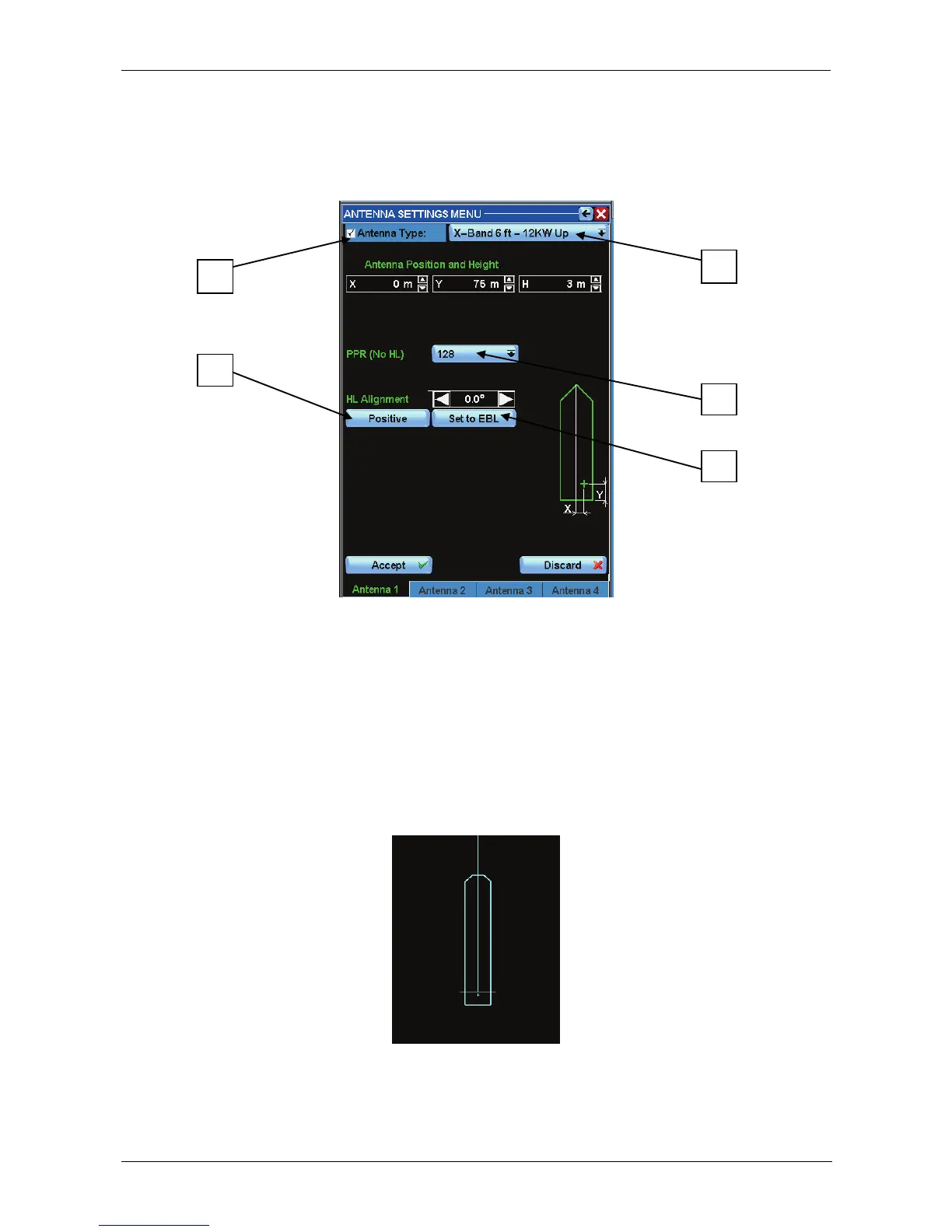
By pressing the “Antenna Settings " button, the following window will appear:
Figure 3.7.1 Antenna Settings
Following the Help Line and the suggestion in the window, it should be easy to set the
correct values for antenna height and antenna Cartesian coordinates, which will be
important to draw the ship profile correctly, visible only at a low range scale.
The PPI will be centred on the cross representing the position of the Radar. The antenna
height is one of the parameters used to calculate the Anti Sea Clutter processing.
As a consequence of this insertion, a drawing of the ship's profile will appear at a low
scale in the centre of the PPI:
To configure a valid radar connection, the checkbox E should be activated and the correct
antenna selected from list A .
The PPR selection B is available only when communication with the transceiver is in
parallel mode (all radar signals connected separately).



 To Next Page