7 PICOSCALE CONTROL GUI
7.5.3 Calculation System
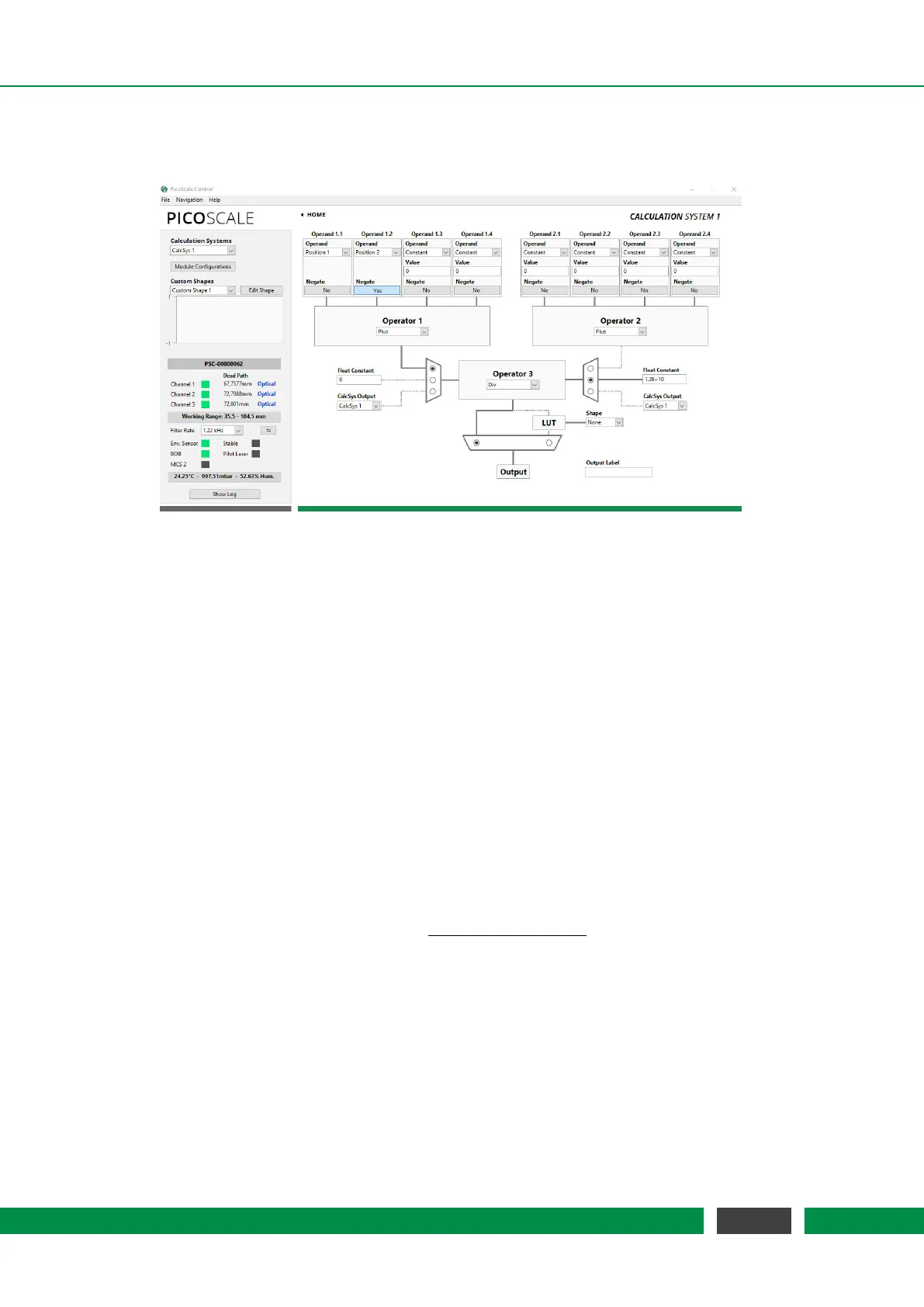
Figure 7.18: Configuration Menu of the Calculation System.
Within the Calculation System you can perform basic calculations with data sources. Up to eight
calculation systems can be configured with the Calculation Systems drop-down menu in the upper
left part of the window.. First, you can define up to four operands (1.1–1.4). Each operand can
be a constant, a position/velocity/acceleration value from one of the three PICOSCALE channels,
an ADC value, a data source value from the environmental module (temperature, pressure or
humidity), signal generator outputs or a counter value. Then, you can sum up the four channels
or the minimum or maximum value can be calculated as defined in the grey Operator 1 box. If, for
instance, a subtraction is required, the Negate Output button can be activated in order to multiply
an operand by -1 before performing the summation. The exact same operations can be performed
with a second branch of data by defining operands 2.1–2.4 and Operator 2. In the third stage, the
results of Operator 1 and Operator 2 can be processed with Operator 3, resulting in a Calc Sys
Result. Operator 3 allows summation, subtraction, multiplication, division or Max/Min operation.
Alternatively, the inputs of Operator 3 can be set to a float constant or the Calc Sys Result of another
calculation system.
In the exemplary operation as shown in figure 7.18 the calculation is set up to give
Calc Sys Result =
Position 1 − Position 2
12000000000
.
By default, the result is simply forwarded to the 64 bit Calc Sys Output. However, it is possible to
map the result to a specific value defined by a lookup-table (LUT). Note that in this case, the cal-
culation system result has to be in the range of [-1,1]. Results outside this range will be truncated.
The lookup-table needs to have 12 bit resolution (and thus has a length of 2
12
=4096 points). The
result is interpolated based on those 4096 points to again give a 64 bit resolution. User defined
LUTs can be uploaded as CSV files in the Custom Shapes panel. (Decimal sign is "." and the 4096
individual entries have to be separated by a line break.) Once a calculation system is configured,
it can be stored in configuration slots for later usage by using the Module Configurations button.
69
PicoScale User Manual



 To Next Page