98
D335 User Manual Customizing the Phone Settings
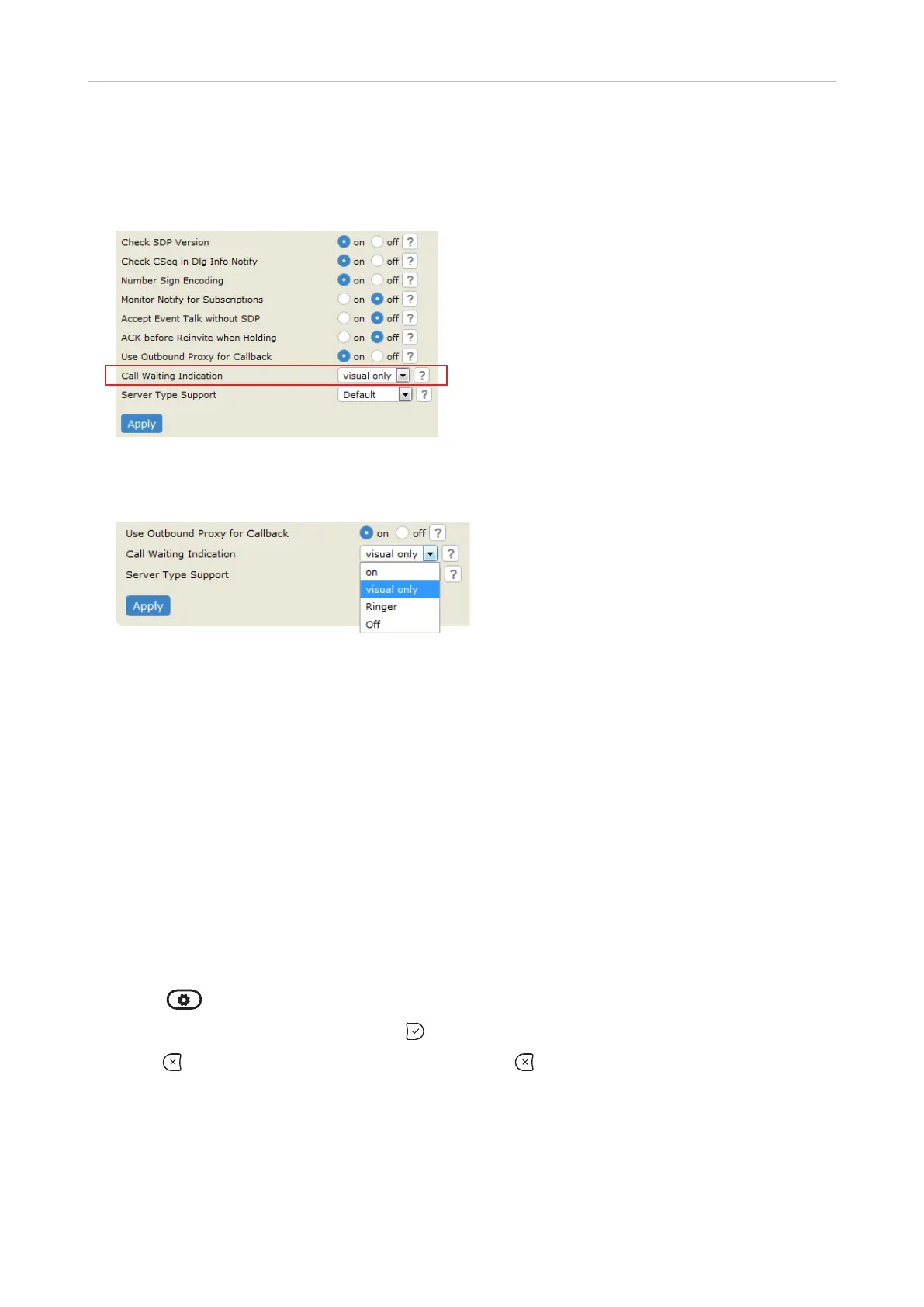
Setting on the web interface
1. In the menu on the left, click the identity whose call waiting settings you want to change.
2. Click the SIP tab. The setting Call Waiting Indication is the second to last on the page.
3.
if you want waiting calls announced only by the "phone ringing" symbol or by the double beep,
respectively.
4. Click Apply and Save.
Hiding my caller ID
With this setting your phone number will not be transmitted to any phones you call. The function
must be set for each identity separately. .
Please note that your call may not be accepted if the other phone is set to reject
anonymous calls (see next item).
Setting on the phone
On the phone, the function is applied to the identity selected as the current identity for outgoing calls.
Select each identity as outgoing identity in turn and select and save the function.
1. Press > Call Features > Outgoing Calls.
2. Select Hide own outgoing ID and press to change the setting from no to yes and vice versa.
3. Press for two seconds to return to the idle
screen.
Setting on the web interface
1. Open the Identity page of the identity.
2. Click the Features tab.



 To Next Page