79
D335 User Manual Conguring the Function Keys
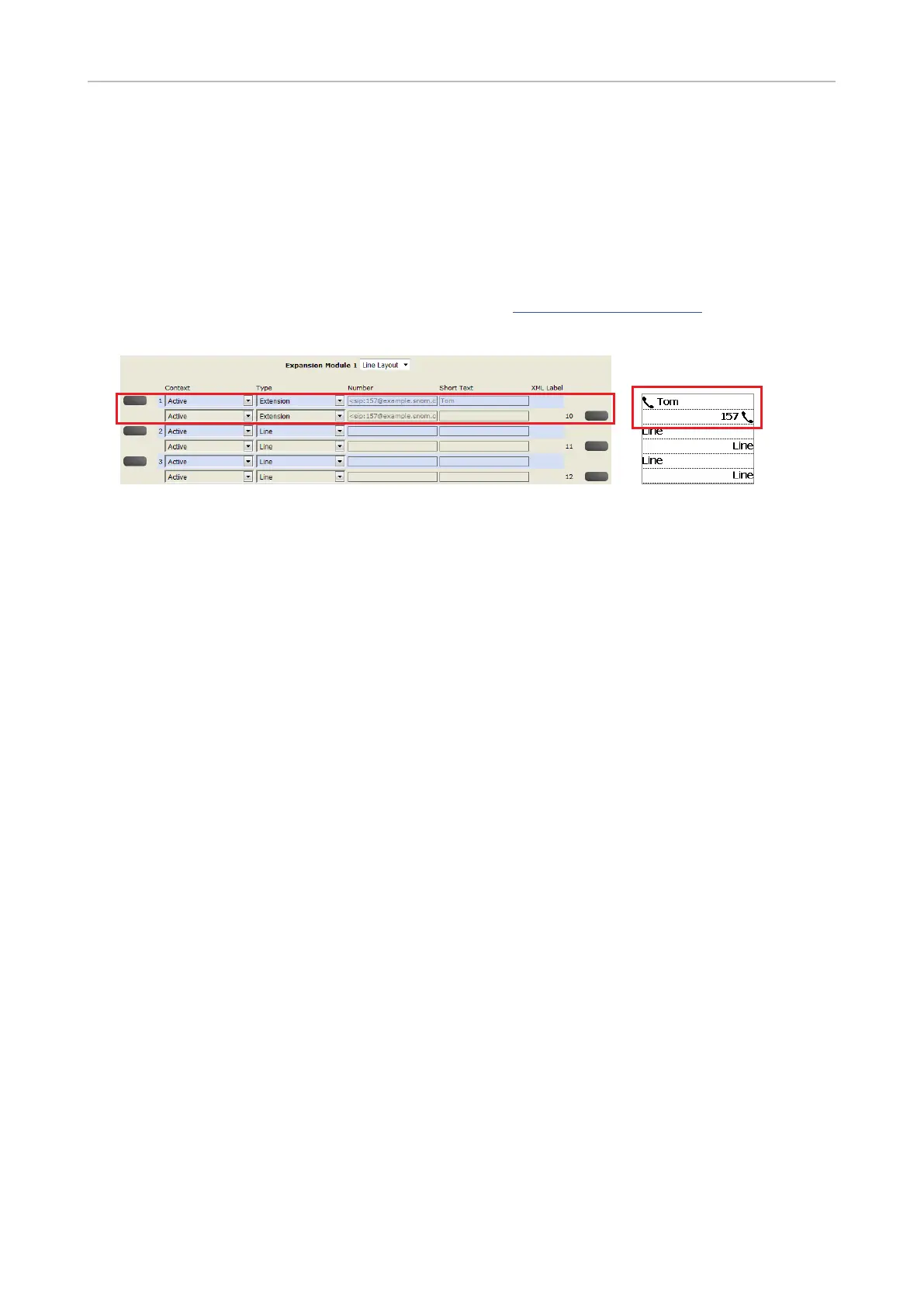
Example 2, Extension monitoring and call pick-up on D3 expansion module
• All functions available on the freely programmable LED function keys of the phone are available
on the connected D3.
• The prerequisites are the same as those for the LED function keys on the phone. See "Example 1,
Extension monitoring and call pick-up" on page 77.
• For information on how to connect the D3 to the phone, as well as on D3 function key and display
layout and settings, please see the D3 User Manual at https://service.snom.com, Accessories
button, Expansion Modules.
1. On the phone's web interface, click Function Keys in the menu on the left.
2. Click the Key Assignment tab, if necessary.
3. Scroll down to Expansion Keys
4. Under Context
identities from the drop-down list.
5. Under Type, select "Extension" from the drop-down list.
6. In the Number
it is extension 157 on key 1 and extension 167 on key 10 (the left and right top keys on the D3).
7. Optional: In the Short Text
the number will be displayed in the key's label area on the D3's display.
8. Click Apply and Save.
call is not answered, you can pick it up by pressing the key. When the extension is engaged in a call,
the key will glow red steadily.



 To Next Page