19
IMPORTANT INFORMATION
1� Use only the power adapter supplied with this product�
To order a replacement power adapter, visit our website at
www.snomamericas.com �
2� The power adapter is intended to be correctly oriented in a vertical or floor mount
position� The prongs are not designed to hold the plug in place if it is plugged into
a ceiling, under-the-table or cabinet outlet�
Battery installation and charging
Install the battery as shown on the following page� Once you have installed the
battery, the screen indicates the battery status (see the table below)� If necessary,
place the handset in the charger to charge the battery� For best performance, keep the
handset in the charger when not in use� The battery is fully charged after 11 hours of
continuous charging�
If the screen is blank, you need to charge the handset without interruption for at least
30 minutes to give the handset enough charge to use the telephone for a short time�
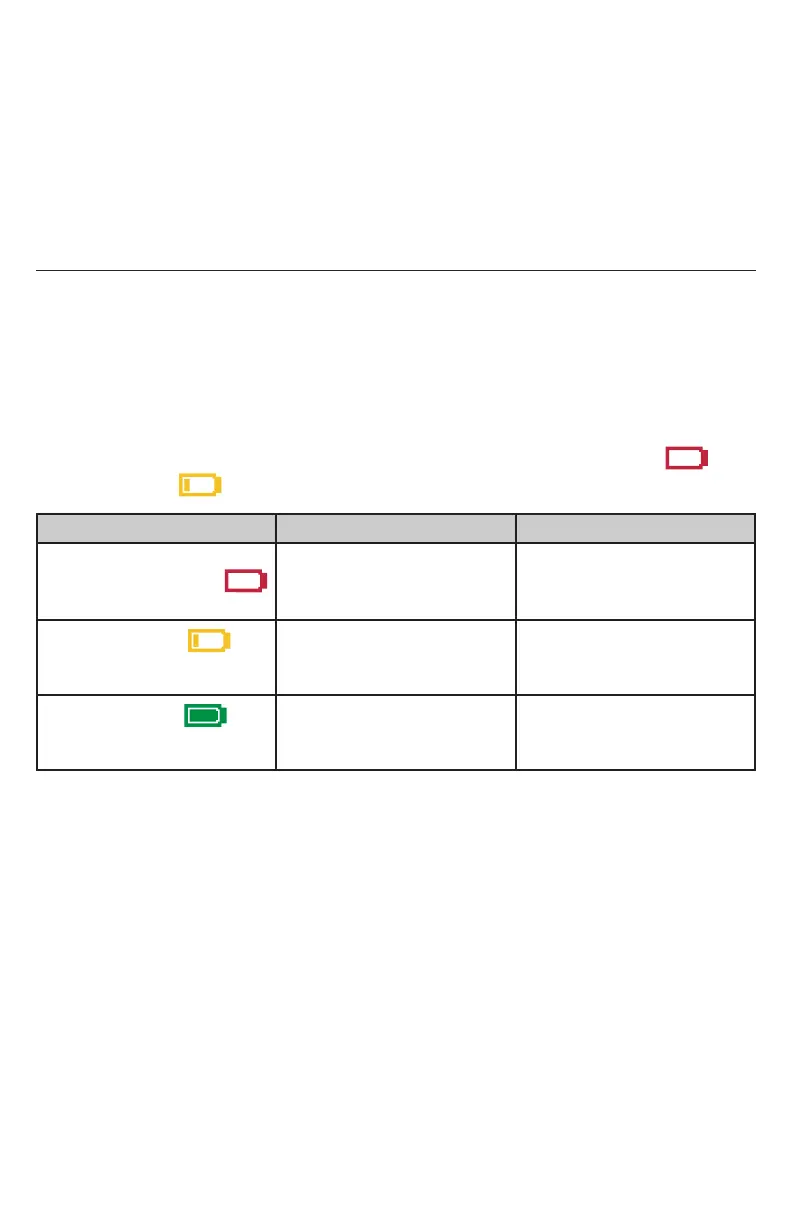
When the battery is low, the handset shows a flashing Very low battery icon or
Low battery icon �
Battery indicators Battery Status Action
The screen is blank or
Very low battery icon
flashes�
The battery has no or
little charge� The handset
cannot be used�
Charge without
interruption (at least 30
minutes)�
Low battery icon
flashes�
Battery has enough
charge to be used for a
short time�
Charge without
interruption (at least 30
minutes)�
Full battery icon
appears�
Battery is charged� To keep the battery
charged, place it in the
charger when not in use�



 To Next Page