28
c� If your phone system is a multi-cell environment, make sure you are
registering to the Primary base station� Click Status in the WebUI sidebar,
and then click Base Status� See which base station IP address is set to
“Primary” mode� Open the WebUI for this IP address�
d� Try to register again; go to step 3�
Deregistering the handset
Before using the handset with a different base station, you must deregister the
handset from the base station to which it is currently registered�
To deregister the handset:
1� Press the MENU/Confirm key�
2� Press and to select (Settings), then press OK�
3� Press or to scroll to User settings, and press Enter�
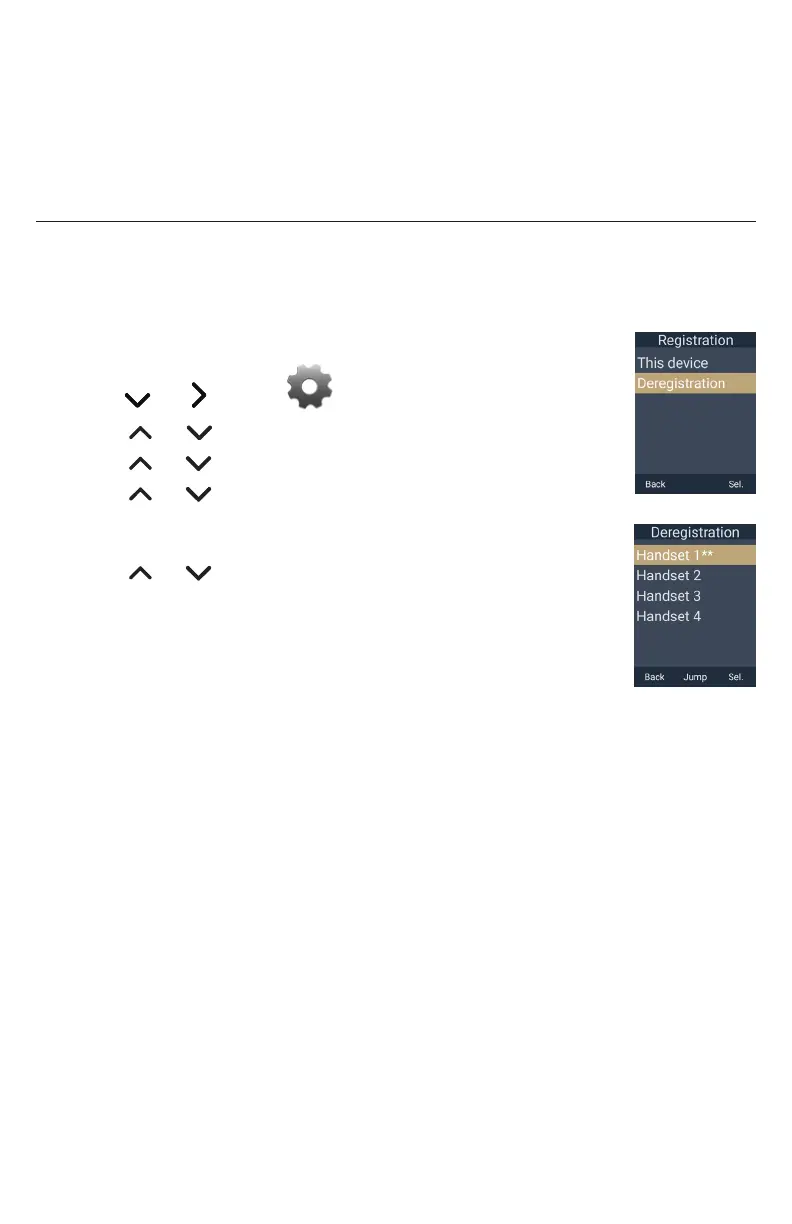
4� Press or to scroll to Registration, and press Enter�
5� Press or to scroll to Deregistration, and press Sel�
The “Deregistration” screen appears, showing the list of registered
handsets� Your handset is indicated by ÛÛ�
6� Press or to select the handset you want to deregister,
and press Sel�
7� Enter the PIN and press OK� The default PIN is 0000�
The handset beeps and displays “Handset is deregistered”�
To deregister the handset using the WebUI:
1� Using the base station’s IP address, open the base station’s WebUI in a web
browser�
NOTE: If your phone system is a multi-cell environment, you must open the
Primary base station’s WebUI� Click Status in the WebUI sidebar, and then click
Base Status� See which base station IP address is set to “Primary” mode� Open the
WebUI for this IP address�
2� On the WebUI, click Status and then click Cordless Registrations�
3� Under Cordless Registrations, click Deregister next to the Handset ID you want to
deregister�



 To Next Page