35
Answering calls
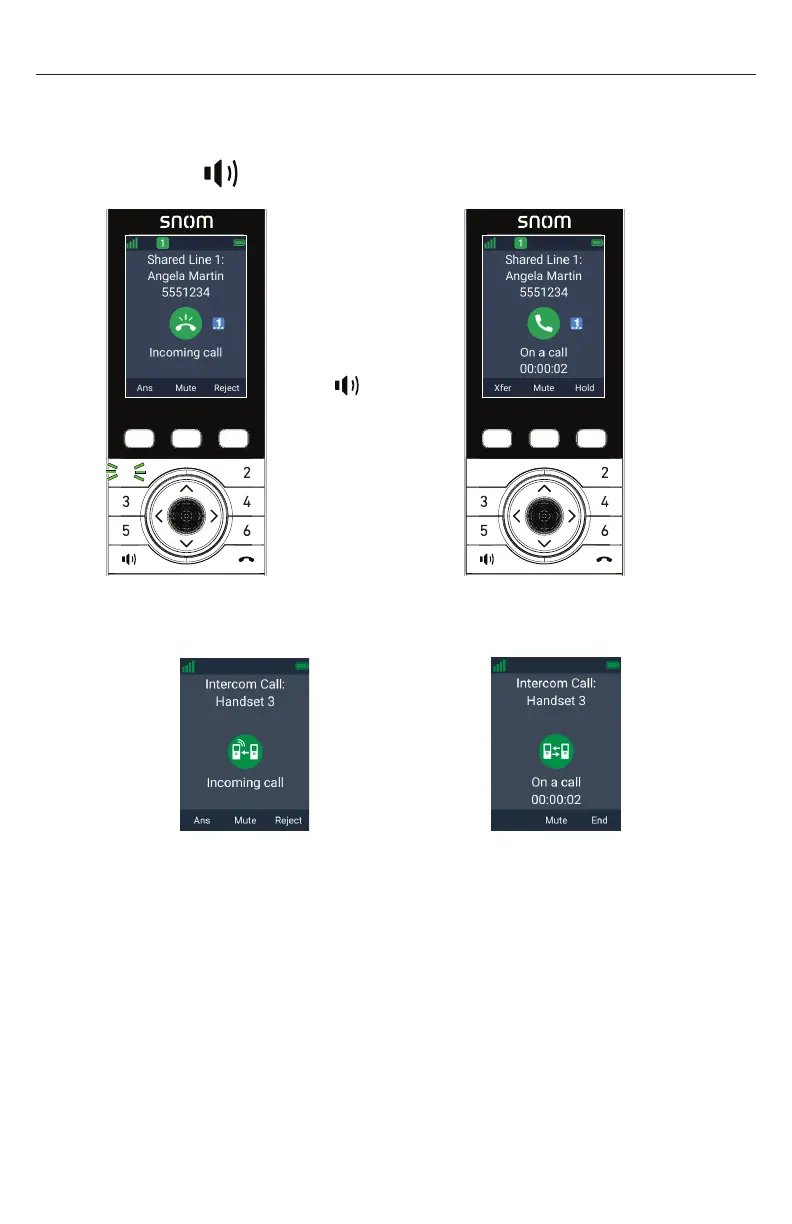
When there is an incoming call, the handset rings and displays the Incoming call
screen�
To answer a call:
• Press Ans,
Taihoon Kim | 24. Jan. 2019 | Revision 1.0AW | M10-Handset (US version)
illustration scale 100%
Silkscreen on the Rear
Pantone 8001C
Silkscreen on the Rear
Pantone Cool Gray 3C
Silkscreen on the Rear
Pantone Cool Gray 3C
Silkscreen on the Top
Pantone 200C
Silkscreen on the Rear
Transluscent
Pantone Cool Gray 3C
Taihoon Kim | 24. Jan. 2019 | Revision 1.0AW | M10-Handset (US version)
illustration scale 100%
Silkscreen on the Rear
Pantone 8001C
Silkscreen on the Rear
Pantone Cool Gray 3C
Silkscreen on the Rear
Pantone Cool Gray 3C
Silkscreen on the Top
Pantone 200C
Silkscreen on the Rear
Transluscent
Pantone Cool Gray 3C
or the green flashing PFK (assigned as a shared line key):
1
1
Press
Ans, or
fl ashing PFK
To answer an intercom call from another handset or deskset:
• Press Ans�
â
Answer
To mute the ringer:
• Press Mute�
The incoming call still appears on your handset display until you answer or
reject the call�
If the incoming call is on a shared line, it still appears on your handset
display until it is answered by a handset/deskset or rejected by all handsets/
desksets�
To reject a call:
• Press Reject�
If the call is on a shared line, the rejected call will continue to ring on other
handset/desksets until it is answered or rejected by all handsets/desksets�
Your handset will not ring again for the rejected call�



 To Next Page