53
Using the Directory
The handset has two lists of contacts� The Local directory is only
available on your handset� The Shared directory is usually main-
tained by your system administrator, and is available on all handsets�
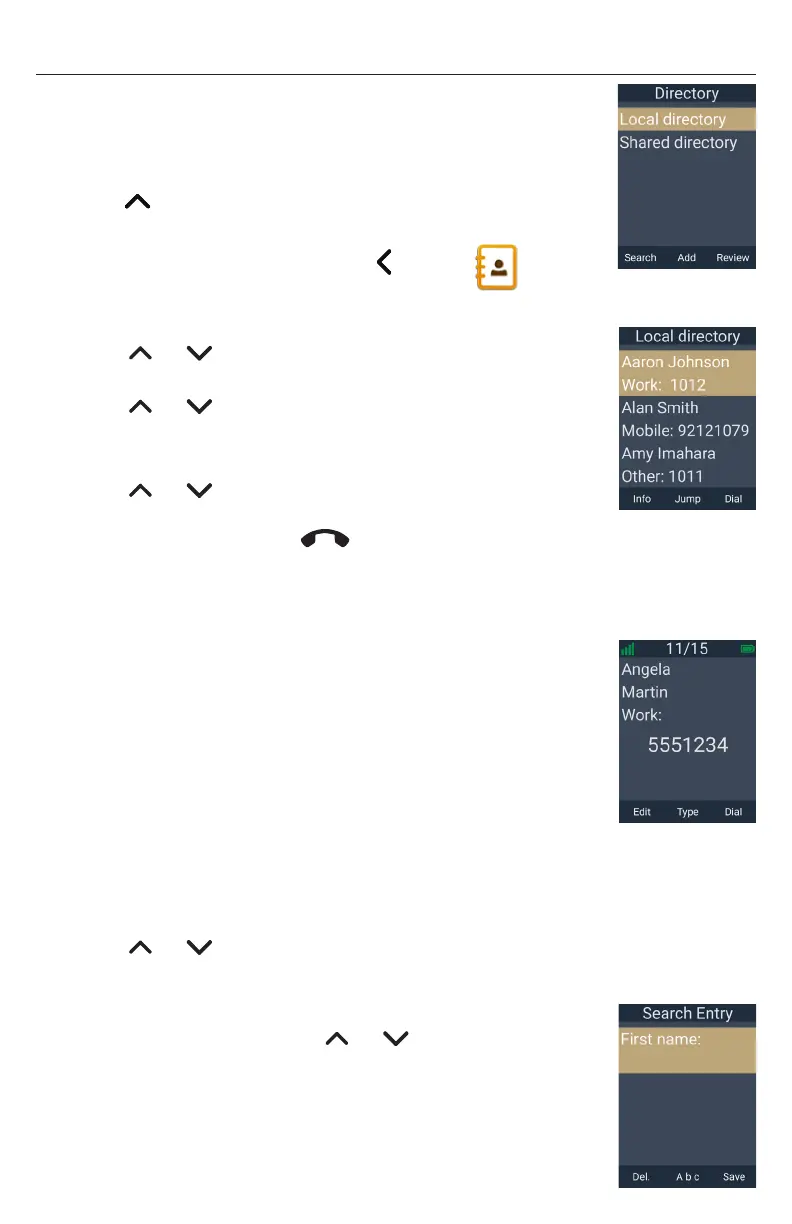
To view a directory:
1� Press when the phone is displaying the idle screen
-OR-
Press the MENU/Confirm key, press to select
(Directory), and then press OK�
The Directory menu appears�
2� Press or to select the directory you wish to view, and
then press Review�
3� Press or to scroll through contacts� To scroll a page at a
time, press Jump�
4� Press Info to display contact details�
5� Press or to scroll through contacts while displaying
contact details�
6� To exit the directory, press
Taihoon Kim | 24. Jan. 2019 | Revision 1.0AW | M10-Handset (US version)
illustration scale 100%
Silkscreen on the Rear
Pantone 8001C
Silkscreen on the Rear
Pantone Cool Gray 3C
Silkscreen on the Rear
Pantone Cool Gray 3C
Silkscreen on the Top
Pantone 200C
Silkscreen on the Rear
Transluscent
Pantone Cool Gray 3C
Taihoon Kim | 24. Jan. 2019 | Revision 1.0AW | M10-Handset (US version)
illustration scale 100%
Silkscreen on the Rear
Pantone 8001C
Silkscreen on the Rear
Pantone Cool Gray 3C
Silkscreen on the Rear
Pantone Cool Gray 3C
Silkscreen on the Top
Pantone 200C
Silkscreen on the Rear
Transluscent
Pantone Cool Gray 3C
�
To call a contact:
When displaying contact details, you can call a contact in the following ways�
Dial the phone number in the contact:
1� Press Type to cycle through work, mobile, and other
numbers�
2� Press Dial�
Edit the phone number before dialing:
1� Press the MENU/Confirm key�
2� With Edit dial highlighted, press Select�
3� Edit the number as required, and then press Dial�
To sort contacts in a directory:
1� When viewing a directory, press the MENU/Confirm key�
2� Press or to select Sort by first name or Sort by Last name, and then
press Select�
To search for a contact:
1� On the Directory menu, press or to select the directory
you wish to view, and then press Search�
NOTE: If the directory is sorted by first name, you will search by
first name� If the directory is sorted by last name, you will search
by last name�
2� Enter a few letters of the name, and then press Search�



 To Next Page