54
You can add, edit and delete contacts in the Local directory only�
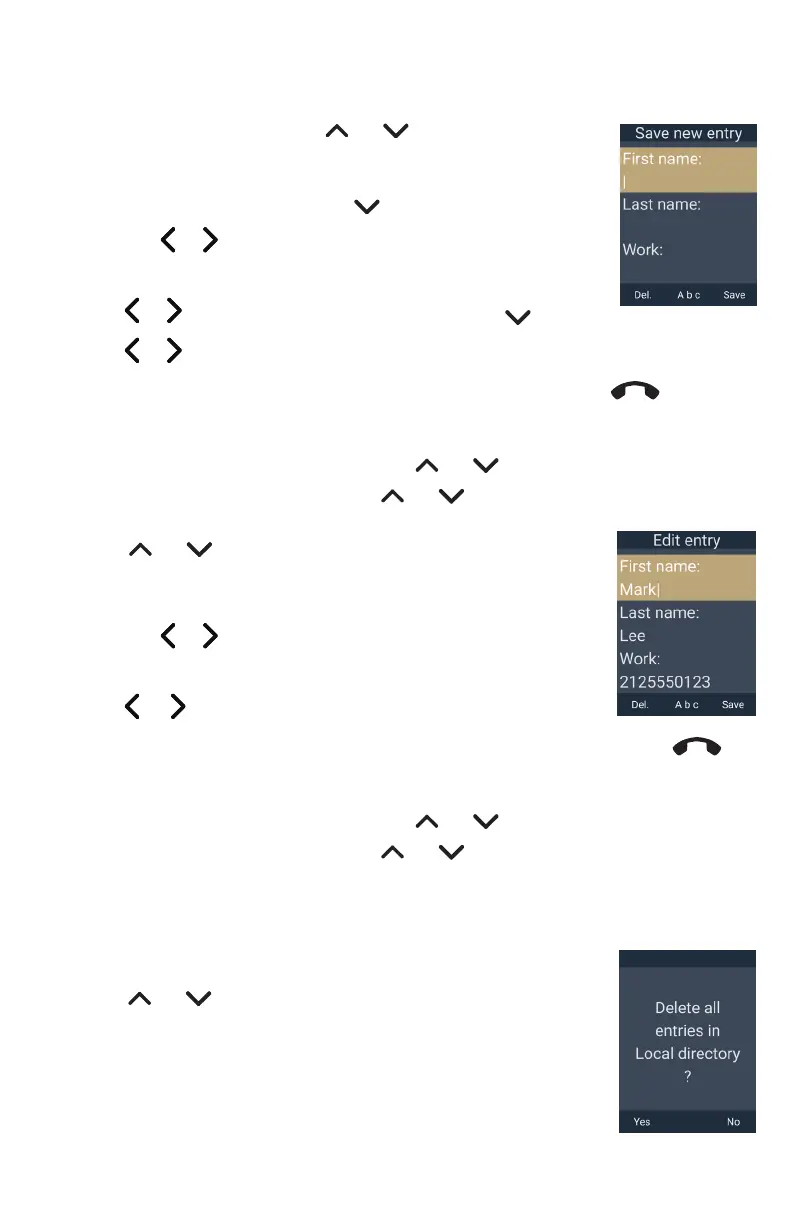
To add a contact:
1� On the Directory menu, press or to select
Local directory, and then press Add�
2� Use the keypad to enter the First name, Last name, Work, Mobile,
and Other phone numbers� Press after entering each item�
• Press or to move the cursor�
• Press Del. to delete a character�
3� Press or to choose the Ringer tone, then press �
4� Press or to choose the Dial line (account)�
5� To save the contact, press Save� To cancel without saving, press
Taihoon Kim | 24. Jan. 2019 | Revision 1.0AW | M10-Handset (US version)
illustration scale 100%
Silkscreen on the Rear
Pantone 8001C
Silkscreen on the Rear
Pantone Cool Gray 3C
Silkscreen on the Rear
Pantone Cool Gray 3C
Silkscreen on the Top
Pantone 200C
Silkscreen on the Rear
Transluscent
Pantone Cool Gray 3C
Taihoon Kim | 24. Jan. 2019 | Revision 1.0AW | M10-Handset (US version)
illustration scale 100%
Silkscreen on the Rear
Pantone 8001C
Silkscreen on the Rear
Pantone Cool Gray 3C
Silkscreen on the Rear
Pantone Cool Gray 3C
Silkscreen on the Top
Pantone 200C
Silkscreen on the Rear
Transluscent
Pantone Cool Gray 3C
�
To edit a contact:
1� When viewing the Local directory, press or to select the contact�
2� Press the MENU/Confirm key, press or to select Edit, and then press
Select�
3� Press or to select an item to edit�
4� Use the keypad to change the First name, Last name, Work,
Mobile, and Other phone numbers�
• Press or to move the cursor�
• Press Del. to delete a character�
5� Press or to change the Ringer tone and Dial line (account)�
6� When you are done editing, press Save� To cancel without saving, press
Taihoon Kim | 24. Jan. 2019 | Revision 1.0AW | M10-Handset (US version)
illustration scale 100%
Silkscreen on the Rear
Pantone 8001C
Silkscreen on the Rear
Pantone Cool Gray 3C
Silkscreen on the Rear
Pantone Cool Gray 3C
Silkscreen on the Top
Pantone 200C
Silkscreen on the Rear
Transluscent
Pantone Cool Gray 3C
Taihoon Kim | 24. Jan. 2019 | Revision 1.0AW | M10-Handset (US version)
illustration scale 100%
Silkscreen on the Rear
Pantone 8001C
Silkscreen on the Rear
Pantone Cool Gray 3C
Silkscreen on the Rear
Pantone Cool Gray 3C
Silkscreen on the Top
Pantone 200C
Silkscreen on the Rear
Transluscent
Pantone Cool Gray 3C
�
To delete a contact:
1� When viewing the Local directory, press or to select the contact�
2� Press the MENU/Confirm key, press or to select Delete, and then press
Select�
3� Press Yes on the delete confirmation screen�
To delete all entries:
1� When viewing the Local directory, press the MENU/Confirm key,
press or to select Delete all, and then press Select�
2� Press Yes on the delete all confirmation screen�



 To Next Page