33
Making calls
You can make calls to any phone number (an outside call), or you can call another
handset (an intercom call)�
To make an outside call:
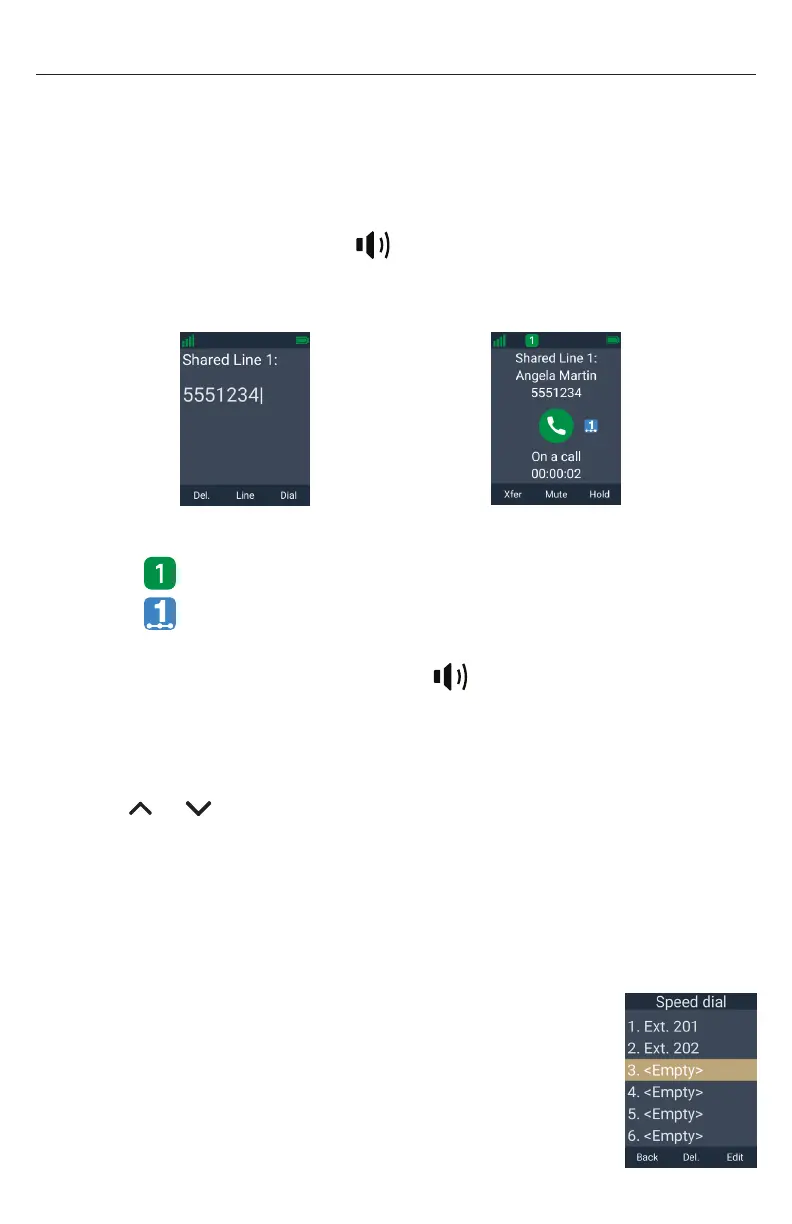
1� Use the keypad to enter the desired number�
• Press Del. if you enter an incorrect digit�
2� Call the number by pressing Dial,
Taihoon Kim | 24. Jan. 2019 | Revision 1.0AW | M10-Handset (US version)
illustration scale 100%
Silkscreen on the Rear
Pantone 8001C
Silkscreen on the Rear
Pantone Cool Gray 3C
Silkscreen on the Rear
Pantone Cool Gray 3C
Silkscreen on the Top
Pantone 200C
Silkscreen on the Rear
Transluscent
Pantone Cool Gray 3C
Taihoon Kim | 24. Jan. 2019 | Revision 1.0AW | M10-Handset (US version)
illustration scale 100%
Silkscreen on the Rear
Pantone 8001C
Silkscreen on the Rear
Pantone Cool Gray 3C
Silkscreen on the Rear
Pantone Cool Gray 3C
Silkscreen on the Top
Pantone 200C
Silkscreen on the Rear
Transluscent
Pantone Cool Gray 3C
or an idle PFK (assigned as a shared line
key)�
When the call is answered, the active call screen appears�
â
Dial
NOTE: The call screen shows the following icons:
• icon indicates the call occupies PFK 1�
• icon indicates shared call index number 1 is assigned to this shared
call� This icon is not shown for private calls�
You can also live dial a number by pressing
Taihoon Kim | 24. Jan. 2019 | Revision 1.0AW | M10-Handset (US version)
illustration scale 100%
Silkscreen on the Rear
Pantone 8001C
Silkscreen on the Rear
Pantone Cool Gray 3C
Silkscreen on the Rear
Pantone Cool Gray 3C
Silkscreen on the Top
Pantone 200C
Silkscreen on the Rear
Transluscent
Pantone Cool Gray 3C
Taihoon Kim | 24. Jan. 2019 | Revision 1.0AW | M10-Handset (US version)
illustration scale 100%
Silkscreen on the Rear
Pantone 8001C
Silkscreen on the Rear
Pantone Cool Gray 3C
Silkscreen on the Rear
Pantone Cool Gray 3C
Silkscreen on the Top
Pantone 200C
Silkscreen on the Rear
Transluscent
Pantone Cool Gray 3C
or an idle PFK (assigned as a
shared line key) to go off hook before entering a phone number on the keypad�
If you wish to choose a dialing line (account) for the outside call:
1� Press Line�
2� Press or to select the dialing line (account)�
3� Press Enter�
4� Use the keypad to enter the desired number, and then press Dial�
To make an outside call using speed dial:
• Press and hold the keypad number key (0-9) that matches the speed dial number�
NOTE: If the Speed Dial screen appears instead, it means the speed dial number
has not been programmed� See “Setting Speed Dial entries” on
page 65�



 To Next Page