55
Using the Call History
The Call History contains lists of your missed calls, received calls, and
dialed calls� You can dial the number of a call saved in the list, or save
the number to the Local directory�
To view the Call History:
1� Press when the phone is displaying the idle screen
-OR-
Press the MENU/Confirm key� With (Call History)
highlighted, press OK�
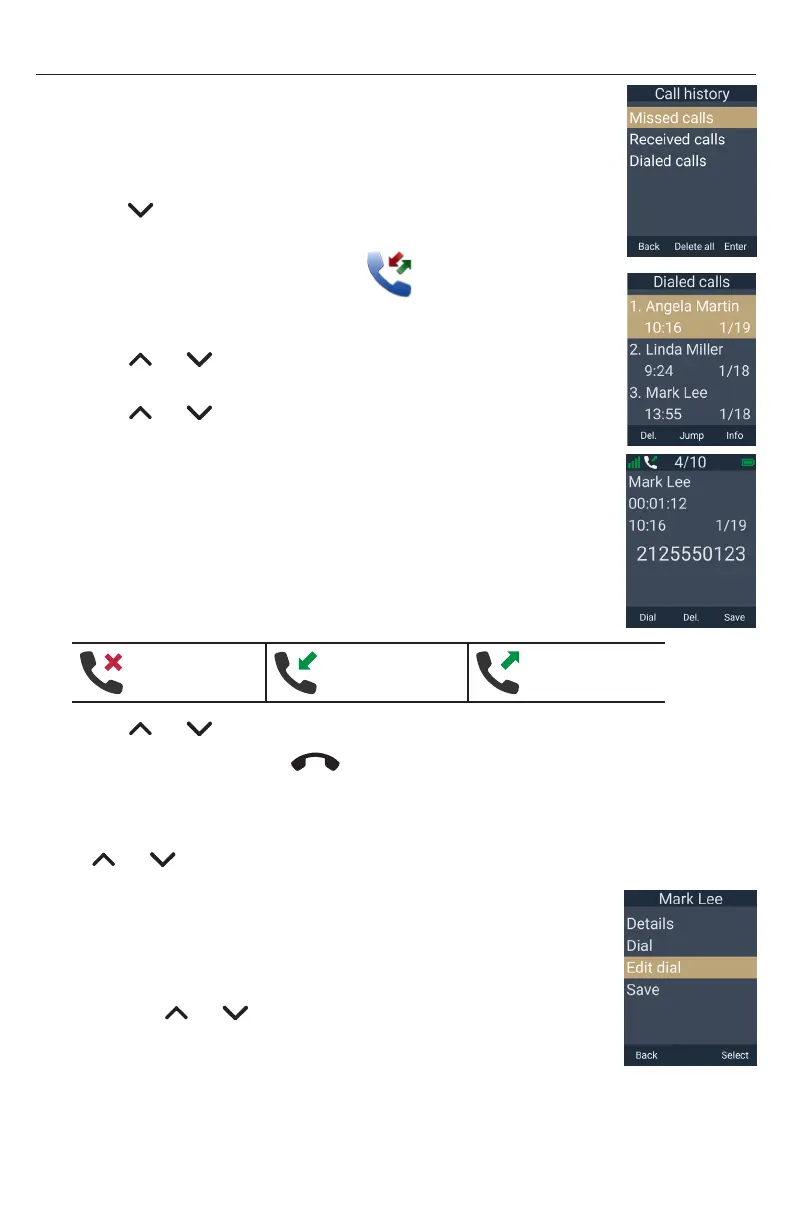
The Call History menu appears�
2� Press or to select Missed calls, Received calls or
Dialed calls, and then press Enter�
3� Press or to scroll through the list of calls� To scroll a
page at a time, press Jump�
The list of calls shows an index number of the call, caller’s name/
number, time and date�
4� Press Info to display call details�
The call details screen shows the caller’s name, number, call
duration, time, and date� The top of the screen shows the index
number of the call, number of calls in the list, and an icon
indicating the type of call�
Missed call Received call Dialed call
5� Press or to scroll through calls while displaying call details�
6� To exit Call History, press
Taihoon Kim | 24. Jan. 2019 | Revision 1.0AW | M10-Handset (US version)
illustration scale 100%
Silkscreen on the Rear
Pantone 8001C
Silkscreen on the Rear
Pantone Cool Gray 3C
Silkscreen on the Rear
Pantone Cool Gray 3C
Silkscreen on the Top
Pantone 200C
Silkscreen on the Rear
Transluscent
Pantone Cool Gray 3C
Taihoon Kim | 24. Jan. 2019 | Revision 1.0AW | M10-Handset (US version)
illustration scale 100%
Silkscreen on the Rear
Pantone 8001C
Silkscreen on the Rear
Pantone Cool Gray 3C
Silkscreen on the Rear
Pantone Cool Gray 3C
Silkscreen on the Top
Pantone 200C
Silkscreen on the Rear
Transluscent
Pantone Cool Gray 3C
�
To call a number in the list:
When displaying the list of Missed calls, Received calls or Dialed calls,
press or to select a call� You can dial the number in the following ways�
Dial the phone number of the call:
• Press Info, and then press Dial�
Edit the phone number before dialing:
1� Press the MENU/Confirm key�
2� Press or to select Edit dial, and then press Select�
3� Edit the number as required, and then press Dial�



 To Next Page