5. Verifythattheinverterisconfiguredtothepropercountry:PresstheLCDlightbuttonuntilreaching
theIDstatusscreen:
I D : # # # # # # # # # #
D S P 1 / 2 : 1 . 0 2 1 0 / 1 . 0 0 3 4
C P U : 0 0 0 3 . 1 9 x x
C o u n t r y : U S A 1
6.
Ifrequired,performthefollowingadditionalstepsbeforeclosingtheinvertercover:
l CountrysettingsorinverterconfigurationusingtheinternalLCDuserbuttons–referto
CountryandGridonpage60.
l Communicationoptionsconnection–refertoSettingUpCommunicationtotheMonitoring
Platformonpage72.
l StorEdgeapplicationconfiguration-refertoSystemConfigurationonpage81.
7.
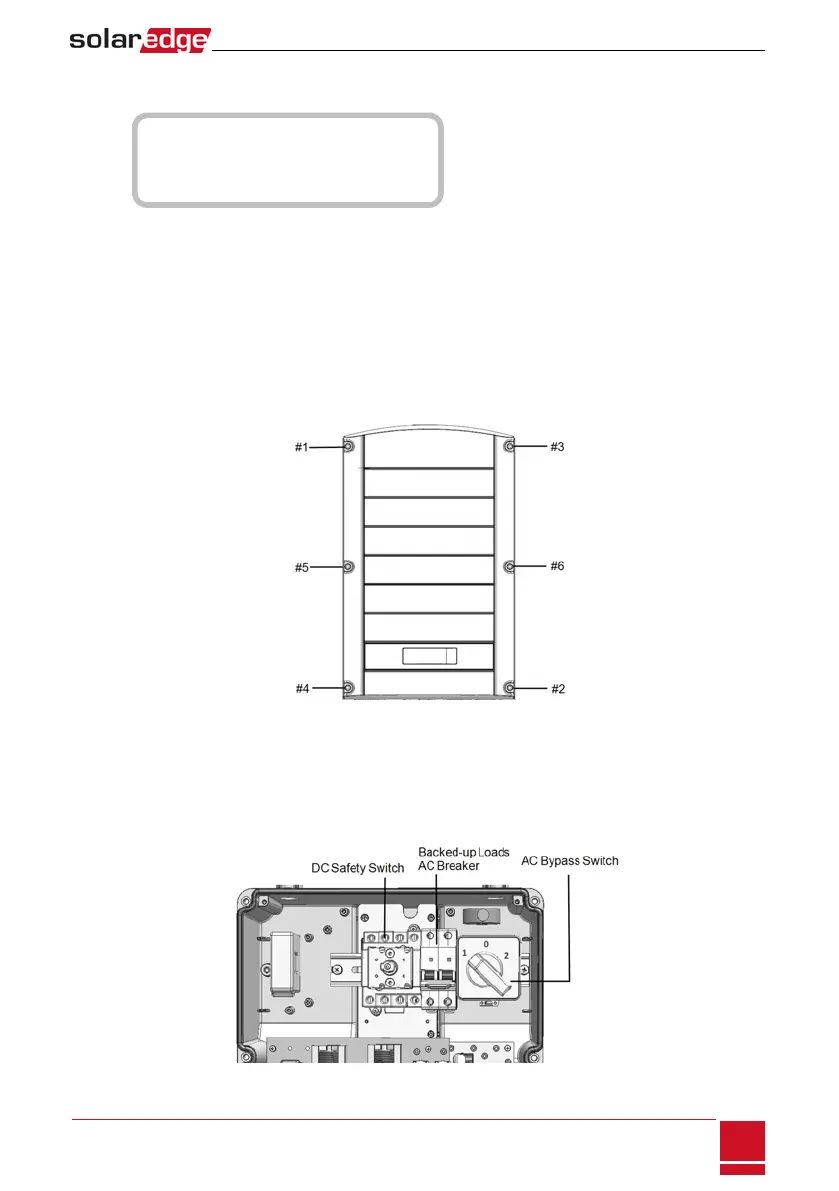
Closetheinvertercoverbytighteningthescrewswithatorqueof9.0N*m/6.6lb*ft.Forproper
sealing,firsttightenthecornerscrewsandthenthetwocentralscrews.Thefollowingfigure
illustratesrecommendedorder:
Figure 29: Tightening order of the screws
8. ClosetheConnectionUnitinternalcover:Attachthecoverandsecureitbytighteningthefour
screwswithatorqueof1.2N*m/0.9ft.*lb.
9. MakesuretheACBypassswitchintheConnectionUnitisswitchedtotheleft(position1).
10.
Makesurethebacked-uploadsACbreakerintheConnectionUnitisUP.
Figure 30: Connection Unit
Chapter 7: Commissioning the Installation
SolarEdge-StorEdge Installation Guide MAN-01-00262-1.3
47



 To Next Page