3.3 CHECKING
THE FUNCTION STORE
Before
trying
to enter a function check,
that
*
a function
slot is vacant (FUNCTION
status) and
•
sufficient memory
space is available
to hold
the function (PROGRAM
status).
If the instrument
has been initialized
since functions
were last entered
then user-
defined scaling
functions may be
entered under
any number from 1 through
9,
as
described in
Section 3.5.
If the instrument
has not been initialized
and
you are uncertain .of the
contents of
the function
store, then the FUNCTION
pages of
the STATUS menu will show
you.
When all function
slots are in
use, you may clear
unwanted functions selectively,
as
described in
Section 3.4.
Stored functions
and learnt programs
use the same area
of memory and the
availablity
of
this, for battery-sustained
and non-volatile
memory,
appears under
PROGRAM on the first
STATUS
page.
A
function
uses two memory blocks.
3.3.1
Accessing the
Function Status Page
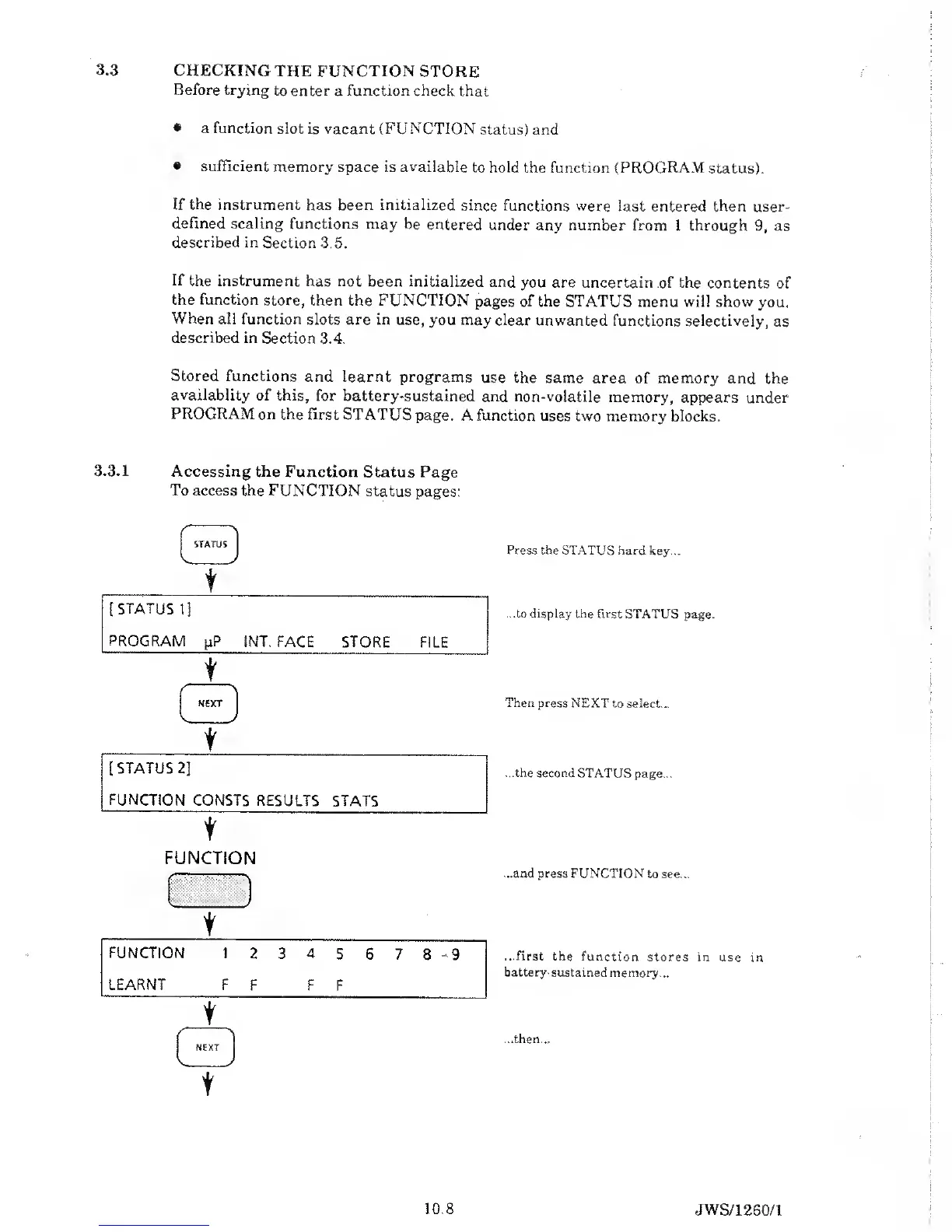
To access the FUNCTION
status
pages:
t
Press the
STATUS hard key...
...to display the first STATUS
page.
Then press
NEXT to select...
...the second
STATUS page...
FUNCTION
:::L/
...and press FUNCTION
to see...
t
FUNCTION 1
2 3 4
5 6 7
8
-
9 ...first
the function
stores in use
in
LEARNT
battery-sustained
memory...
F F F
F
t
...then...
t
10.8
JWS/1260/1



 To Next Page