2 CHECKING THE PROGRAM
MEMORY
SPACE
Before
trying
to create a
learnt
program
check that
•
a
vacant
program
slot
is available
and
•
sufficient memory
space is available to hold all the
instructions.
If the instrument has been initialized since programs were last entered then the
learnt program memory will be completely clear and
a
program may be created
under any number from 1 through
9,
as
described in Section 4.
If the instrument has not been initialized
and
you are uncertain about the contents
of the program memory, then
use the
STATUS menu
to
find
out
what
space
is
available
:
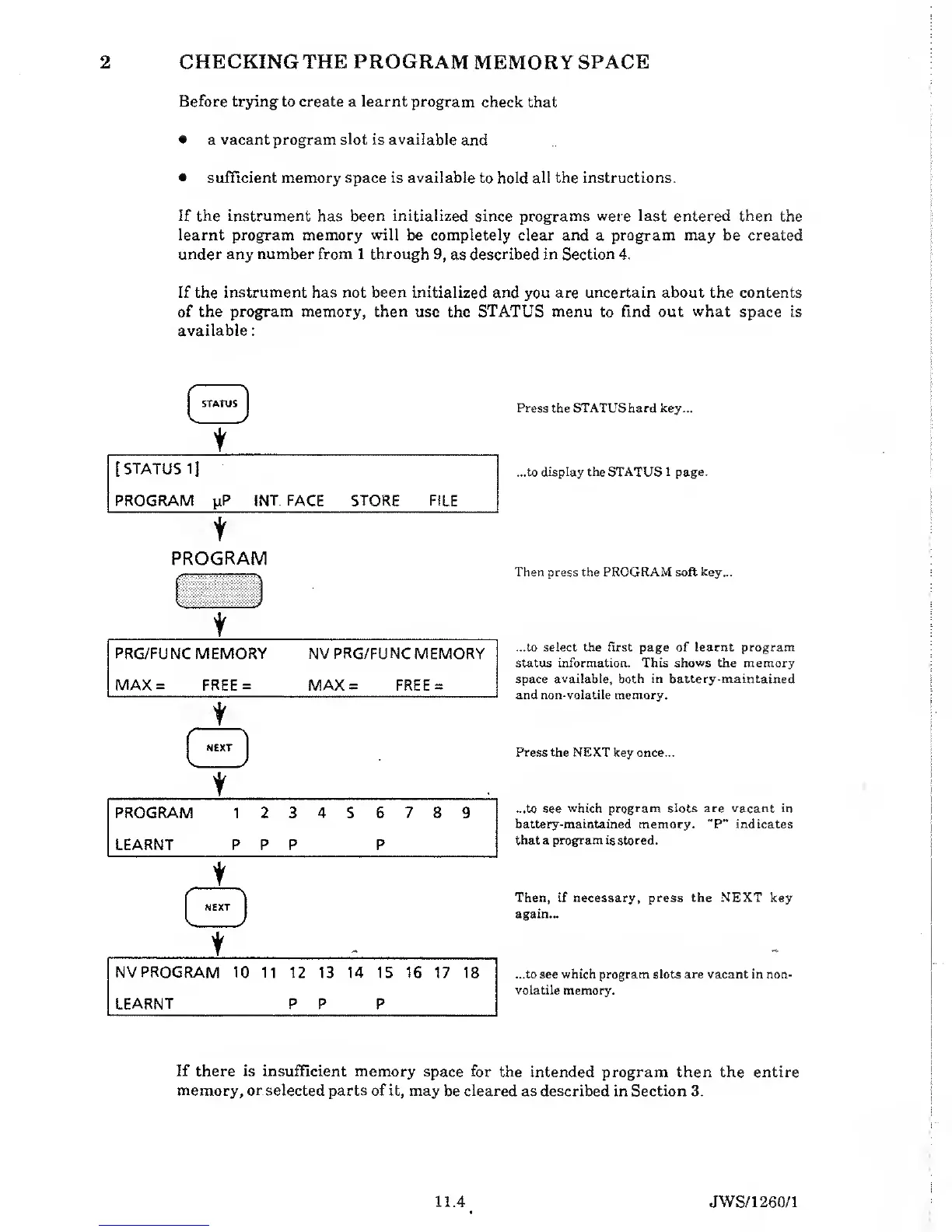
Press
the
STATUS
hard
key...
...to
display the STATUS
1
page.
PROGRAM
Then
press the
PROGRAM
soft
key...
...to select the first page
of learnt program
status
information. This shows the
memory
space available, both in battery-maintained
and non-volatile memory.
Press
the NEXT
key once...
...to see
which program slots are vacant in
battery-maintained
memory. "P" indicates
that
a
program is stored.
Then,
if necessary, press
the
NEXT key
again...
...to see which program slots are vacant in non-
volatile
memory.
If
there is insufficient memory space for
the intended program then the entire
memory,
or
selected parts of it, may
be
cleared
as described in Section 3.
11.4 JWS/1260/1


 To Next Page