3
CLEARING A LEARNT
PROGRAM
If
none of the
learnt programs
presently stored in the
instrument are wanted
then
the
whole program
memory
may be cleared
by
initializing
the instrument.
Remember, however,
that this will
also erase the history file and
other stored
data
and set the control settings
to their default
states. The battery-maintained
program
memory (programs/functions
1 through 9
and stored set-ups/results 1
through
9)
is
always cleared on initialization,
but the non-volatile
memory
(programs/functions
10 through 18 and stored
set-ups 10 through
16) is cleared only if the
instrument
is
operating in the supervisor
mode, i.e. when
the PROGRAM keyswitch
on the
instrument rear panel is
set to SUPERVISOR and BREAK
has been
commanded.
If
you wish to keep the contents
of the non-volatile
memory, always
set the
PROGRAM
keyswitch to NORMAL
before initializing
the instrument-
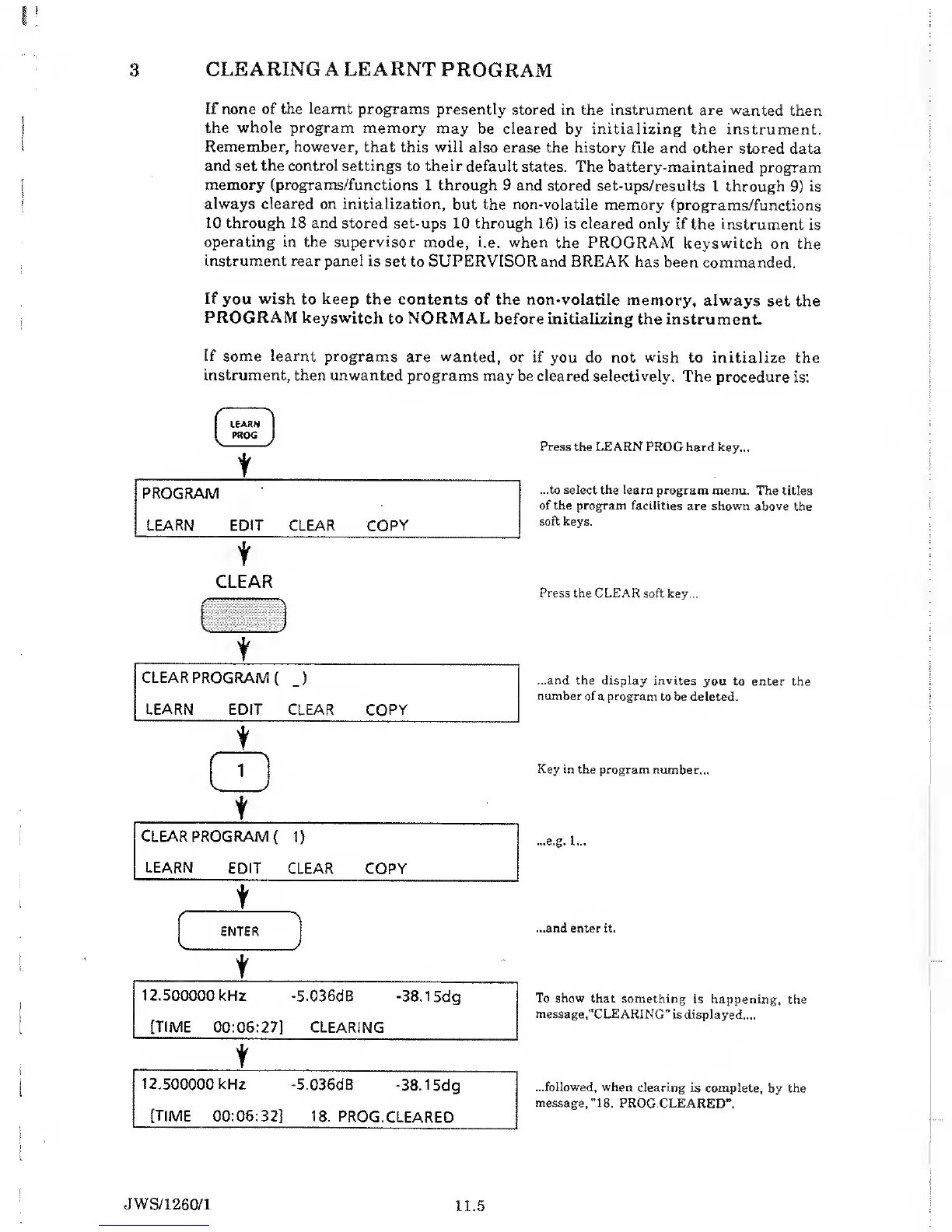
If some learnt
programs are wanted,
or if
you do not
wish
to initialize
the
instrument,
then unwanted programs
may be cleared selectively.
The
procedure is:
LEARN
PROG
V- >
t
PROGRAM
LEARN EDIT
CLEAR COPY
t
CLEAR
Press
the
LEARN
PROG hard key...
...to select the learn
program menu.
The titles
of the program facilities
are shown above
the
soft keys.
Press
the CLEAR soft key...
...and the display invites
you to enter
the
number
of a program
to be deleted.
Key in the program number...
...e.g. 1...
...and enter it.
To
show that something
is happening,
the
message,
"CLEARING” is
displayed....
...followed, when
clearing is
complete,
by
the
message,
"18.
PROG.CLEARED”.
JWS/1260/1
11.5


 To Next Page