4
CREATING A
LEARNT
PROGRAM
To create a
learnt
program, simply
set the
instrument into
the learn
program mode
and then
enter commands in the order in
which they are to
be executed.
Remember
that a
recall set-up instruction can set any
number of
control
parameters in one go.
This is
useful in tests that require several
parameters (e.g.
the
SWEEP settings) to
be
altered
part of the
way
through.
4.1
ENTERING
THE LEARN MODE
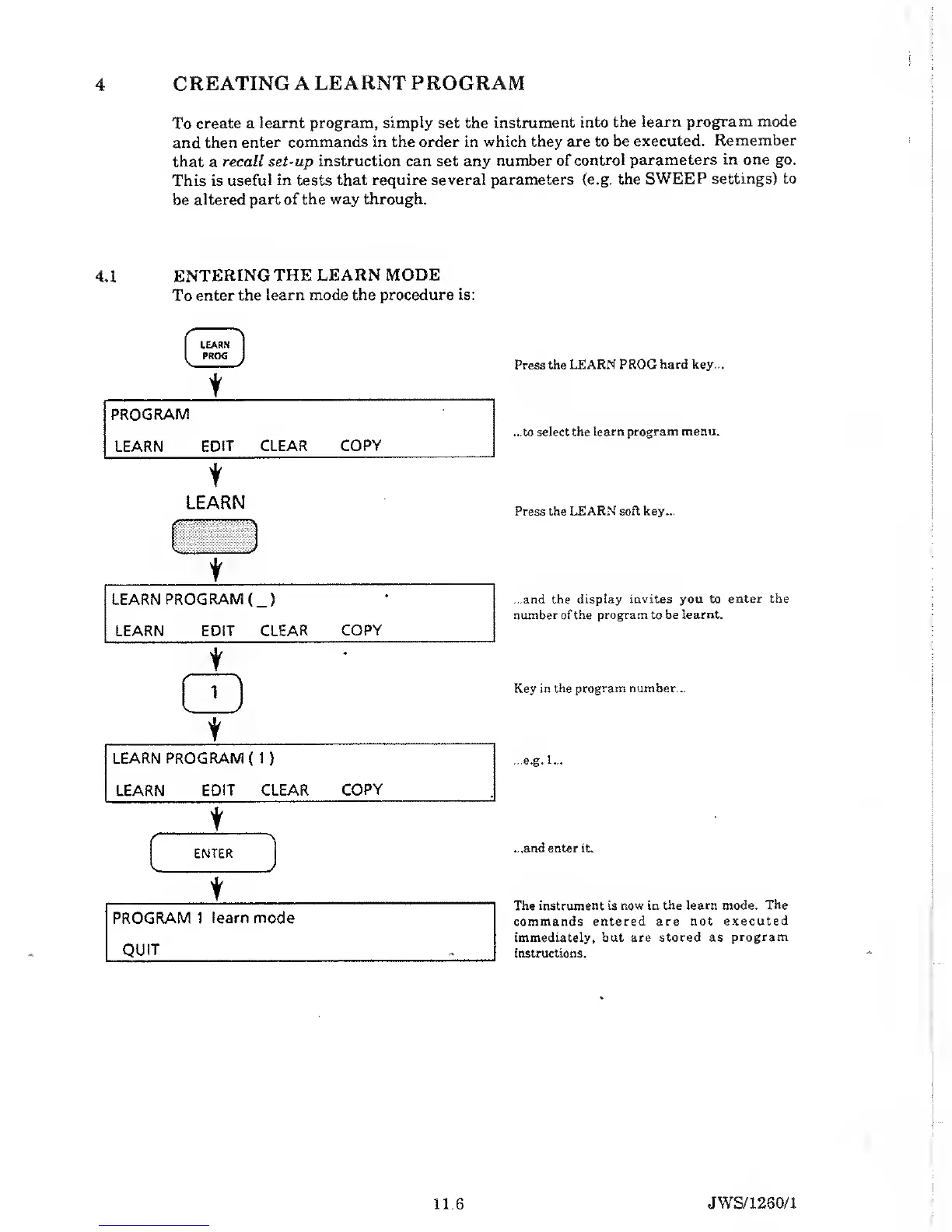
To
enter the learn
mode the procedure is:
LEARN
PROG
J
t
PROGRAM
LEARN
EDIT CLEAR
COPY
t
LEARN
Press the
LEARN PROG hard key...
...to select the
learn program menu.
Press the
LEARN soft key...
...and the
display invites you to enter
the
number of the program to be
learnt.
Key
in the program number...
...e.g.
1...
...and enter
it.
The instrument is
now in the learn mode. The
commands entered
are not executed
immediately, but are stored as
program
instructions.
11.6
JWS/1 260/1


 To Next Page