EasyManua.ls Logo

Solartron 1260 - Page 207

Solartron 1260
295 pages
Print Icon
To Next Page IconTo Next Page
To Previous Page IconTo Previous Page
Loading...
4.2
LEARNT PROGRAM
EXAMPLE
In the
following
example the
instrument
is
programmed to subject
the item
under
test to a
series of
frequency
sweeps
of increasing amplitude. The aim
is
to test the
item for linearity.
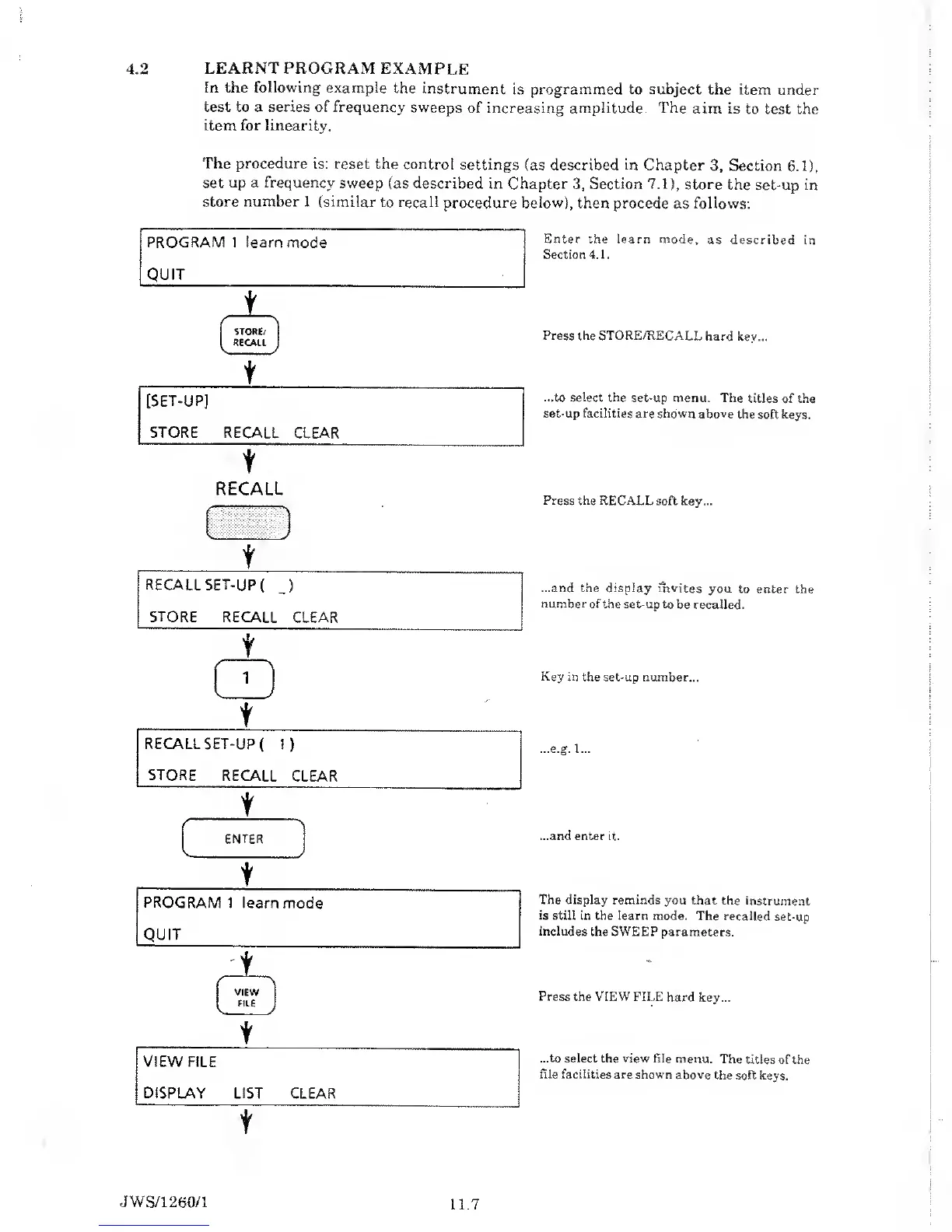
The procedure is: reset
the control
settings
(as
described in
Chapter
3,
Section
6.1),
set up a frequency
sweep
(as
described
in Chapter
3,
Section
7.1),
store the
set-up in
store number 1
(similar to recall
procedure below), then
procede as follows:
PROGRAM 1
learn
mode
QUIT
t
s
\
STORE/
RECALL
V y
t
[SET-UP]
STORE RECALL CLEAR
t
Enter the learn mode,
as described
in
Section 4.1.
Press the STORE/RECALL
hard
key...
...to
select the
set-up menu. The
titles of the
set-up facilities are shown above
the
soft keys.
RECALL
(
^ J
f
RECALL
SET-UP
(
_)
STORE
RECALL
CLEAR
t
v
t
t
VIEW FILE
DISPLAY LIST
CLEAR
t
Press the
RECALL soft key...
...and the display invites
you
to
enter
the
number of
the set-up to be recalled.
Key in the
set-up number...
...e.g. 1...
...and
enter it.
The display reminds
you that the
instrument
is still in the learn
mode. The
recalled set-up
includes
the SWEEP parameters.
Press
the VIEW FILE
hard key...
...to select the view file
menu. The
titles of the
file facilities
are
shown
above
the soft
keys.
JWS/1260/1
11.7

Table of Contents

Related product manuals