EasyManua.ls Logo

Solartron 1260 - Page 208

Solartron 1260
295 pages
Print Icon
To Next Page IconTo Next Page
To Previous Page IconTo Previous Page
Loading...
11 .
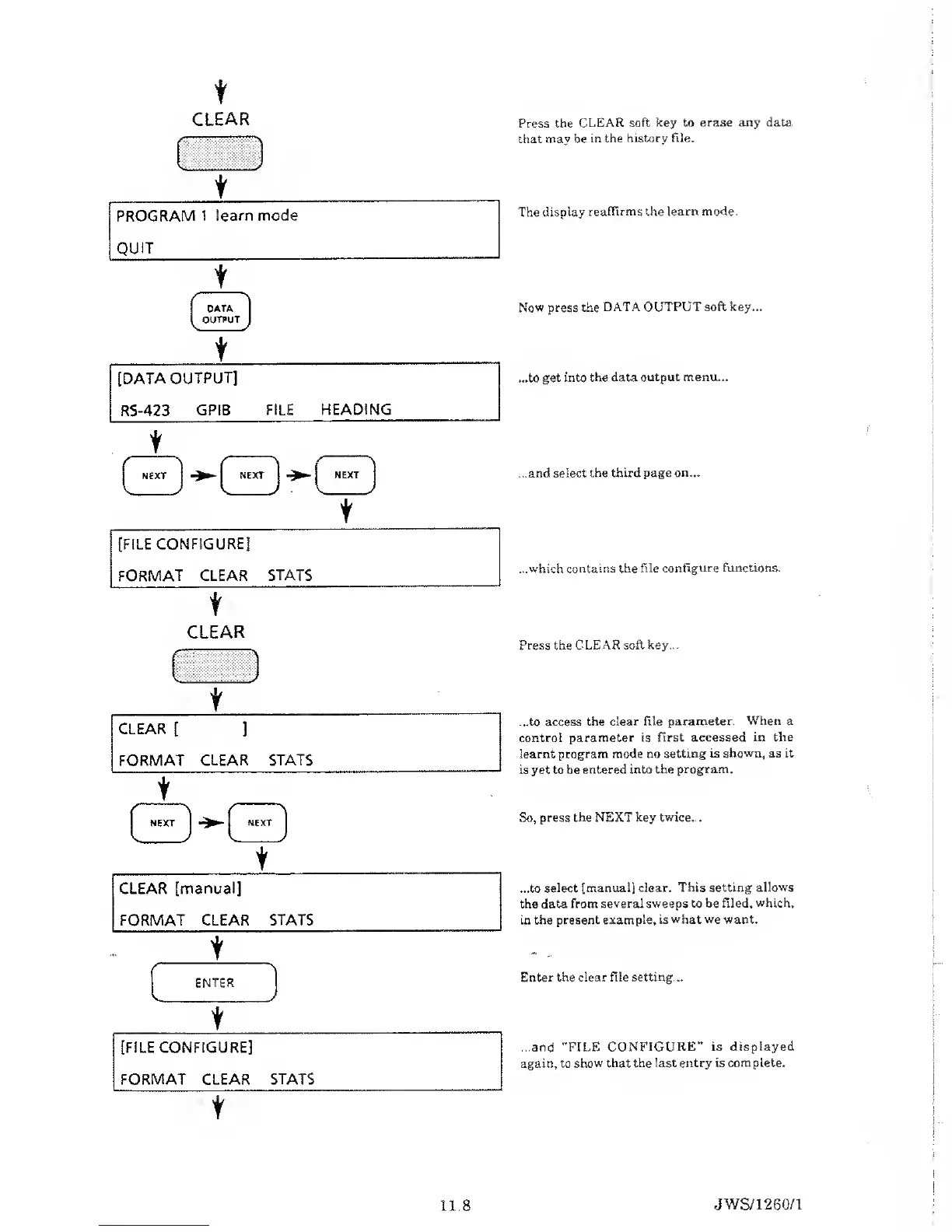
Press the
CLEAR
soft key to erase
any
data
that may be
in the
history file.
The display
reaffirms the
learn mode
.
Now press the DATA
OUTPUT soft key...
...to
get into the data
output menu...
...and
select the third page
on...
...which contains the
file configure functions.
Press the CLEAR
soft key...
...to access
the clear file
parameter. When a
control
parameter is
first accessed in the
learnt program mode
no setting is
shown,
as it
is yet to be
entered
into the program.
So, press the
NEXT key twice...
...to
select [manual] clear.
This setting allows
the data
from several
sweeps
to be
filed, which,
in the present
example, is what we want.
Enter the clear file setting...
...and "FILE
CONFIGURE” is displayed
again, to
show that the last entry is
complete.
JWS/1260/1

Table of Contents

Related product manuals