EasyManua.ls Logo

Solartron 1260 - Executing a Learnt Program

Solartron 1260
295 pages
Print Icon
To Next Page IconTo Next Page
To Previous Page IconTo Previous Page
Loading...
5
EXECUTING
A LEARNT PROGRAM
A
program
is started
simply by
entering the program number
from
EXECUTE
PROGRAM.
The
procedure is:
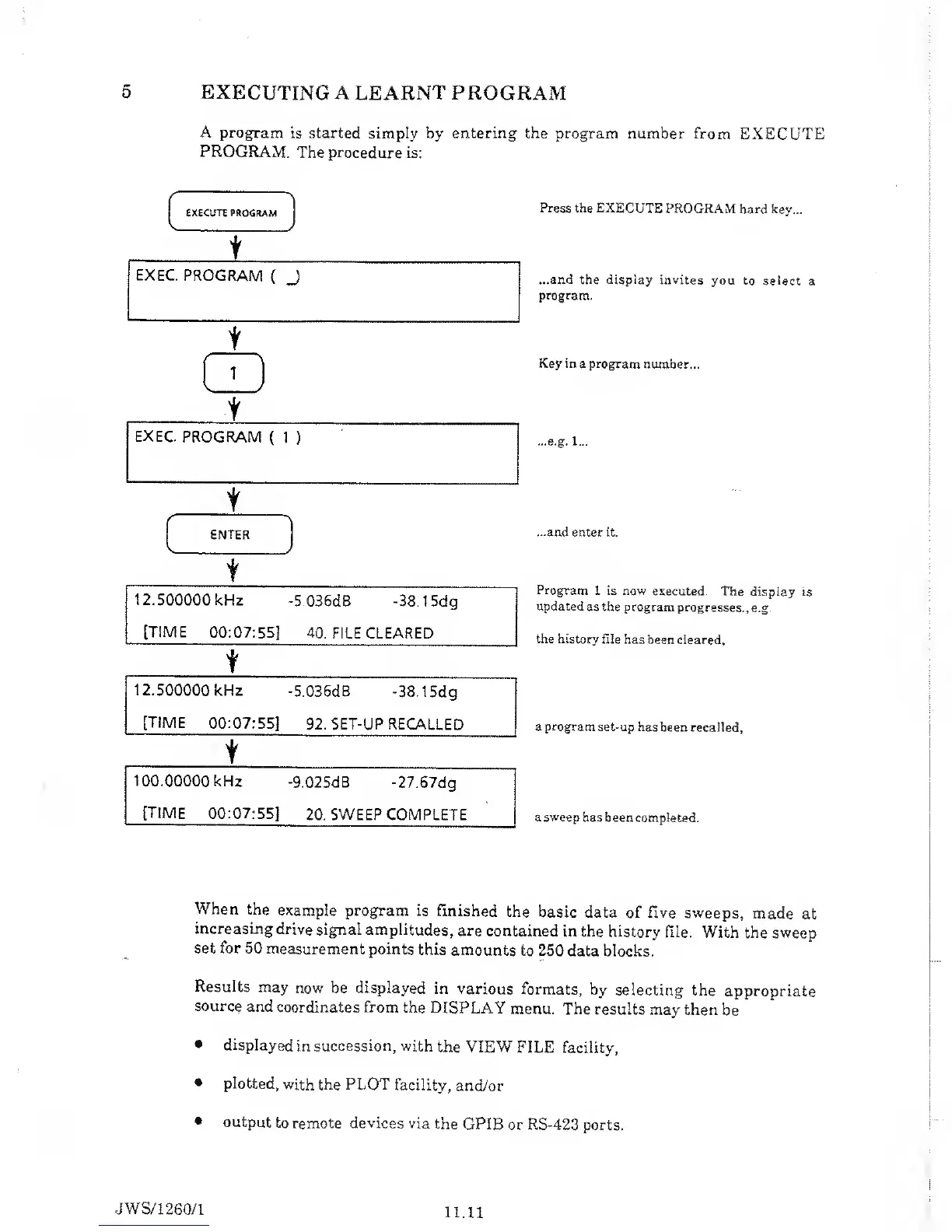
Press the EXECUTE
PROGRAM
hard key...
...and the display invites
you to
select a
program.
Key in
a
program
number...
...e.g. 1...
...and enter it.
Program 1
is
now
executed.
The
display is
updated as the program
progresses.,
e.g.
the history file
has been cleared.
a program
set-up has
been recalled.
a sweep has
been completed.
When the
example
program is
finished
the
basic data
of five sweeps,
made
at
increasing
drive signal
amplitudes,
are contained
in the
history
file. With
the sweep
set for
50
measurement points
this
amounts to 250
data blocks.
Results may
now be displayed
in
various formats,
by
selecting
the
appropriate
source
and
coordinates from
the
DISPLAY
menu. The
results
may then
be
displayed
in
succession, with
the VIEW
FILE facility,
plotted,
with the PLOT
facility,
and/or
output
to
remote
devices
via
the
GPIB or RS-423 ports.
JWS/1
260/1
11.11

Table of Contents

Related product manuals