EasyManua.ls Logo

Solartron 1260 - Editing a Learnt Program

Solartron 1260
295 pages
Print Icon
To Next Page IconTo Next Page
To Previous Page IconTo Previous Page
Loading...
6
EDITING
A
LEARNT
PROGRAM
EDIT
allows
a learnt
program to
be altered.
Instructions
may be inserted or
deleted.
6.1
ENTERING
THE
EDIT
MODE
To enter
the edit
mode the
procedure
is:
C
'\
LEARN
PROG
t
PROGRAM
LEARN
EDIT
CLEAR
COPY
t
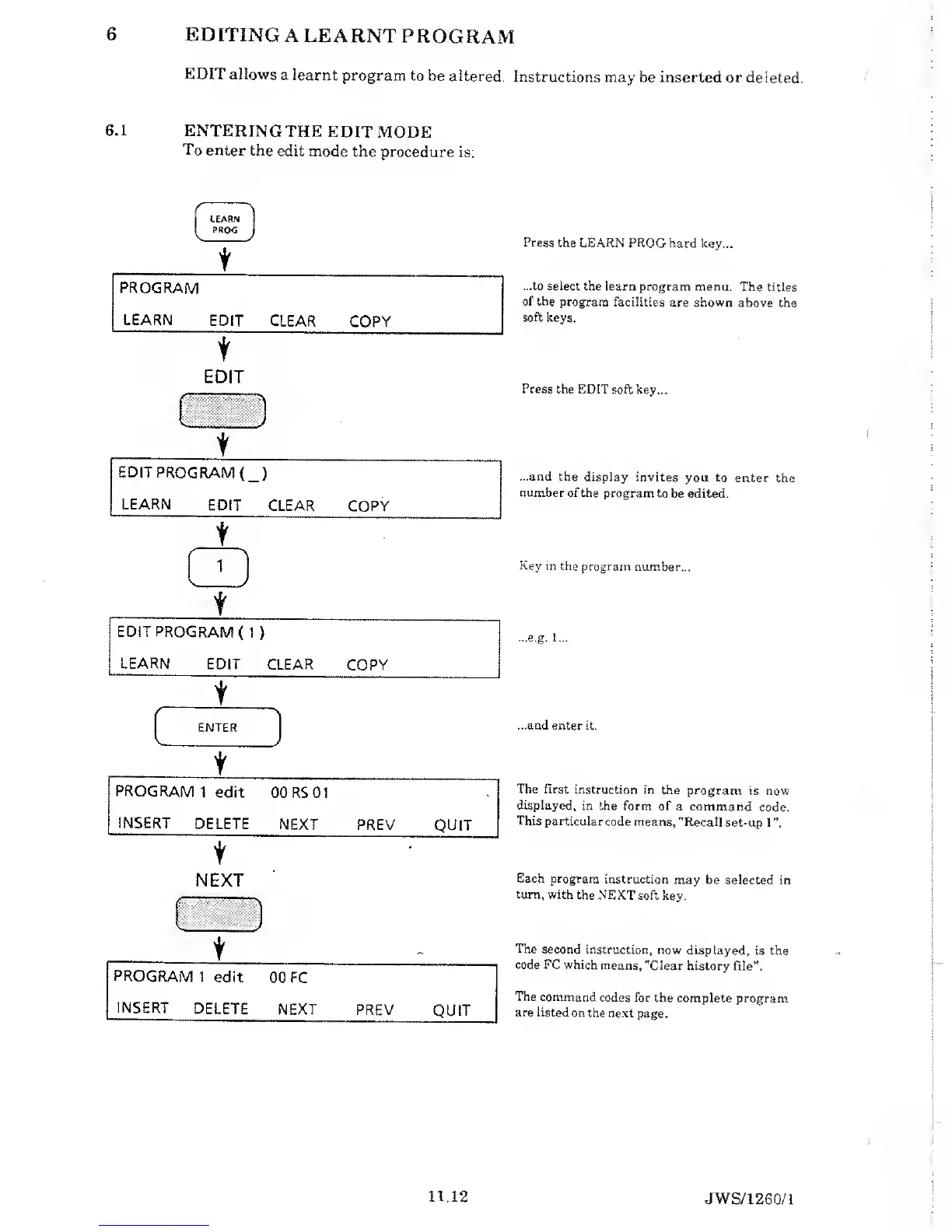
Press
the LEARN PROG
hard key...
...to select
the learn program
menu. The
titles
of the
program facilities
are shown
above the
soft
keys.
EDIT
f
NEXT
Press
the EDIT soft
key...
...and
the display
invites you to
enter
the
number of
the program
to be edited.
Key in
the program
number...
...e.g.
1...
...and enter
it.
The first
instruction in
the program
is now
displayed,
in the form of
a command
code.
This
particular
code means, "Recall
set-up
1”.
Each
program instruction
may
be selected in
turn, with
the NEXT soft
key.
The
second instruction,
now
displayed,
is the
code FC which
means, "Clear
history
file”.
The command
codes for
the complete
program
are listed
on the next
page.
11.12
JWS/1260/1

Table of Contents

Related product manuals