EasyManua.ls Logo

Solartron 1260 - Page 215

Solartron 1260
295 pages
Print Icon
To Next Page IconTo Next Page
To Previous Page IconTo Previous Page
Loading...
I
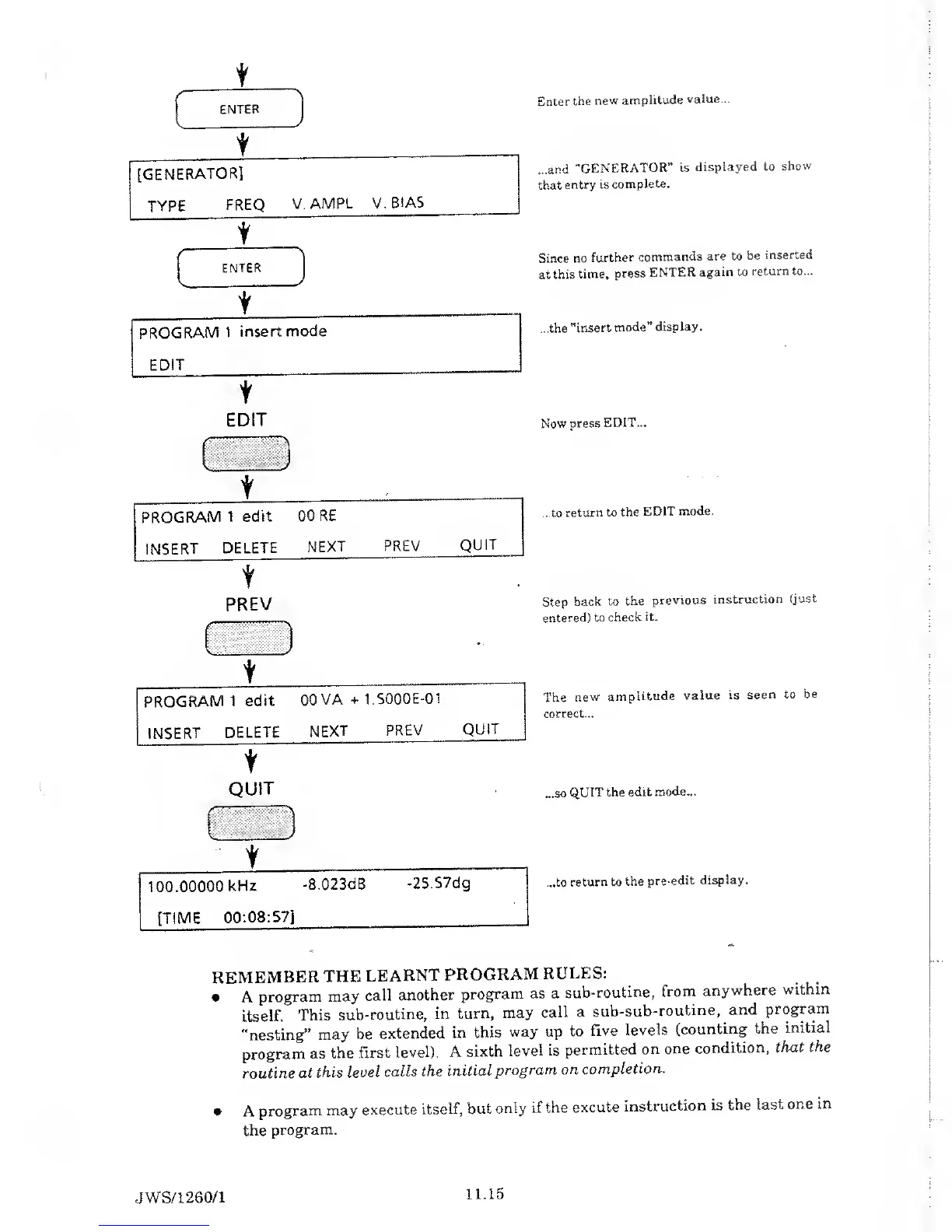
ENTER
[GENERATOR]
TYPE
FREQ
V.AMPL V.
BIAS
t
ENTER
n
L ._
t
PROGRAM
1
insert
mode
EDIT
t
Enter
the
new
amplitude
value...
...and
"GENERATOR”
is
displayed to
show
that
entry is
complete.
Since
no
further
commands
are to be
inserted
at
this
time,
press
ENTER
again
to
return to...
...the
"insert
mode”
display.
EDIT
Now press
EDIT...
t
PROGRAM
1
edit
INSERT
DELETE
00 RE
NEXT
PREV
QUIT
...to
return
to the
EDIT
mode.
t
PREV
-
Step
back to
the
previous
instruction
(just
entered) to
check
it.
..
PROGRAM
1
edit
INSERT
DELETE
00
VA
+ 1.5000E-01
NEXT
PREV
QUIT
The
new
amplitude
value is
seen to
be
correct...
t
QUIT
...so
QUIT the
edit
mode...
t
100.00000
kHz
-8.023dB
-25.57dg
...to
return to
the
pre-edit
display.
[TIME
00:08:57]
REMEMBER
THE
LEARNT
PROGRAM
RULES:
A
program
may
call
another
program
as a
sub-routine,
from
anywhere
within
itself.
This
sub-routine,
in
turn,
may
call a
sub-sub-routine,
and
program
"nesting”
may
be
extended
in
this
way up
to
five
levels
(counting
the
initial
program
as
the
first level).
A
sixth
level
is
permitted
on
one
condition,
that
the
routine
at
this Level
calls
the
initial
program on
completion.
A
program
may
execute
itself,
but
only
if the
excute
instruction
is
the last
one in
the
program.
JWS/1
260/1
11.15

Table of Contents

Related product manuals