7
COPYING A
LEARNT
PROGRAM
COPY allows
a
complete learnt
program
to be copied,
under
another program
number. This facility is used for
transferring learnt programs to
non-volatile
memory
(program numbers 10 through
18). It may also be used,
with
EDIT, to
derive one
learnt program from another.
Note that the instrument must be operating
in the
supervisor
mode
for programs
to
be copied
to program numbers 10 to 18. To protect
these programs
it
is
advisable
to
return
the instrument to the normal mode immediately after
copy complete,
otherwise
the programs may be corrupted
by
an inadvertant initialize.
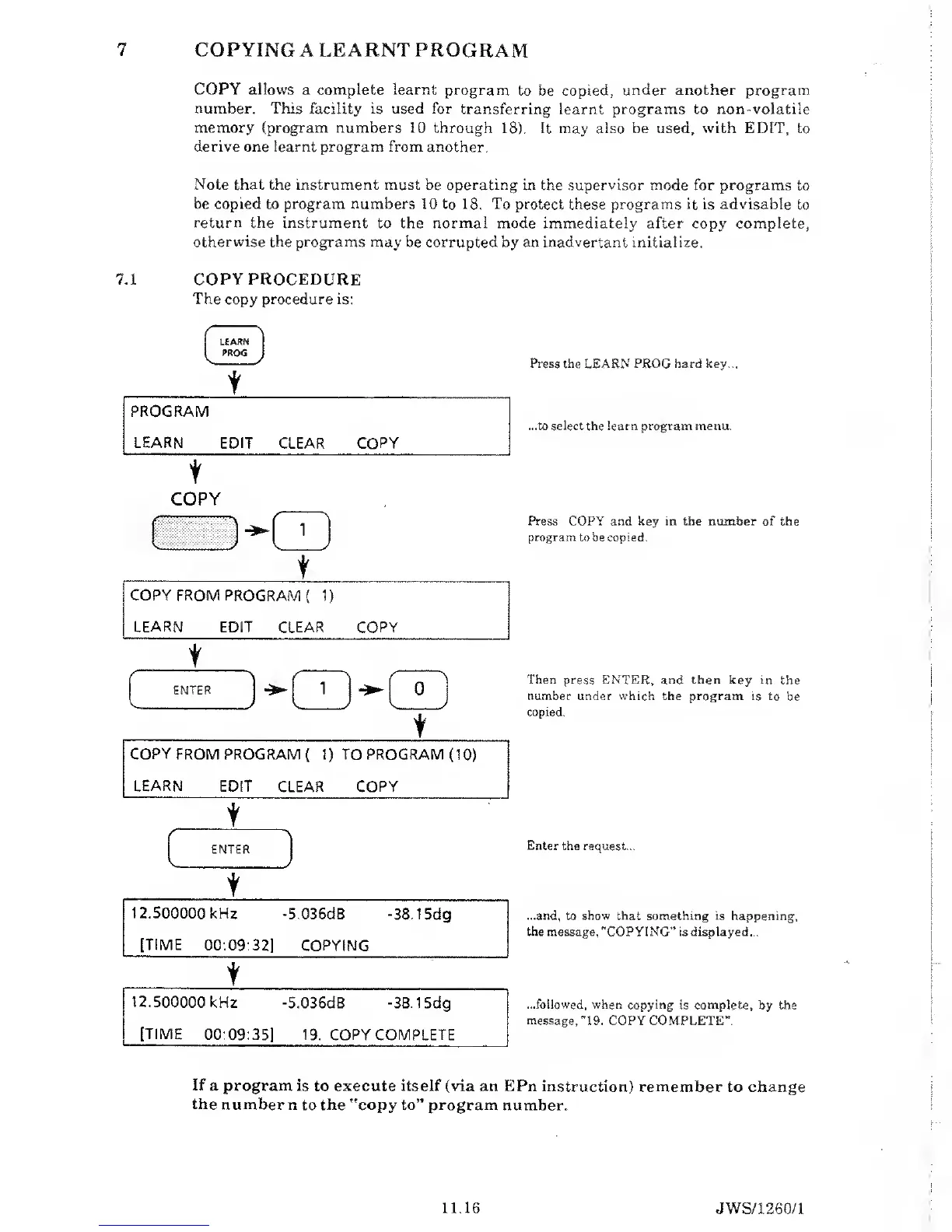
7.1 COPY
PROCEDURE
The
copy procedure is:
(
LEARN
PROG
1
t
PROGRAM
LEARN EDIT
CLEAR COPY
t
COPY
Press the
LEARN
PROG hard key...
...to select the learn program menu.
Press
COPY
and
key
in the number
of the
program
to be
copied.
Then press ENTER, and then key in the
number
under
which
the program is to be
copied.
Enter the request...
...and,
to
show
that something
is
happening,
the message, "COPYING" is displayed...
...followed, when copying
is complete, by the
message,
"19.
COPY COMPLETE".
If
a program is
to execute
itself
(via an EPn instruction)
remember to change
the
number n
to
the "copy to” program
number.
11.16
JWS/1260/1


 To Next Page