EasyManua.ls Logo

Solartron 1260 - Page 91

Solartron 1260
295 pages
Print Icon
To Next Page IconTo Next Page
To Previous Page IconTo Previous Page
Loading...
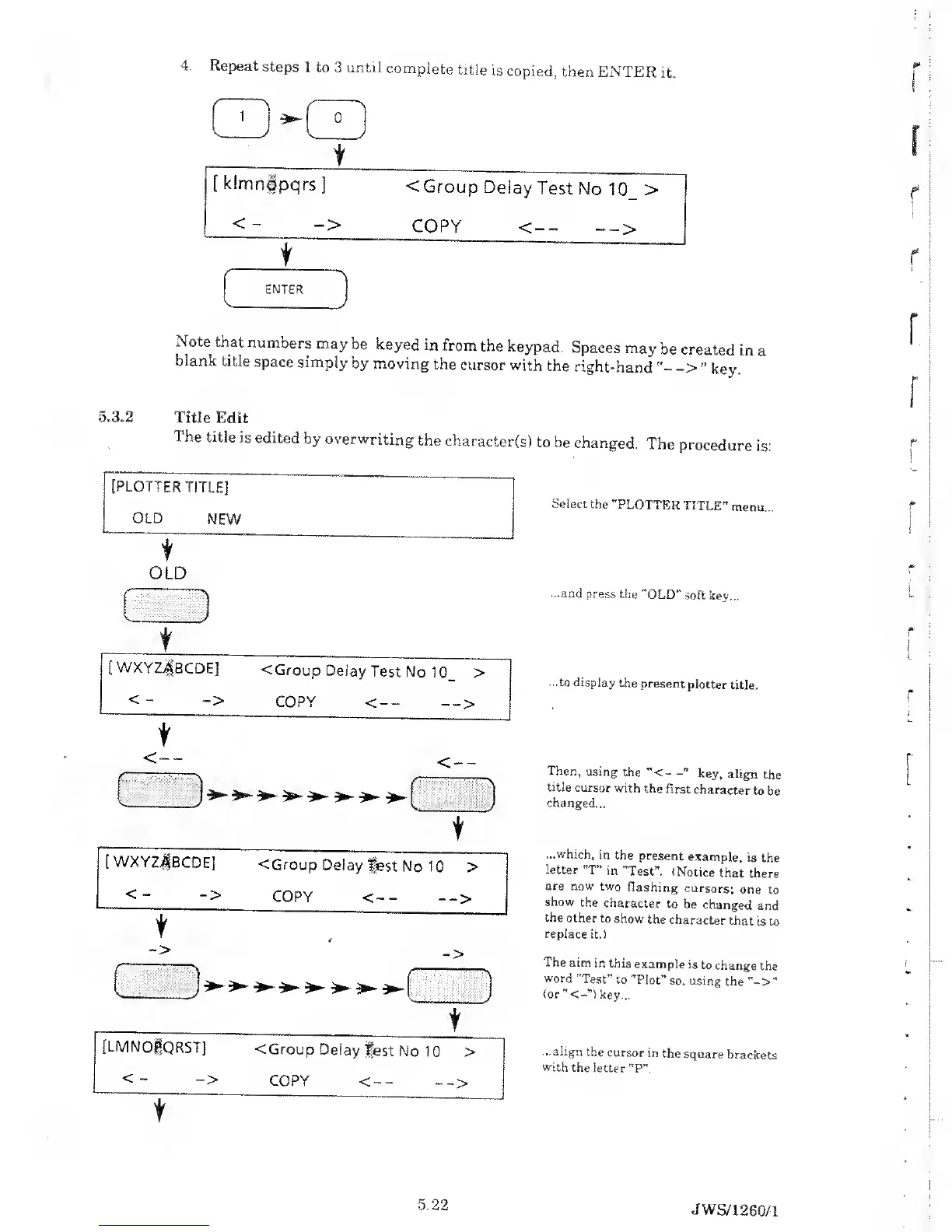
4.
Repeat
steps
1 to
3 until
complete
title
is
copied,
then
ENTER
it,
Note
that
numbers
may
be
keyed in
from
the
keypad.
Spaces
may
be
created
in
a
blank
title
space simply
by moving
the
cursor
with
the
right-hand
key.
5.3.2
Title
Edit
The
title
is edited
by overwriting
the
character(s)
to be
changed.
The
procedure
is:
[PLOTTER
TITLE]
OLD
NEW
t
OLD
^ J
t
[WXYZjfBCDE]
<
Group
Delay
Test
No
10_
>
<
-
->
COPY
<--
-->
[
WXYZjBCDE]
< Group
Delay
fest
No 10
>
<-
->
COPY
<--
-->
[LMNOgQRST]
< Group
Delay
fest
No
1
0
>
<-
->
COPY
<--
-_>
f
Select
the
"PLOTTE
R
TITLE”
menu.
...and
press
the
"OLD" soft
key...
...to display
the present
plotter
title.
Then,
using
the
"<-
key,
align
the
title
cursor
with
the
first
character
to
be
changed...
...which,
in the
present
example,
is
the
letter
"T” in
"Test".
(Notice
that
there
are
now two
flashing
cursors:
one
to
show
the
character
to be
changed
and
the
other to
show
the
character
that is
to
replace it.)
The
aim
in this
example
is to
change
the
word
"Test”
to
"Plot”
so, using
the
(or
key...
...align
the
cursor
in
the
square
brackets
with
the letter
"P”.
5.22
JWS/1
260/1

Table of Contents

Related product manuals