EasyManua.ls Logo

Solartron 1260 - Page 92

Solartron 1260
295 pages
Print Icon
To Next Page IconTo Next Page
To Previous Page IconTo Previous Page
Loading...
COPY
r~i
t
[LMNOtQRST]
<Group Deiay gest
No
10
>
_>
COPY
<-
-->
<
-
1
-> ->
COPY
[
klmnopq
r s
]
<Group
Delay
Ploi|No
10
>
<-
-> COPY
<--
>
COPY
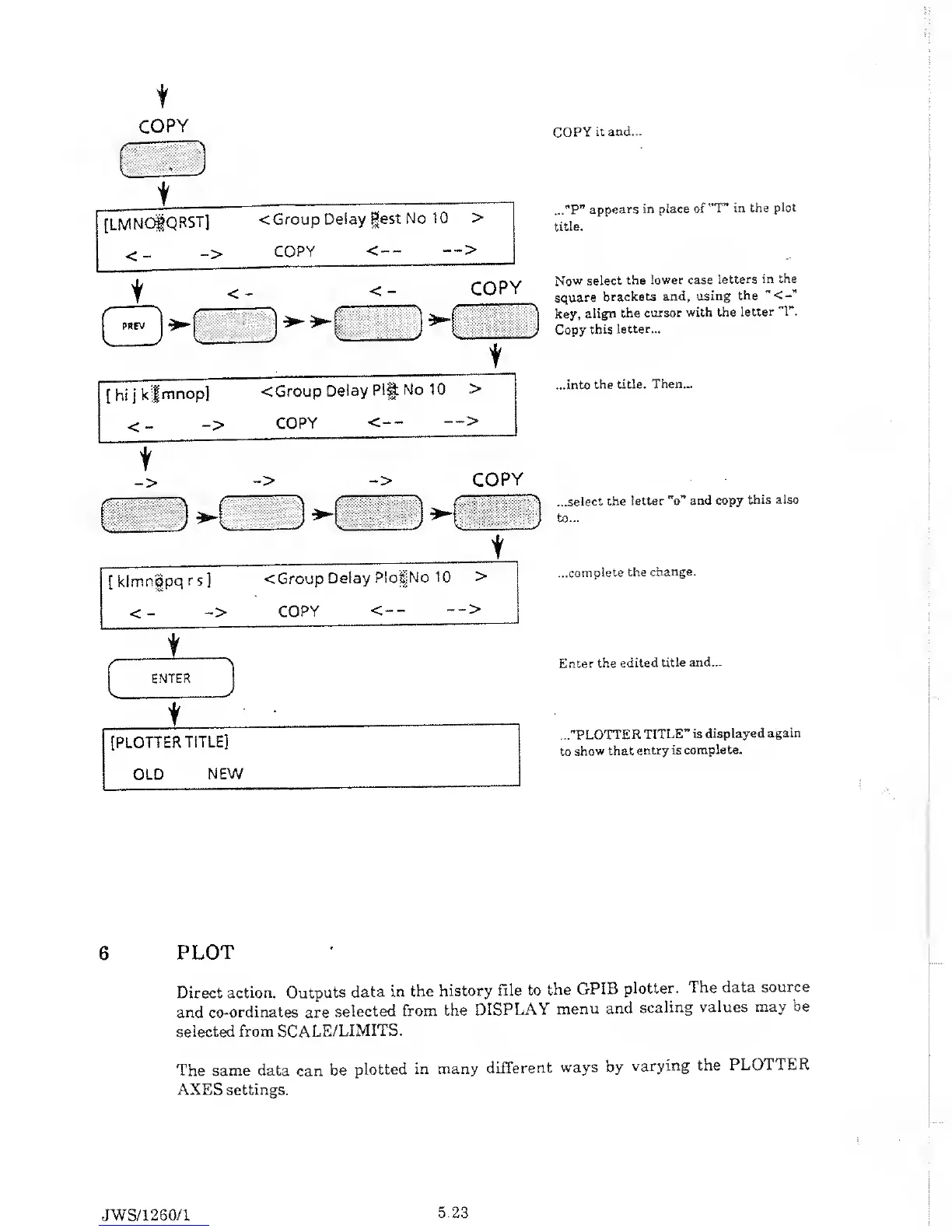
it and...
..."P”
appears
in place
of ~T” in the
plot
title.
Now select
the
lower case
letters
in the
square
brackets
and, using
the
key,
align
the cursor
with
the
letter
"1”.
Copy
this letter...
...into
the
title.
Then...
...select the
letter "o"
and copy
this also
to...
...complete the
change.
Enter
the
edited title
and...
..."PLOTTER
TITLE”
is displayed
again
to
show that
entry
is complete.
6
PLOT
Direct
action.
Outputs
data in
the
history
file to
the
GPIB
plotter.
The data
source
and
co-ordinates
are
selected
from
the
DISPLAY
menu
and
scaling
values
may be
selected from
SCALE/LIMITS.
The same data
can
be
plotted
in many
different
ways by
varying
the
PLOTTER
AXES settings.
JWS/1
260/1
5.23

Table of Contents

Related product manuals