System Overview
2
1.1 LED Status Indicators
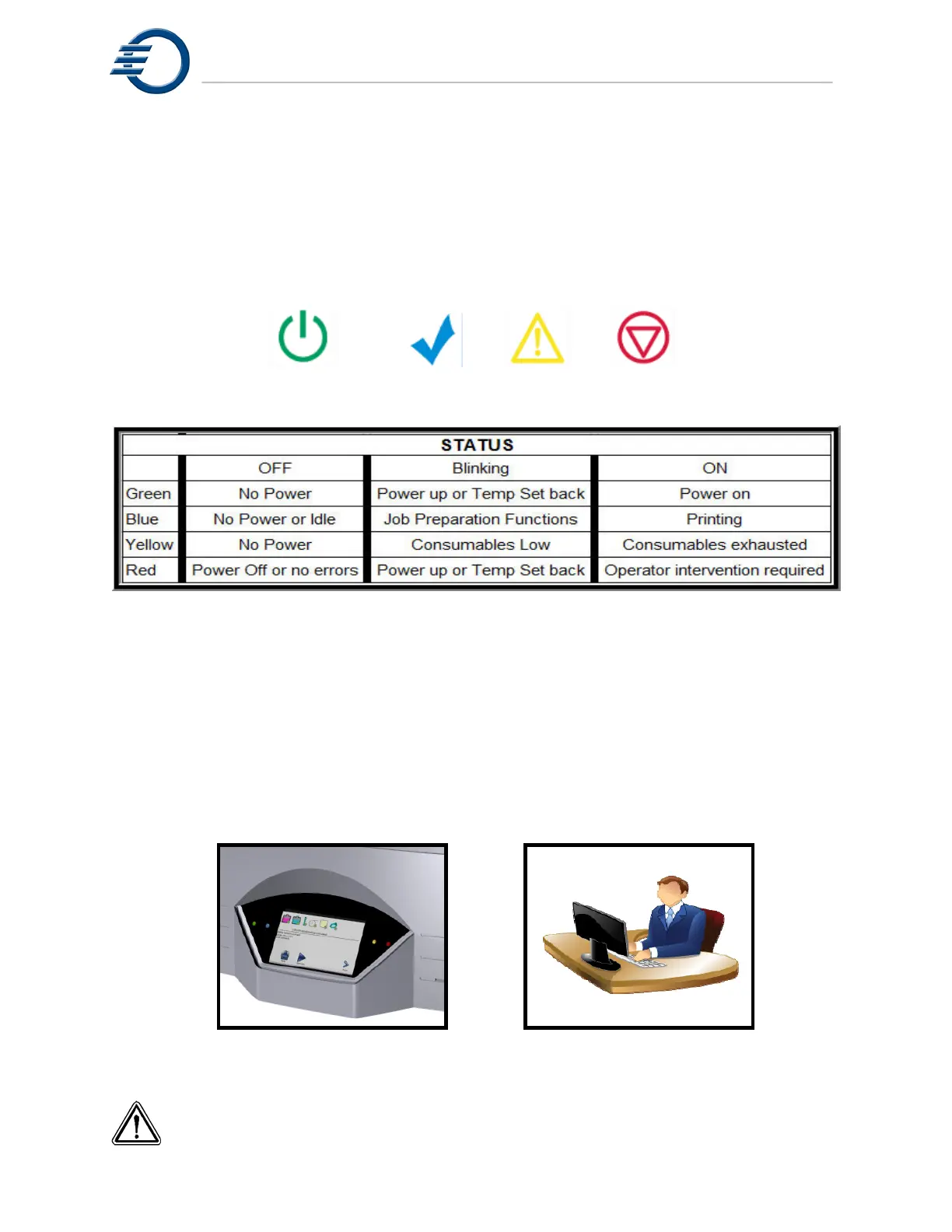
There are four status indicator lights on the 3Z Series
model making system. The two on the left
of the touch panel are the Green (Power) indicator and the Blue (Busy) indicator. The two on the
right of the control panel are the Yellow (Caution) and Red (Intervention) indicators. The
indicators can be off, blinking, or steady on. The table in Figure 1-2 shows the status of the
printer as indicated by the LED status indicators.
Power Busy Caution Intervention
Figure 1-2 LED Status Indicators
1.2 Touch Panel
Operator input to a 3Z Series printer is provided through a touch screen. The printer provides
feedback to the operator via the front panel display. 3Z Touch remote runs on any remote,
networked Windows workstation. The remotely operated screen provides the operator with the
exact same look, feel and level of control as the front panel of the printer. However there are
several functions that require close proximity to the system at the time they are performed and,
under normal circumstances, these functions should not be initiated remotely. See Figure 1-3.
Touch screen 3Z Touch Remote
Figure 1-3 3Z T
OUCH SCREEN AND REMOTE
CAUTION! The touch panel provides control over several setup and calibration



 To Next Page